That is a good call
@Oop North John . We have a rat run near us - any build up of traffic in the main road, vehicles turn off and use this very narrow, car lined, steep hill as if it was a main road. Locals got fed up of accidents - the front door of their houses open onto a narrow footpath. I have to use it to get out - the only other exit is a blind junction. Then suddenly, my satnav stopped navigating down that road. I investigated that by looking at the OSM site where you can contribute to the addition of detail to the map. Someone has closed that road off half way down. I could have corrected it, but it is probably better as it is.
Garmin use acknowledge their use of OSM data on the credit screen.
@gwilki . Can you see what happens when you bring the start point closer to home. Say 50 yards away - so the you still pass through it - but earlier.
I have evidence in the middle of a route that in certain circumstances, a route point is removed from a route if you ignore instructions that will take you to it. When you start a riding a route, the green flag is where you are now, the original start point becomes just another via point ( or so it seems from some screen captures I have).
I normally provoke RUT behaviour by skipping an earlier route point. The route recalculates and it is then different in nature. Any deviation after that may result in RUT behaviour. But others on the forum have commented that RUT has been observed without pressing skip.
I am still wondering about this 'counting' of u-turns and missed instruction. Does the XT2 switch modes according to your behaviour.
I imagine the numskull inside the head of the XT2 thinking something along the lines of ... "Ok, I keep trying to get you to follow the route, but you keep ignoring my instructions. I'm supposed to be getting you to the end eventually, so I will just take you there and issue instruction to get you back onto the original route at the closest point in the route - and that may mean heading straight for the end".
I have seen this a lot on the XT, but have not noticed it on the XT2.
Take a look at this screen shot.
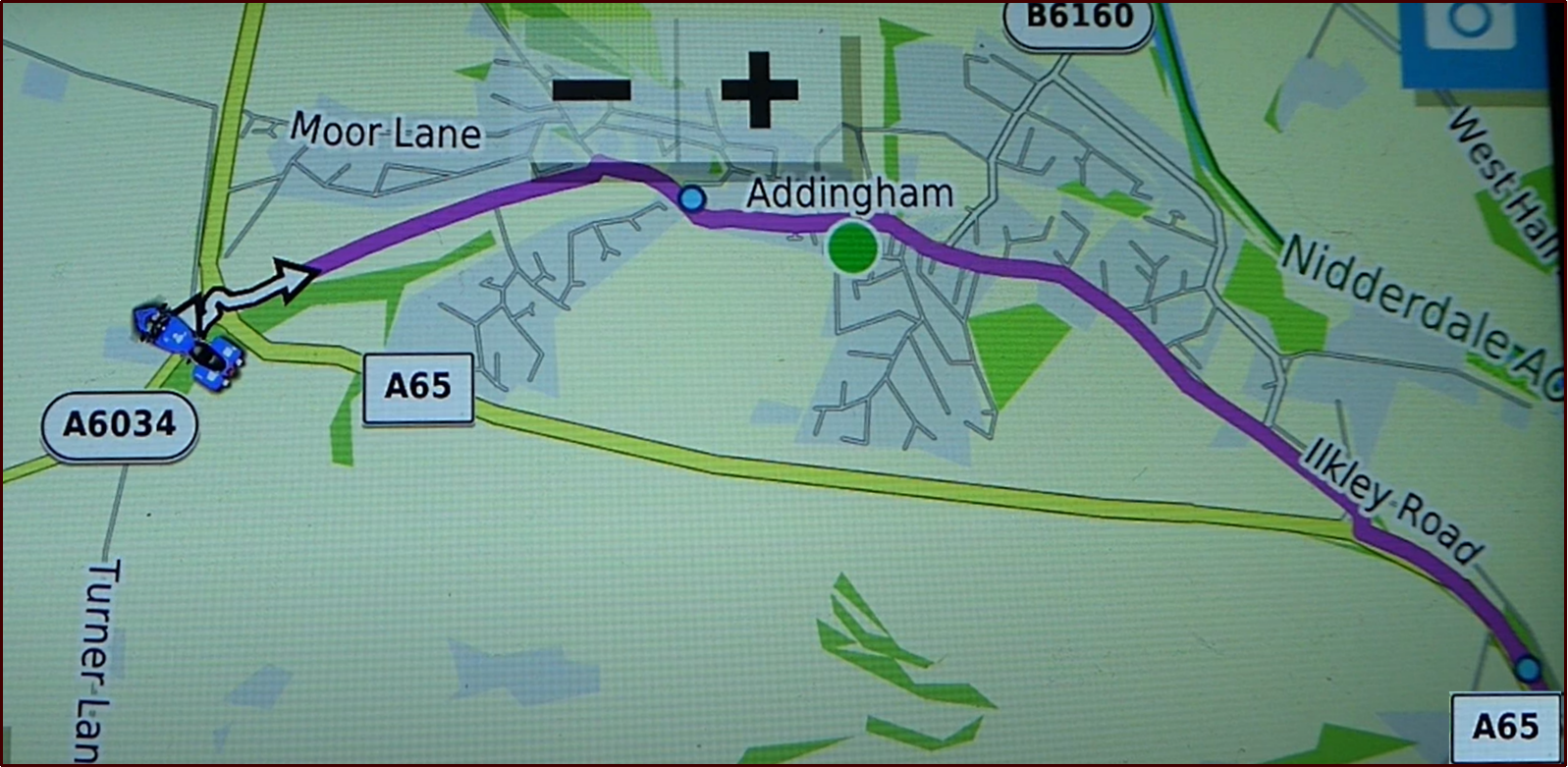
- Ignore Route Screen Shot.png (1.85 MiB) Viewed 4032 times
This screen shot of part of a route applies to both of the following videos. I am on a side road just before the roundabout. I have loaded a route and I am following it, having previously skipped a route point that I had placed close to the start (so that I could skip it !). I ulled over to get some the above screen shot.
It shows me stopped on a side road immediately ahed of the roundabout. Note that when I am not moving, the satnav doesn't know which way I am facing !! I am actually facing South - but I was facing that way a few seconds before I stopped moving.
The planned route is shown by the magenta line. There is a Shaping Point on the magenta line after the roundabout and before the village of Addingham. I need to take the second exit to go through that Shaping Point. The third exit at the roundabout is the A65 (we go around rouandabouts clockwise in the UK) - a fast 60mph road which by-passes Addingham. It joins up with the magenta route in the bottom right hand corner of the screen shot - and there is a shaping point just after that - so I pass through that shaping point whichever route I take.
Both videos show what happens when I take the 3rd exit (A65) road at the roundabout instead of following the route to the 2nd exit.
The only difference in the videos is the the first one shows what I regard as 'correct' behaviour. What the Zumo 590 would have done. It has been created using the Zumo Trip Planner using stored Waypoints (from Zumos Favourites). The Zumo regards this as a 'Saved' route.
The second video shows a route that uses the same waypoints. Not copies. The same ones. The route has been create din Basecamp, transferred to the Zumo XT and then Imported. The Zumo XT regards this as an "Imported Route". I drive the same route doing the same things in both videos.
Video #1 - This is a Zumo XT running a route that has been created and saved on the XT screen.
It is a "Saved Route", and I have previously skipped a route point.
Note what the XT does. The shaping point stays in place, and at the at the next opportunity it intends to turn left and go back to the shaping point near Addingham - even thought he rest of the route is clearly plotted ahead. You can see this if you freeze the video at 20 seconds. The shaping point at Addingham is still present. It is important to realise that there are two sections of route here - the first section leading to the first (Addingham) shaping point, and the second section leading from the Addingham shaping point to the A65 shaping point. I am on the first section, so it has to double back to pick up the missed Shaping Point. When I ignore that instruction, I joint up with the second section - and because I have missed only a shaping point - it is happy to continue navigation ahead. At 43 seconds - just before the junction, the next via point is 3.2 miles ahead - it takes into account the distance back to the missed shaping point and back. At 45 seconds, the same Via point is 1.3 miles ahead - it is no longer planning to go back to that first shaping point.
---------------------------------------------------------------------------------------------------------------------------------------
Video #2. The same route, but this time the video has been created in Basecamp.
It is an "Imported Route." I have previously skipped a route point - same as before.
Before you start the video, notice where the shaping point is. The two videos show the same route, and I do nothing different. Notice what happens when I take the third exit from the roundabout and at 17 seconds and after when the screen Zooms out to show Addingham and the next A65 Shaping point up ahead - the first shaping point at Addingham has disappeared.
Later on, there is an off route Via Point. It is plotted in a field, so I have no chance of reaching it. The first test (not show on the video - but I have it if you want it) it repeatedly tries to get to that Via Point. I go past and have to turn back. I go past again, I have to turn back again. In the second test (not shown), it directs me to go across the field, but when I ignore it, it navigates me ahead along the rest of the route - just as if it was a shaping point that I had missed.
Pressing Skip (or otherwise causing an imported route to be recalculated) causes the navigation system to behave differently.
I am wondering if onthe XT2, multiple refusals to follow instructions also change the nature of the route in a similar manner.
=============================
Can I suggest. Create the same route on the XT2. First create 2 waypoints for the start and end by tapping on the map to create a flag . If its wrong, zoom in, tap again. When it is accurately placed, save it. The XT2 will probably expect you to assign it to a collection. Remember which one you put it in. Unorganised will do !
Then create one for the end in the same way.
Then go to route planner to create a route. It gives you the map planner. The 'start' button will be white. Tap on the search magnifying glass and find your new waypoint from the list and select that. The white 'start' button will now say 'stop'. Magnifying glass, find your end waypoint that you saved and select that. The route will draw on the map. Accept it and save it. it will probably want you to assign it to a collection. Choose the same collection as before. Then check you can load the route.
This route will probably behave differently. If it behaves in exactly the same way, then I reckon that is a candidate for
@Oop North John's mapping error. But I think it WILL behave, because I reckon that your disappearing start point is significant - and suggests to me that your route is behaving like Video 2. Building the route on the XT2 itself will (like the XT) make that route behave in the way that my Saved Route behaved - Video 1.