Weird navigation lately

Having Garmin zumo XT problems? there is loads of help and advice in this forum
b1324
Posts: 24
Joined: Wed Sep 29, 2021 4:48 am
Has liked: 8 times
Been liked: 8 times
Slovenia

Weird navigation lately

Post by b1324 »

Hi everybody. I am still using the original Zumo XT and I always update everything, as soon as the message hits. My route planning software is MRA, and I have gold membership so that I can use HERE maps with my Garmin. I use via and shapping points and export to gpx 1.1 and then throughout Drive to Zumo XT... It works and generally I am happy.

Lately I noticed some weird navigation; I think I first encountered that in November, but not sure... And I didn't change any settings...
This is just one example of the weirdness:

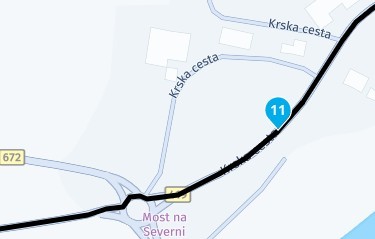
This is how one part of the map looks on MRA - and this is exacly as I want it:
20260412_190000.jpg
20260412_190000.jpg (13.6 KiB) Viewed 633 times
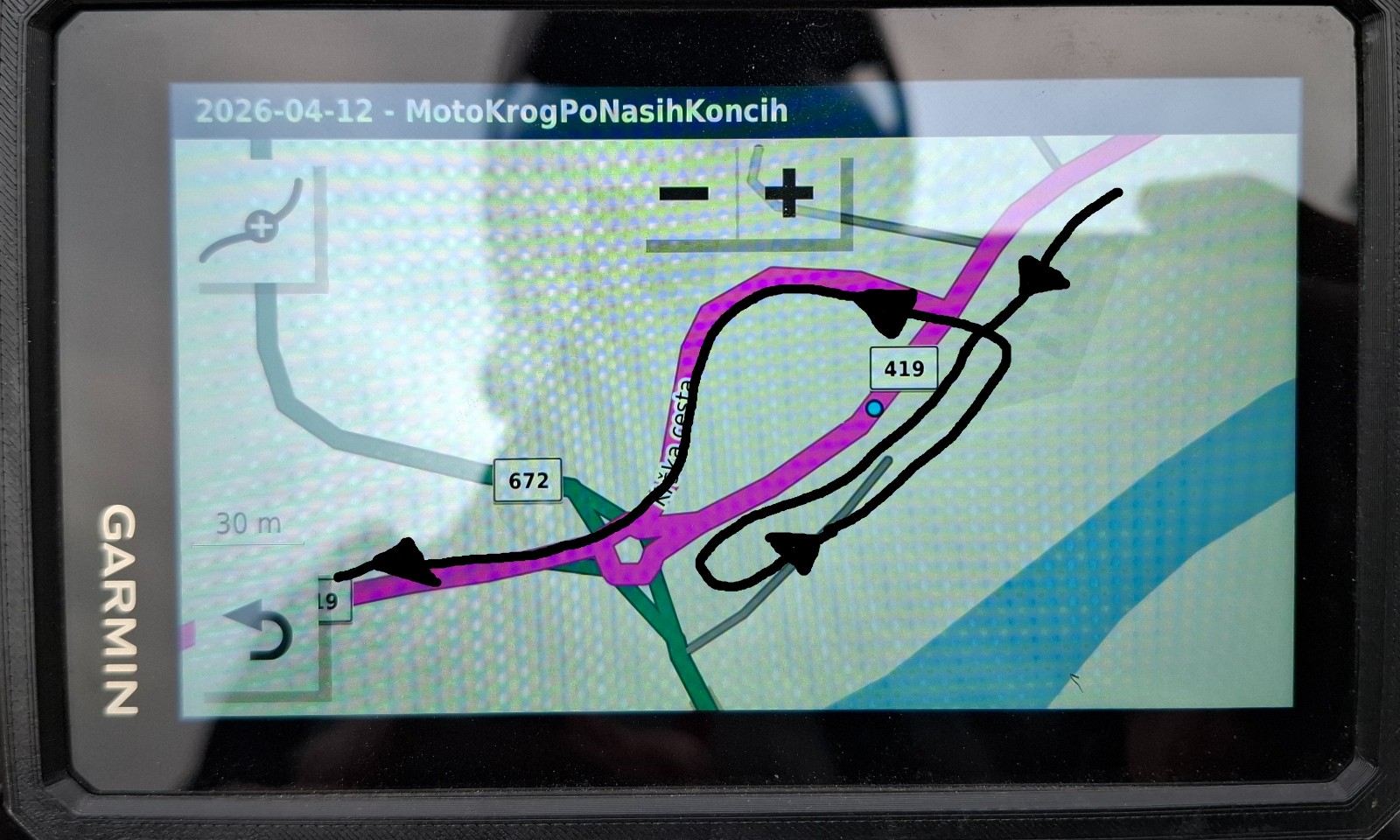
This is how it looks in Zumo XT maps and the black arrows shows how XT wanted to navigate me through this section:
20260412_175729a.jpg
20260412_175729a.jpg (329.14 KiB) Viewed 633 times
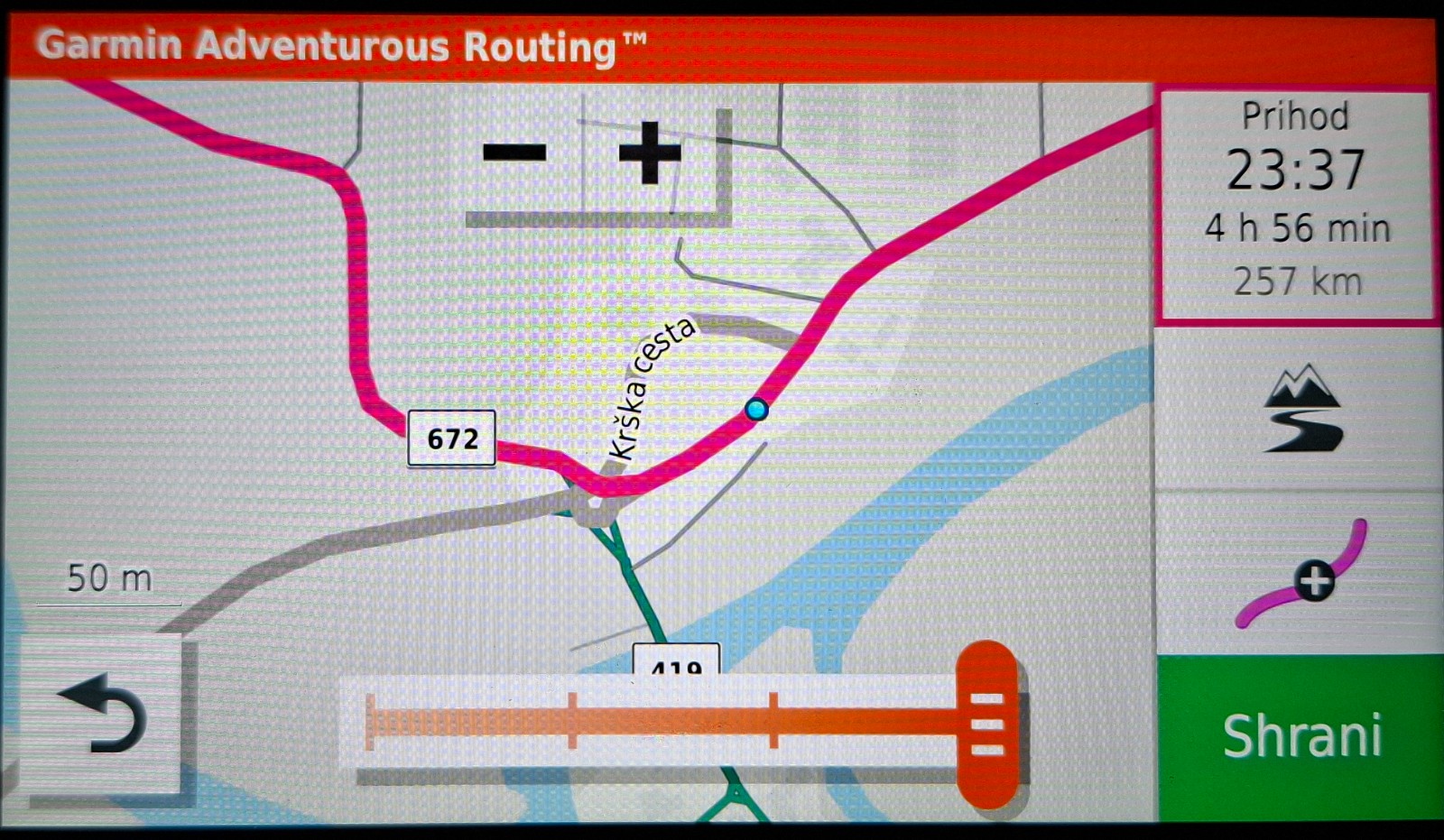
By default, I have selected "shortest way" option. It is the same if I select the "shortest time" option. But if I select the "adventures routing" option, then I get (but notice that not the exit goes to some other road):
20260412_184047.jpg
20260412_184047.jpg (396.32 KiB) Viewed 633 times
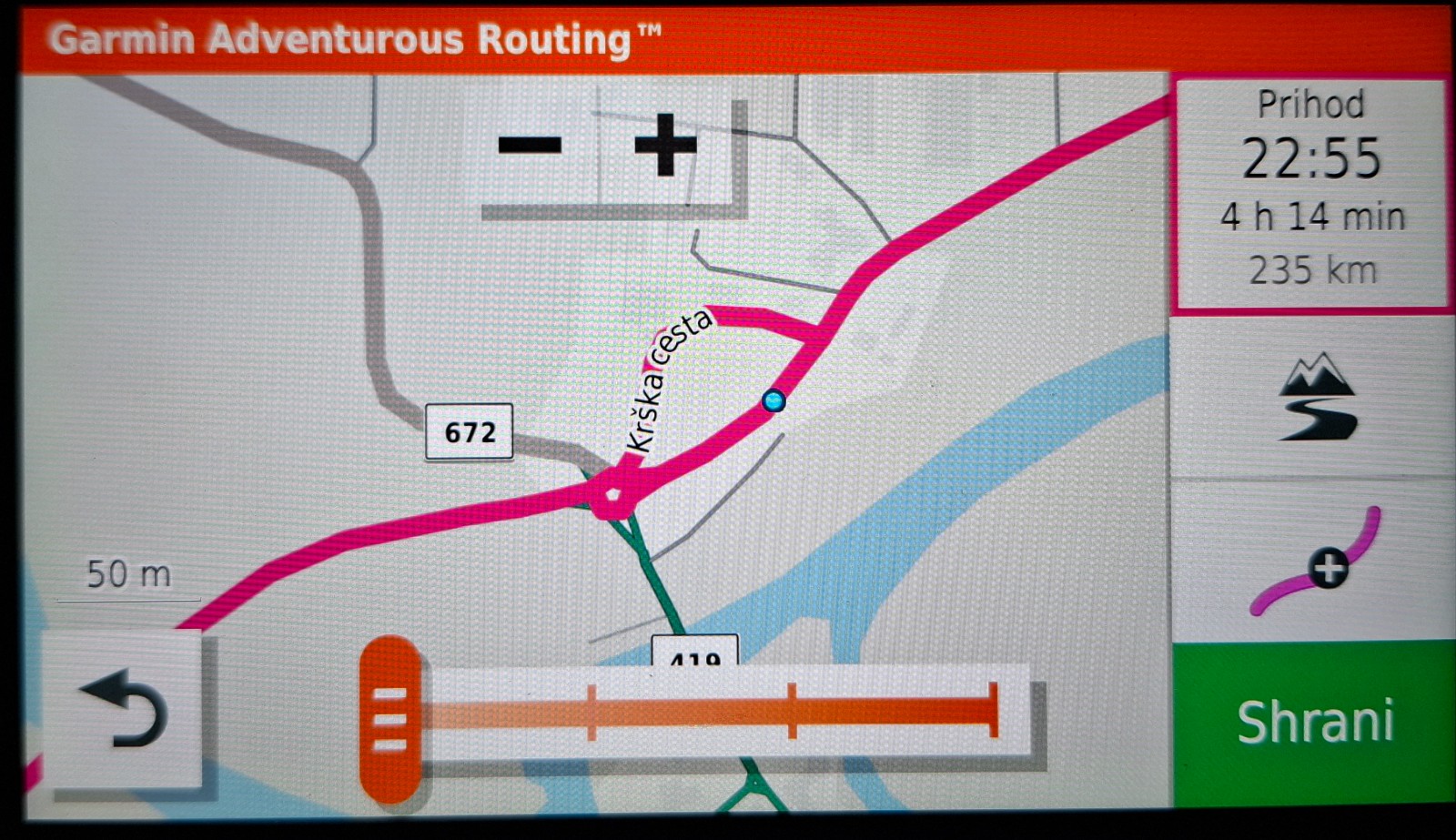
If I use the cursor "adventures routing" to less, it is the same as original pointless navigation:
20260412_184058.jpg
20260412_184058.jpg (381.19 KiB) Viewed 633 times
What is weird though, this is the original map on my Zumo XT of this section, when I don't have navigation active (it has everything connected and it shows that Zumo XT knows which road is the main one):
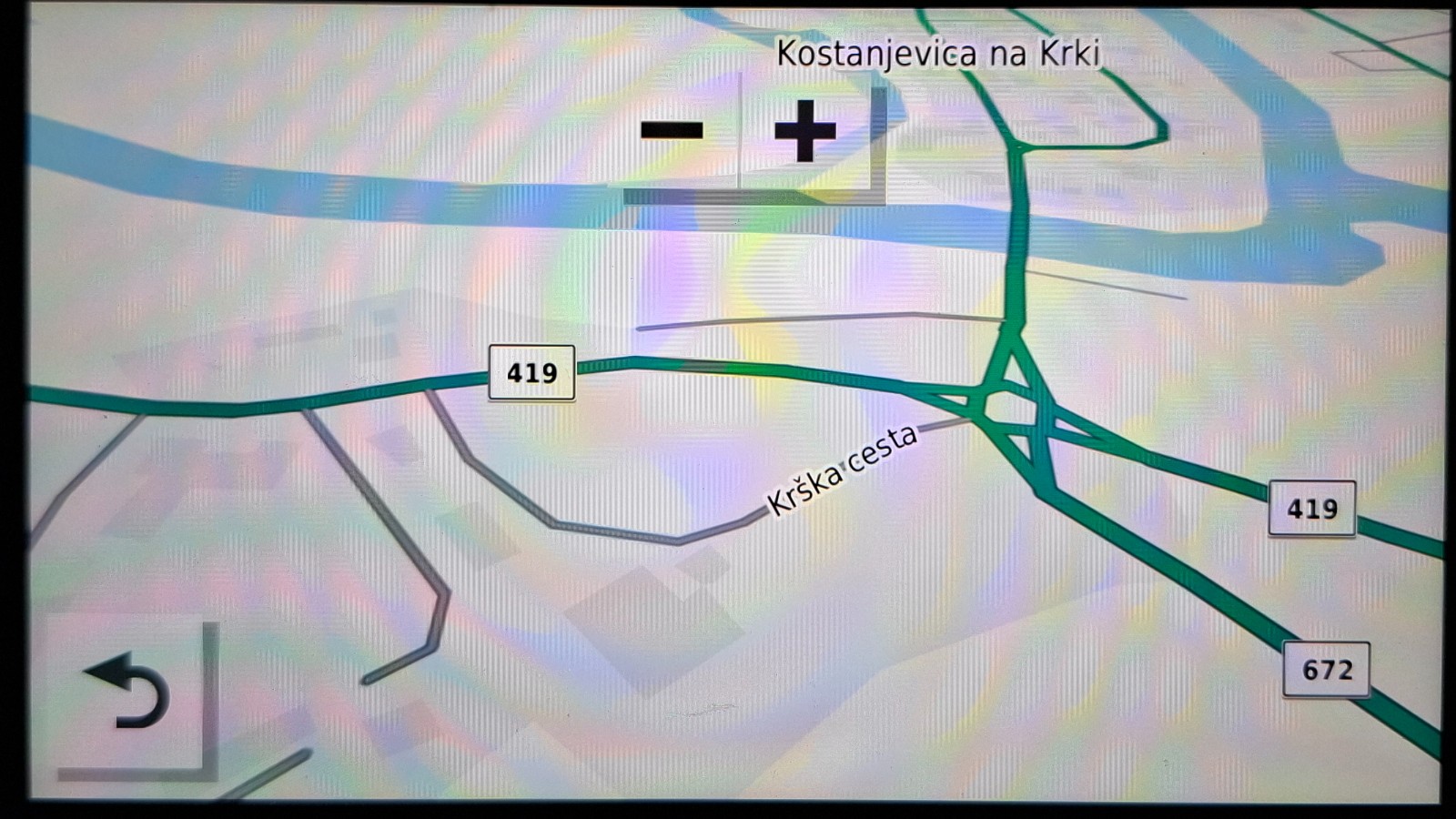
20260412_184315.jpg
20260412_184315.jpg (291.06 KiB) Viewed 633 times

I also checked my avoidance settings, but nothing helped there.

Any idea of why this is happening? I got few of these kind of weirdness on each ride lately and it is annoying.


Thnx & drive safe everybody ;)
User avatar
Peobody
Subscriber
Posts: 2121
Joined: Tue Apr 20, 2021 1:33 pm
Location: North Carolina USA
Has liked: 194 times
Been liked: 559 times
United States of America

Re: Weird navigation lately

Post by Peobody »

b1324 wrote: Sun Apr 12, 2026 5:28 pm What is weird though, this is the original map on my Zumo XT of this section, when I don't have navigation active (it has everything connected and it shows that Zumo XT knows which road is the main one):
clipimage.png
clipimage.png (2.63 MiB) Viewed 622 times
This image appears to be what the XT would calculate if that route point (blue dot) was being detect by the XT as being in the lane moving away from the roundabout. The XT would circle you around the roundabout to route you through that route point and then would return back to the route which it decided was best done by turning left back to the roundabout. This is just a guess though.
2008 Honda GL1800 Goldwing
zūmo XT linked to Cardo Packtalk Bold and iPhone SE.
Iris
Posts: 92
Joined: Tue Jul 31, 2018 1:17 am
Has liked: 2 times
Been liked: 17 times
United States of America

Re: Weird navigation lately

Post by Iris »

Yeah, I wonder if the blue dot was placed accidentally in the wrong lane. Maybe zoom in further on BaseCamp and see if it’s in the correct lane.
b1324
Posts: 24
Joined: Wed Sep 29, 2021 4:48 am
Has liked: 8 times
Been liked: 8 times
Slovenia

Re: Weird navigation lately

Post by b1324 »

This is a good point, but I don't think this is the case.

If I zoom to the max on my Garmin XT, it still shows this road as a "normal" road (it doesn't seem to separate lanes):
20260413_062410.jpg
20260413_062410.jpg (247.5 KiB) Viewed 591 times
I don't use BaseCamp, I use MRA (MyRoute App) which uses HERE maps (same as Garmin). Also on MRA I cannot place the VIA/SHAPING point on the different lane in this road. I guess this road is just to narrow for this.
But if I navigate to different part of the map, there are wider roads which has separate lanes (on the left side is just some wide road, and on the right side there is the payable motorway):
20260413_062411.jpg
20260413_062411.jpg (43.48 KiB) Viewed 591 times

I guess there must be something else...
raza
Posts: 54
Joined: Fri Mar 12, 2021 10:16 pm
Has liked: 24 times
Been liked: 15 times
Slovenia

Re: Weird navigation lately

Post by raza »

Interestingly, BaseCamp draws the road section in the vehicle settings for a motorcycle like this:
Zajeta slika.JPG
Zajeta slika.JPG (75.59 KiB) Viewed 567 times

in the car setting like this:
Zajeta slika1.JPG
Zajeta slika1.JPG (86.36 KiB) Viewed 567 times
colirv
Posts: 231
Joined: Mon Dec 30, 2019 9:38 am
Location: Tyne & Wear
Has liked: 66 times
Been liked: 64 times
Contact:
Great Britain

Re: Weird navigation lately

Post by colirv »

My XT is playing up too. It'll take me up a side road, then tell me to do a u-turn to get me back on the route. I use MRA, and for now I'm simply following the track it produces.
Colin
BMW R1250RS
https://www.namrider.com
danham
Posts: 410
Joined: Fri Jul 13, 2018 2:25 pm
Location: Cape Cod, MA
Has liked: 144 times
Been liked: 139 times
United States of America

Re: Weird navigation lately

Post by danham »

Two thoughts. I'm not familiar with HERE maps, but if they differ in even the tiniest detail from the maps in your XT, the chance for errors increases. Same for using MRA to lay out routes. Not saying it can't or shouldn't be done, but it involves the need to check resulting routes in your XT turn by turn unless you want surprises. Also, when my XT is going to act strangely, odds are a roundabout is involved. The cure then is usually moving a shaping point, even though there is nothing apparently wrong about its original placement.

-dan
Zumo XT, 660, nuvi 760 and many retired units dating back to the GPS III+
2018 Kawasaki Ninja H2 SX SE
colirv
Posts: 231
Joined: Mon Dec 30, 2019 9:38 am
Location: Tyne & Wear
Has liked: 66 times
Been liked: 64 times
Contact:
Great Britain

Re: Weird navigation lately

Post by colirv »

MRA is really my only option, as I can't, and I've tried a couple of methods, get Basecamp to run on my Linux PC.
Colin
BMW R1250RS
https://www.namrider.com
b1324
Posts: 24
Joined: Wed Sep 29, 2021 4:48 am
Has liked: 8 times
Been liked: 8 times
Slovenia

Re: Weird navigation lately

Post by b1324 »

I am also only using MRA. My reason is that I just find it much easier to deal with then BaseCamp and also I can easily manage navigation changes on my andorid tablet when I am on a tour.
danham wrote: Mon Apr 13, 2026 10:25 am Also, when my XT is going to act strangely, odds are a roundabout is involved. The cure then is usually moving a shaping point, even though there is nothing apparently wrong about its original placement.
This is good to know, I wasn't paying attention until now but I will try to avoid placing shaping points near roundabouts it the future.
User avatar
Peobody
Subscriber
Posts: 2121
Joined: Tue Apr 20, 2021 1:33 pm
Location: North Carolina USA
Has liked: 194 times
Been liked: 559 times
United States of America

Re: Weird navigation lately

Post by Peobody »

b1324 wrote: Tue Apr 14, 2026 4:35 pm
danham wrote: Mon Apr 13, 2026 10:25 am Also, when my XT is going to act strangely, odds are a roundabout is involved. The cure then is usually moving a shaping point, even though there is nothing apparently wrong about its original placement.
This is good to know, I wasn't paying attention until now but I will try to avoid placing shaping points near roundabouts it the future.
Basecamp users have also learned to avoid placing route points at intersections or roundabouts. Strange behavior can also occur for not apparent reason, cured by moving a route point. Unfortunately it can be difficult to identify the specific point that is causing the problem. Surprising, odd behavior has been cured by creating all new route points positioned closely to the original ones. There is nothing visual that would indicate an issue but there must have been something in one of the original routes points that was causing the problem.
2008 Honda GL1800 Goldwing
zūmo XT linked to Cardo Packtalk Bold and iPhone SE.
Post Reply
