Page 1 of 1
Replace Zumo 660 USB connector?
Posted: Tue Apr 07, 2026 4:58 pm
by joebedford
With lots of fiddling, I have determined that my USB connector will charge the battery, but not pass data. If I hold the cable 'just so' it will pass data too but that's a bit of a pain. (yes, I've tried different cables)
Has anybody disassembled the Zumo and soldered a new connector on the board? Any hints? What connector did you solder in (yes, I know it's called a mini USB)
Thanks, Joe
Re: Replace Zumo 660 USB connector?
Posted: Tue Apr 07, 2026 5:35 pm
by raza
It will be necessary to disassemble the Zuma and check which pins on the board have lost contact. The connector is definitely loose.
With USB connectors, the copper foil usually separates from the motherboard and breaks the connection further along the printed circuit board. It is necessary to remove the connector and clean the soldering points. If the copper foil is damaged, it must be replaced with a copper wire during soldering. After soldering the connector, it is recommended to additionally glue the connector with two-component adhesive. Usually the connector is not damaged at all and a new one needs to be inserted, but the existing one is soldered back.
If you are not skilled in repairing circuits, I suggest having the work done by a professional.
Re: Replace Zumo 660 USB connector?
Posted: Wed Apr 08, 2026 12:50 am
by carolinarider09
Just in case you are interested, I have used the person below for several "fixes" to my Zumo 550 and by 665. He has done very good and reliable work.
https://www.palmdr.com
So, if you would like someone to do the fix for you and probably at a fair price, I would give the Palm Doc a call.
Oh his name is Chris Short.
Re: Replace Zumo 660 USB connector?
Posted: Wed Apr 08, 2026 6:39 pm
by jfheath
I had a go at hardwiring the battery to my Zumo 590 motherboard - in place of the battery connector.
It turned out that the printed circuit was not in contact with the board itself and it was cracked. The area to solder was extremely small and the heat of the iron melted the bit that I was trying to solder to. IT was also extremely close to some very tiny and sensitive components that control the ability to use the device and to charge at the same time. I tried, but failed. In the end, I inded up buying a unit with a missing power button for not much money, and used the circuit board from that.
However, the USB connector is in a different location and is usually bolted to the main board as well so there may be more hope of fixing that. I am not a novice at soldering, but I am not an expert. I'd let someone who is used to this stuff have a look at it.
Are you sure that it is not the USB socket causing the problem - it is a USB mini B socket on the 660. SOmetimes the fitment gets a little slack.
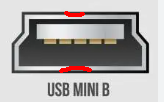
- Mini USB B Socket.png (16.35 KiB) Viewed 1575 times
THis is the way that the socket is at the top left of the rear of the Zumo 660.
The contacts in the plug press UP onto the contacts in the socket. If the metal cage is a sloppy fit, then the contacts in the plug will not press against those in the socket - so a tiny bit of reshaaping the outer case of the USB socket on the Zumo, may help. I tiny bit of pressure on the outside middle of the two long sides will bend the cage slightly and create a more positive contact between the contacts in the socket and the contact in the plug.
Just a tiny bit of a bend - Sometimes just inserting a tiny screwdriver blade - eg a watchmaker's smallest blade - is enough to put a tiny bend in the middle.
Alternatively, placing a thin sheet of card inside the socket against the longer side - the bottom in the image - may make the plug press up a little more firmly where the contacts meet. Worth a shot, it has worked for me with USB B mini sockets in the past.