Hi folks,
been messing a few times with my XT2, importing routes. Tripmanager etc..
When i factory reset, i notice that factory resets doesn't delete the files i added in.
Normally i'm able to spot them and delete manually, however it's been a while and i don't know if i left one in accidentally.
Could someone please point out the files that aren't default?
What can be removed?
Re: What can be removed?
@Lanso
I dont have an XT2, so I'm not able to tell you wich files should be there. But I can give you some guidelines.
First, and most important: Before you delete files, make a backup.Copy them to your hard-drive!
2: In Windows explorer set your view to details. Then you can see the dates. The date could tell you if you've done it yourself.
3: If a file exist with a .unl, or .gma extension, dont delete the files with the same base name. 006-D0697-00.gma, 006-D0697-00.gpi and 006-D0697-00.unl belong together and are locked files.
4: If you have custom pois installed. Look on the the device for: Where to/Categories/Custom POIs (scroll all the way down) If there are none: OK, if there are: You know where to look for.
You mentioned TripManager...
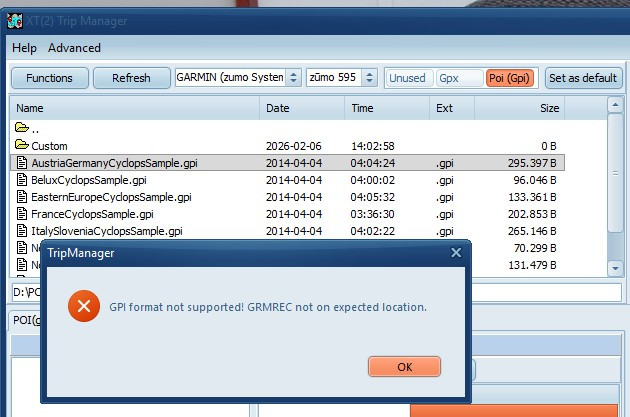
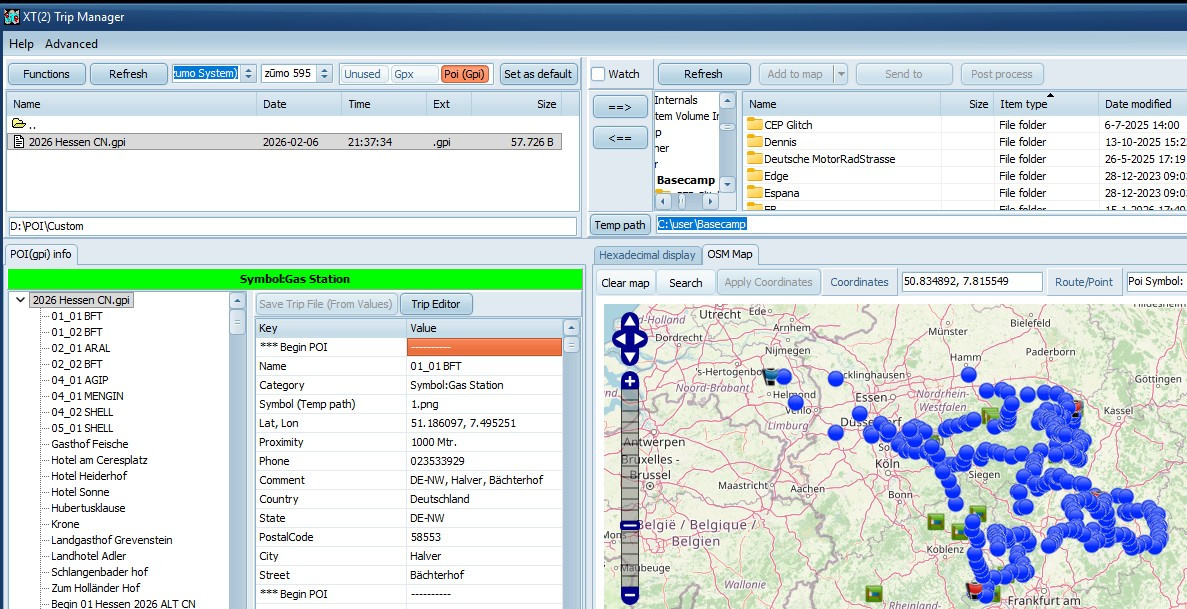
In TripManager browse to the folder. When selecting a file gives you this error, dont delete it. They are probably from Garmin. If TripManager CAN read the file, you can see what's in there, and if not needed anymore delete it via Functions/Delete selected files To prevent this confusion in the future, I recommend creating a new folder and set that as the default in TripManager. The new folder can be a) On the SD Card if you've installed one. b) A sub folder of the default POI folder (EG: Internal Storage\POI\Custom)
See the remark in this page: https://frankbijnen.github.io/TripManag ... files.html
Frank
I dont have an XT2, so I'm not able to tell you wich files should be there. But I can give you some guidelines.
First, and most important: Before you delete files, make a backup.Copy them to your hard-drive!
2: In Windows explorer set your view to details. Then you can see the dates. The date could tell you if you've done it yourself.
3: If a file exist with a .unl, or .gma extension, dont delete the files with the same base name. 006-D0697-00.gma, 006-D0697-00.gpi and 006-D0697-00.unl belong together and are locked files.
4: If you have custom pois installed. Look on the the device for: Where to/Categories/Custom POIs (scroll all the way down) If there are none: OK, if there are: You know where to look for.
You mentioned TripManager...
In TripManager browse to the folder. When selecting a file gives you this error, dont delete it. They are probably from Garmin. If TripManager CAN read the file, you can see what's in there, and if not needed anymore delete it via Functions/Delete selected files To prevent this confusion in the future, I recommend creating a new folder and set that as the default in TripManager. The new folder can be a) On the SD Card if you've installed one. b) A sub folder of the default POI folder (EG: Internal Storage\POI\Custom)
See the remark in this page: https://frankbijnen.github.io/TripManag ... files.html
Frank


