Page 1 of 3
GE 7.28.0.0
Posted: Mon Jan 19, 2026 10:22 am
by Oop North John
Looks like its been released, I've not yet installed it.
Re: GE 7.28.0.0
Posted: Mon Jan 19, 2026 2:47 pm
by Peobody
GE 7.28.0.0 Release Notes:
Source:
https://forums.garmin.com/apps-software ... ease-notes
- Added support for China phone number registration.
- Fixed an issue with the old .img file not being removed for Universal Map Updates on SD cards.
- Addressed a crash that could occur when downloading a software update due to bad data being returned.
- Other minor bug fixes and improvements.
I have not installed it either.
Re: GE 7.28.0.0
Posted: Fri Jan 23, 2026 6:06 pm
by Oop North John
Downloaded it, and Cyclops update for the XT2 always fails to install. Rolled back to 7.27.1.0 and still the problem. So 7.28 might be ok, and the Cyclops update might be the problem

Re: GE 7.28.0.0
Posted: Wed Feb 11, 2026 12:09 pm
by twowheelstom
the version I have now is 7.24.0.0
I've not updated since
Re: GE 7.28.0.0
Posted: Wed Feb 11, 2026 2:59 pm
by jfheath
I seem to have v 7.28 installed. I don't know when that happened, but I must have done it.
It hasn't been a problem so far.
There are ALWAYS issues if I try and ask it to do everything - update all - I'd go away and leave it and it would fail something after completing one of the early tasks. I have long since avoided doing that and do the short jobs one at a time, and leave the map updates until the end when I can walk away and leave it. But they take nowhere near as long as the 3 hours that they suggest to download the new maps - 2027.10. Maybe 30 minutes. And much less if I install to the computer - 5 mins. (Fibre, 30MB/s)
Hmm. Edit. I've screwed this up somehow. I'll get back to you once I've found out what I did.
All working OK. 7.28 Express is working. 2027.10 Europe maps NTU installed on the XT1, XT2 and Basecamp.
I had a glitch - caused primarily by my PC/Windows throwing up a dialog box asking me to confirm I wanted Express to access my hard drive. I missed it because it appeared only after I had closed the program under which it was displayed. But by then I had disconnected the XT from express.
After that everything was weird, but I eventually recovered and did it propelry this time. All OK.
Re: GE 7.28.0.0
Posted: Wed Feb 11, 2026 7:03 pm
by Les
This is the version I downloaded some time ago, no Idea what the numbers/letters are at the end.
Re: GE 7.28.0.0
Posted: Wed Feb 11, 2026 8:50 pm
by Peobody
FWIW, the "About" info of my 7.24.0.0 installation is below. I don't know what the letters and numbers in parenthesis mean nor whether every 7.24 installation shows the same characters.
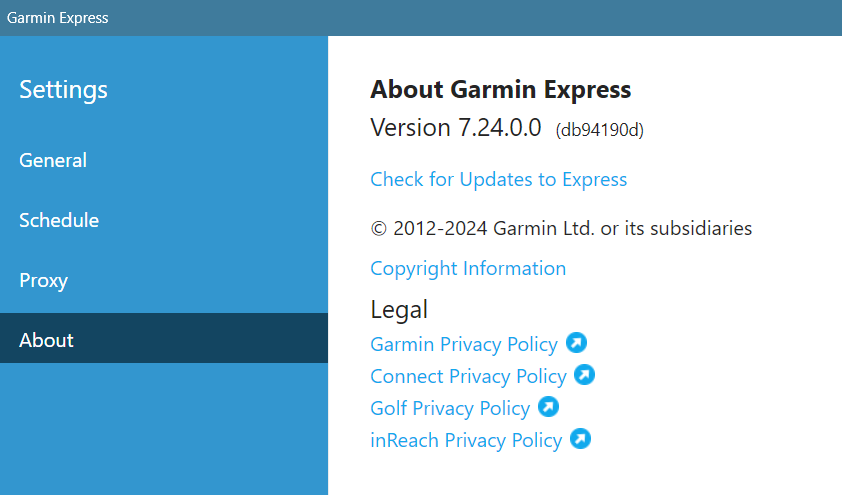
- CnP_11022026_154232.png (65.3 KiB) Viewed 1066 times
Re: GE 7.28.0.0
Posted: Thu Feb 12, 2026 3:05 pm
by twowheelstom
Hi Peobody,
I checked my 7.24.0.0 Garmin Express settings info,
It displays:
About Garmin Express
Version 7.24.0.0 (db94190d)
same letters as yours
Re: GE 7.28.0.0
Posted: Thu Feb 12, 2026 3:19 pm
by lkraus
I've noticed similar suffixes on software under development. I think they are automatically generated hexadecimals used to distinguish different beta builds. Usually, they are stripped off for the published public release versions.
Re: GE 7.28.0.0
Posted: Sat Feb 28, 2026 8:40 pm
by twowheelstom
twowheelstom wrote: Wed Feb 11, 2026 12:09 pm
the version I have now is 7.24.0.0
I've not updated since
well I just updated from Garmin Express version 7.24 to 7.28 and I am still not seeing the Manage Maps button on the main page of Express, it wasn't showing up on 7.24 and now with 7.28 it doesn't show up either, I have no idea why, anyone know why I'm not getting it?