Page 1 of 2
XT2 BaseCamp Connection with Error current.gpx
Posted: Sun Jul 27, 2025 4:13 pm
by proofresistant
Does anyone know the cause or even a solution to my problem with “current.gpx”?
When connecting the XT2 to the PC via USB, the XT2 first creates a "\zūmo XT2\Internal Storage\GPX\
current.gpx" file, in my opinion with the complete route content from the XT2 device.
Firstly, it is frustrating that this often takes several minutes

, at least when I have many routes in the XT2.
I would like to disable this if I could.
Secondly, the resulting current.gpx file is then also unreadable for Basecamp, resulting in the following error

:
An Error occurred while Reading the following file:
gpx\current.gpx

- PNG-Bild (neu).png (7.29 KiB) Viewed 478 times
What is wrong here?
(When I only have a few routes on the XT2, everything is often fine

)
Re: XT2 BaseCamp Connection with Error current.gpx
Posted: Mon Jul 28, 2025 5:07 am
by sussamb
You cannot disable it, that's what Garmin on the road devices do. Basically they check to see if there are .gpx files other than current.gpx, merge those with data in inaccessible internal memory and write a new current.gpx so that BaseCamp can read it.
So, the more data on your device the longer that process will take. If you've had no issues with current.gpx to date it's likely a recent .gpx file you added to your device was corrupt if BaseCamp is now reporting it as corrupt. You could try removing it from your device, and all other .gpx files. Then disconnect from your PC and switch on your device. That will create a new current.gpx file. If that doesn't work you'll need to master reset your device.
Re: XT2 BaseCamp Connection with Error current.gpx
Posted: Mon Jul 28, 2025 12:51 pm
by proofresistant
sussamb wrote: Mon Jul 28, 2025 5:07 am
You cannot disable it, ...
Thanks for the answer that you can't turn it off.
The explanation that the current.gpx has something to do with other GPX files, which may also be merged, is difficult to understand and perhaps not entirely correct. I think that BaseCamp doesn't really care which GPX files (intended for import) are available on the XT2. In my current.gpx (if it works) are the own routes
/ (no) tracks and waypoints that the XT2 currently knows, no more and no less.
If anyone else knows the problem and possibly has further tips, I would of course still be pleased.
Re: XT2 BaseCamp Connection with Error current.gpx
Posted: Tue Jul 29, 2025 4:20 am
by sussamb
Well I could go into a more detailed explanation but I was trying to keep it simple. Yes, if you look at current.gpx it will contain all your data, that's how it works. If you delete it it'll make no difference since as I posted a new current.gpx is created everytime you switch on your device from your data that is stored in internal memory not accessible to the user. The only reason your device creates current.gpx is so that programs like BaseCamp can display your data. When BaseCamp sends more data to your device that is sent as a .gpx file. When you switch on your device after that it merges that new file with the data held in inaccessible to the user, and writes a new current.gpx
My previous suggestions on how to resolve your issue still stand.
Re: XT2 BaseCamp Connection with Error current.gpx
Posted: Tue Jul 29, 2025 7:48 pm
by proofresistant
Once again, merging does not correspond to what can be observed. The "current.gpx" file is created with what the XT2 has in its "saved storage", that's it. I cannot believe any reason for merging.
Because "merging or not" has nothing to do with my Initial question, there is no point in discussing it further, at least not in this thread. Tips such as deleting Routes or resetting the XT2 unfortunately do not fix or explain the cause either.
If anyone else knows the problem and possibly has further tips, I would of course still be pleased.
I would just be interested to know if anyone else has/had similar experiences with Inconsistent or corrupt "current.gpx" file and possibly knows what causes such problems.
Re: XT2 BaseCamp Connection with Error current.gpx
Posted: Tue Jul 29, 2025 9:15 pm
by FrankB
@proofresistant
I have never had this error with my XT, I like to keep that clean. Normally I delete everything that I dont need anymore.
I did however see it a few times with a handheld device that I also have. A Dakota 20. That unit also creates a current.gpx and when it grows large BaseCamp will give me the same error as you had.
There is no way I can prove it, but this is my theory. To explain it better please open a current.gpx in Notepad. You will notice that everything is on 1 line. There are no Newline (0x0a) and/or Carriage Return (0x0d) in the file. you will see something like this.
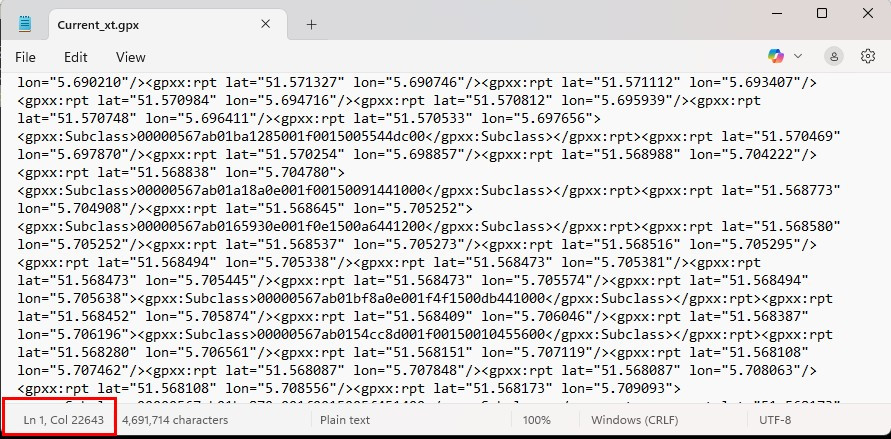
- notepad.jpg (202.7 KiB) Viewed 426 times
Notice that it doesn't matter how far you scroll down, the LN remains 1
This is perfectly valid XML. nothing wrong. EXCEPT.....
Programmers are tempted to write programs that read this line by line. And to do that you need to allocate a buffer to hold the complete line. In this case because it's only 1 line, the complete file! And I ASSUME that the programmers that wrote BaseCamp did not allocate a buffer large enough to hold the complete file.
Just how big is the current.gpx on your XT2?
That is my explanation, or better my theory.
I dont have a solution for the BaseCamp problem, except the one that
@sussamb already mentioned. Just clean up.
TripManager should be able to read the current.gpx, if you first transfer it to your computer. You can use it in 'Add to map' and 'Send to'
Frank
Re: XT2 BaseCamp Connection with Error current.gpx
Posted: Tue Jul 29, 2025 10:29 pm
by proofresistant
Hi @FrankB,
I'll take another look at the file size; that could be a reason.
I don't really care whether the file itself contains [CR] [LF], as long as the structure with all the <tags> ... </tags> remains intact. It's just that [CR] [LF] without is more difficult for a user to read.
The cleanup is a tricky thing; it actually contradicts Garmin's modern philosophy.
Garmin wants everything in the cloud, nicely organized in collections that you can name, so you can bring order to all the routes, waypoints, and tracks.
But they just “forgot” that the XT2 then quickly shovels several megabytes of data into current.gpx, which generates when the XT2 is connected to the PC, and that takes time.
In addition, “Just clean up” is a very relative solution. What is the measure? 1 route, 10 routes, 100 routes?
So let's keep in mind that less is more, but less is not a sustainable solution.
Re: XT2 BaseCamp Connection with Error current.gpx
Posted: Tue Jul 29, 2025 11:03 pm
by proofresistant
proofresistant wrote: Tue Jul 29, 2025 10:29 pm
I'll take another look at the file size; that could be a reason.
OK, it's more likely that the XT2 generates an inconsistent structure

- PNG-Bild (neu) (2).png (33.3 KiB) Viewed 421 times
I've already found two or three open tags, but it's not worth the effort to investigate at the moment why or when the XT2 gets out of control here.
As long as I'm the only one with this problem, let's ignore (forget) about it for this moment.
However, if several people observe the same thing, we can invest time in further analysis of the issue.
Re: XT2 BaseCamp Connection with Error current.gpx
Posted: Sun Aug 03, 2025 2:15 pm
by jfheath
proofresistant wrote: Sun Jul 27, 2025 4:13 pm
Does anyone know the cause or even a solution to my problem with “current.gpx”?
When connecting the XT2 to the PC via USB, the XT2 first creates a "\zūmo XT2\Internal Storage\GPX\
current.gpx" file, in my opinion with the complete route content from the XT2 device.
Firstly, it is frustrating that this often takes several minutes
, at least when I have many routes in the XT2.
I would like to disable this if I could.
Secondly, the resulting current.gpx file is then also unreadable for Basecamp, resulting in the following error
:
An Error occurred while Reading the following file:
gpx\current.gpx
What is wrong here?
(When I only have a few routes on the XT2, everything is often fine
)
I have seen that message a few times. I have assumed that it has been because the USB connection is lost between the Zumo and Basecamp. I've noticed on some occasions that the connection has been broken - perhaps due to a time out. Perhaps because I have been messing inside the folders that Basecamp accesses.
I noticed new behaviour - it was a while ago so I do not know whether it was on the XT1 or XT2. Probably both.
When the Zumo processes data from gpx files - including Basecamp's temp.gpx - It pulls out the <wpt> and the <trk> tags and places the data in the Waypoints and Track stores. The files are removed from the gpx files. The data cannot be imported again. If you delete it from the Zumo, it has gone.
Also, during boot, the contents of current.gpx and the archive folder's numbered gpx files are manipulated to keep track logs of the same period in the same archive.
Two other odd behavious.
When routes are created using Trip Manager, Current.gpx entries are not created.
You cannot delete routes by deleting Current.gpx . I only succeeded by deleting them first from the XT2 and then if you have synch enabled, doing a dance between the XT2 and the Tread app to get rid of others that may reappear after deletion.
Then delete the .trip files and then Cuurent .gpx. Then cold restart let it rebuild a new empty current.gpx
Doing it any other way (and I include when I don't have synch enabled) results in routes reappearing.
There are plenty of potential opportunities for files to become corrupt if the Zumo is interrupted when it is performing such updated.
If you want to send me a corrupt file I can take a look
One other thought which isn't related, but I'll throw it in - as it has just reminded me -----
Sometimes .trip files remain when all routes have gone. I've noticed this only since using Trip Manager, but that doesn't mean it is TripManager that causes it. I've never looked at The .trip folder contents until I started using and checking out TM for the XT2.
At one stage when I discovered that the UUIDs were truly random and unique and that each edit and subsequent transfer resulted in a new unique iD for a route, we realised that we could just make them up using the correct format. Frank realised that anyway because he created readable .trip names. I wondered if as a result of this that there were redundant file names that the other part of the system no longer knew about, so never bothered to delete them.
This would be consistent with other programming errors I have observed eg - where Waypoints are not available to import because there aren't any in internal storage. It doesn't bother looking on the SD card unless it already has at least one waypoint already in active memory. (XT1 issue)
Re: XT2 BaseCamp Connection with Error current.gpx
Posted: Sun Aug 03, 2025 3:47 pm
by proofresistant
Hi
@jfheath,
Thank you again for your very thorough and informative answers.
(I would have to do some advertising for you in the German forum, if they have problems, they will ask for help and get many answers here (from others here too, of course))
But then back, unfortunately I don't have a current example now, but one older I found, I'll send it to you (and also
@FrankB) as a PM.
Then just a quick word about your info:
jfheath wrote: Sun Aug 03, 2025 2:15 pm
I have assumed that it has been because the USB connection is lost between the Zumo and Basecamp.
The USB C connection to the PC (incl. power supply) was and is stable and always flawless and an inconsistent "current.gpx" problem as far as I remember, completely independent of whether BC is currently running or not.
jfheath wrote: Sun Aug 03, 2025 2:15 pm
The data cannot be imported again. If you delete it from the Zumo, it has gone.
I had also noticed that data often could not be re-imported.
My workaround from then on was to always import tracks and or route GPX files via the SD card. Tracks and/or route GPX files saved on the SD card can so be imported multiple times.
jfheath wrote: Sun Aug 03, 2025 2:15 pm
When routes are created using Trip Manager, Current.gpx entries are not created.
This is a completely new aspect.
If the connection to the PC also works much faster, this would be a really useful added value

Yet another reason to make the TripManager a mandatory part of my future workflow
Thanks!