Please excuse my edits to the last three posts - the quotes were all messed up - it was difficult to see who had written what
I've used my moderator privileges to edit the posts so that anyone reading them can tell who said what !!
dan7uk wrote: Fri Jul 04, 2025 12:15 pm
Not sure what you mean is it in the correct directory
Ok - so this has got to be the problem.
'Directory' is another name for a 'Folder'. People that grew up with PC computers or who are programmers will probably use the term 'directory'.
Others may use the term 'folder'.
To explain what it looks like:
When you put things into your Zumo, you connect the zumo to the computer using a USB cable.
The Zumo screen changes to something like this:

- Garmin XT USB Screen.png (15.34 KiB) Viewed 1021 times
This means that the Zumo is talking to the computer via the USB cable.
On your computer, if you open a file explorer, it should show an entry for the Zumo XT.
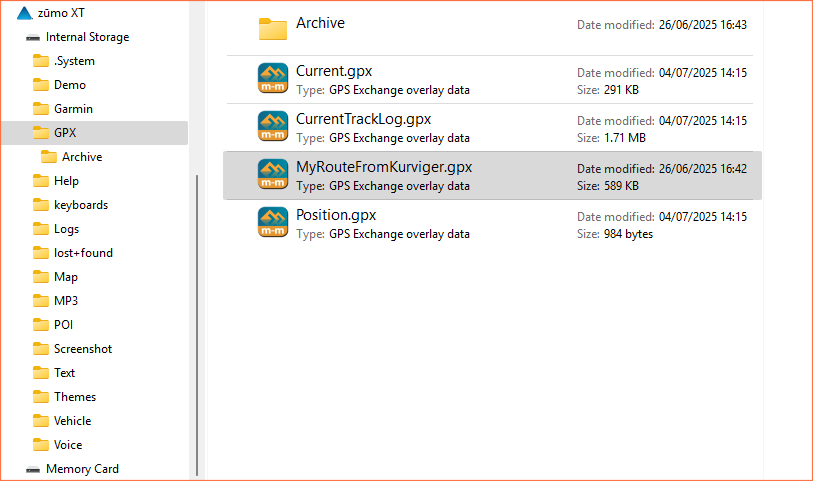
Underneath on the left of the image below, you will see all kinds of "directories" - or "folders". Click the image to get a larger view of it.
- Zumo XT GPX Folder.png (52.46 KiB) Viewed 1021 times
On the left of the screen is a list of the folders. (You probably will not have the .System folder - don't worry about that.
There is a GPX folder or (directory). That folder is currently selected (it has a grey box around it because I clicked the mouse over than folder name). On the right of the screen it is showing the contents of that selected GPX folder.
That is where you place your gpx file from Kurviger. You can do this by dragging and dropping the file name,
or by selecting the file and using the copy / paste facility - depending on the type of computer.
The XT needs some of those files GPX files to be there.
Current.gpx contains the routes, tracks and waypoints that you have created or imported into the Zumo.
CurrentTrackLog.gpx is a record of where you have traveled recently. The
Archive folder contains older versions of CurrentTrackLog.gpx. I keep all of mine and download them every few weeks. They are a useful record of where you have been and which roads you have taken. The archive folder can store only 20 old track logs. After that the oldest is delete to make room for a new one. Depending on how much you ride will determine how long it takes for all 20 files to be repalced with new. When I was riding 12,000 miles a year, it took about 3 months - but I never relied on that and copied them more frequently. Don't delete them - it may confuse the system. You do have the option to stop it recording htese tracks - but the XT uses them to improve its ability to work out your ETA in routes. It builds up a picture of your average speeds on different types of roads.
Position.gpx is your last known position. This is needed to help the Zumo start up quickly.
The folder or directory pathname is
Internal Storage / GPX / MyRouteFromKurviger.gpx (or whatever name you called your gpx file).
If your gpx file is placed in that location, the XT will find it.