Many thanks for your detailed observations @Regain. It is really useful to be able to observe what other people are doing and how well (or otherwise) the satnav is behaving for them.
I'd like to follow up on a few comments if I may.
Regain wrote: Mon Jun 30, 2025 9:46 am
The bar one was due to the XT2 being desperate to put us on a highway that ran alongside the minor road I'd selected. I ran with the Track but despite running a copy of the route as per our friendly expert @jfheath, it produced RUT behaviour in order to get us on that highway. I eventually had to stop the route and open it again with CEP once away from the highway.
I suspect that this was not RUT behaviour - it sounds like the situation that you get when the original route has been modified by the Tread App itself - ie routes are altered to follow the faster roads and shaping points are moved from their original location onto Tread's New Route.
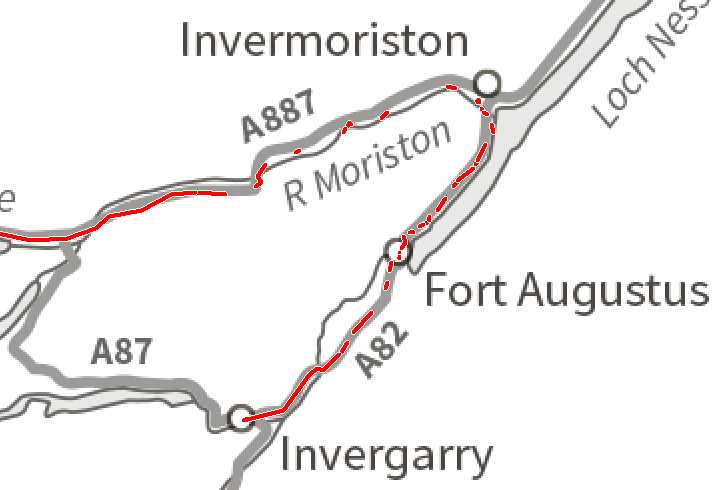
There is a way that you can determine whether or not you have experienced RUT behaviour - if you allow the Zumo to automatically record your riding. The Track Log will be fragmented into tiny sections. Each break in the log will correspond to when the XT2 ussued a command to perform a U Turn. Here is an example:
- Broken Track Log Example.png (49.39 KiB) Viewed 818 times
My plotted route was to travel from Invergarry west-ish along the A87 and then off the left hand side of the page. In fact, I needed petrol and knew that the only place was in Fort Augustus - so I continued NW along the A82. The satnave was asking me to turn back, and each time it did so, it produced a break in the automatically recorded log file. At Fort Augustus, the distance to turn back (A82 SW then A87) is exactly the same as it is to continue NE to Invermoriston and then take the A887. Approx 24 miles. After Invermoriston it took much longer to calculate the route back to Fort Augustus, Invergarry and the A87 - to reach the point where we were heading anyway - where the A87 meets the A887. Nevertheless it continues demanding U turns, and gives up about 4.5 miles from that point. Up to that point it was demanding that I turn back - 37.5 miles.
That is RUT behaviour. You can only
begin to suspect it when you have reached the tipping point - the point where if you start a route and head to the destination the Zumo will plot one way, and if you go back a mile, it will plot the other way.
But the clincher for me is this track log - it has only ever got fragemented like this during RUT behaviour, and I have proved to myself beyond reasonable doubt that the break in the track correspond with the period when it is recalculating the route.
Track logs are to be found in Internal Storage/GPX/ CurrentTRackLog.gpx and in the Archive folder. It keeps them for about 6 months.
I'd be curious to know whether or not your track log for that date, time and location had become fragemented.
If you record a track manually by selecting Track Recorded on the XT2 main screen - that log never gets fragmented.
If you want to know more about how to use these - drop me a PM or start a new thread.
Regain wrote: Mon Jun 30, 2025 9:46 am
I nearly always started the route via CEP, though this can create confusion with other riders on much older Zumos if it doesn't route via the planned start (first Via) point. They would then need to restart their route, once on the track to the 'end' point. No problem really.
Personally I still treat CEP with a healthy amount of suspicion, and never use it unless I am forced to. If I am leading a group of riders, I always put the via point for the start and coffee stops on the road that I will be taking when we set off. Sometimes it will be a mile up the road, often more.
That way, when everyone sets off, they select the start point and the Zumo takes them to it and automatically continues navigation of my route from there. (That is true for all Zumos with the Trip Planner app - the 590/390 onwards. )
Regain wrote: Mon Jun 30, 2025 9:46 am
Make sure all your riding buddies also have all your hotels programmed in as waypoints in case of separation (intended or otherwise). It's always that final run in through a town or city where a dozen of you can get split up! Sucked enough eggs yet?

Entirely agree - providing that they are genuine Garmin Waypoints. ie if you select 'Where To->Waypoints' they appear in the list.
You mention MRA a few times and they do not create Garmin Waypoints from the shaping and via points that you use to create a route. They refer to every route point as a waypoint - which has resulted in a lot of confusion with members of the forums. Since we are a Zumo User Forum, I feel duty bound to use Garmin's terminology - especially as it is consistent with the GPX file format standard.
Regain wrote: Mon Jun 30, 2025 9:46 am
At the end of each day, I deleted the route, track and collection from the XT2 and imported the next day's route as above. The occasional reappearance of a deleted route but easy to deal with.
If you delete data from your XT2 then you have to make sure that it has had time to synch with the Tread Database. Otherwise it will exist on the datbase and not on the XT2. If the last known action is to transfer data from the Tread database (it doesn't know that you deleted it on the XT2, 'cos it didn't synch) then synch process will put it back again.
Regain wrote: Mon Jun 30, 2025 9:46 am
One great thing that happened; despite checking for road closures on Google maps prior to setting off - (which is another superb thing I found out how to do on these pages with imported MRA routes), inevitably there were other closures not published. The XT2 simply guided us round them and back onto the route. I keep re-calculation on automatic but you can use prompted if preferred.
Was this as a result of the Tread App discovering about the closure and re-routing accordingly ? If so, that is good. I find this feature sometimes useful, often annoying, and I tend not to believe it. Bu tthe XT2 gives you no choice. If it gets a message indicating a road is closed - it re-routes, no matter what. I often find that a closure is in a different part of the same road, or it is a night time only closure and that it has re-routed me for no reason. On long tours in the UK, I tend to take a look at the AA pages where they have upto date information on road works, traffic and road closures. They tend to be reasonably accurate.
Regain wrote: Mon Jun 30, 2025 9:46 am
Planning routes away from home. I love MRA and the later Zumos for this as we usually have spare days for either a day off the bike or a local rideout. I've found it a little less precise due to the limitations of either my iPhone or tablet with waypoint placement. Sometimes no problem but occasionally the XT2 does not calculate the route. You can either fiddle around a bit more with creating the route on MRA but if you are tired or just can't be bothered, convert the track to a route either in Tread or on the XT2. Crucially, also have the original track displayed so that if you wander off the intended route, you can get back to it. I'm still not 100% sure whether leaving auto-recalculate on or not is the best idea. More testing is required there.
I like to have autorecalc on because it gives me a clue as to what the Zumo is doing.
Certainly having a track visible is a good standby. Load the track, say go. No instructions, just a line on the map and a dotted straight line pointing to the closest point on the original track should you have to deviate. Up to you to find roads to get you there. If you haven't tried this technique, it is well worth a look. I was doubtful - why would you want to do that ? - But it is actually quite relaxing. Informative, without being intrusive. Like having a paper map always open with a pointer as to where you are now.
Regain wrote: Mon Jun 30, 2025 9:46 am
If you stop getting phone notifications (I only allow texts anyway otherwise you end up with pings from everywhere - and turn off audible pings from WhatsApp on your phone!), you may need to pair your Tread app to XT2 again. I can find no other way of doing this than deleting the app and reinstalling. I'm open to other ideas though. Apple Music works perfectly with the XT2 so you can select anything within it without having to set it running first. It's only for the longer straighter routes in my case which isn't often. I also have a ton of music on the SD card which works great too.
I don't bother with phone music. Spotify stopped working properly ages ago, and I find that streamed BT music gets fragmented the longer you ride with it. I have music on the SD card if I want it - but I find it takes my concentration away from the road - or I am concentrating hard anyway and never actually hear the music.
Messages from phone are usually restricted to text messages and phone calls. No one texts me or calls me unless it is important. Partly because I'm not glued to it like most people that I nearly knock over. Most of the day, I don't know where my phone is. That's a point, Where is it ? I've not seen it since last night.
I reported in another thread that the XT seems to lose a connection with the headset every now and then, and instructions stop coming through. I find that reaching over the back and turning the XT off and then again to turn it on - it takes a couple of minutes , but it reboots and reconnects everything. I've never had to do that with the XT. But whent he sound comes back on - there is a queue of navigation messages waiting to be sent to the headset and it spends the next five minutes playing these one after the other.
Regain wrote: Mon Jun 30, 2025 9:46 am
Finally, remember it's a navaid and not your routemaster. And - ALWAYS remember to have your track visible.
You mentioned that you set the track to Widest Red. I believe that also sets the magenta route to be the same width.
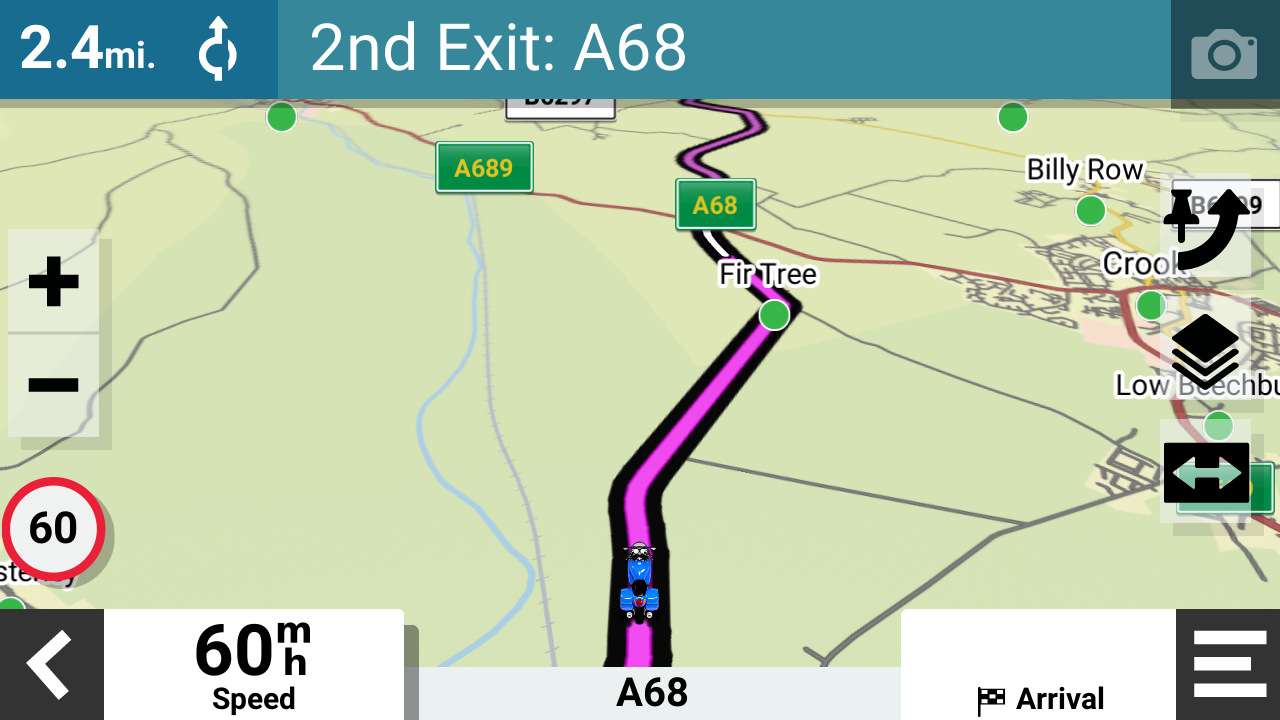
Most of the time, the route obscures the track which is the same width underneath. You can make some simple edits to the theme file to make the track wider than the route. I use black for tracks, and I can see the black track under the magenta route as a black outine either side of the route.
Like this:
- 88725.png (484.21 KiB) Viewed 818 times
If you want to know how to do this - it just needs a text editor and a bit of know how - so just ask.


 .
.