Page 1 of 1
MRA & XT Trip difference
Posted: Wed Jun 18, 2025 10:28 am
by karltimber
Hi,
have created a route from Chamonix to a campsite south of it.
Easy route is thru a tunnel and onwards south. This is what I have done in MRA (with Tunnels
not set to avoid)
Xferred to the XT, the Track looks perfect, the way I wanted to travel.
But when sent to Trip, it avoids the tunnel and sends me on a wild chase.
1 - why so and 2 If I note this and just travel thru the tunnel, will the Trip just pickup the road (at no.4) on the other side and continue or will it want me to do a U-turn.
see picture
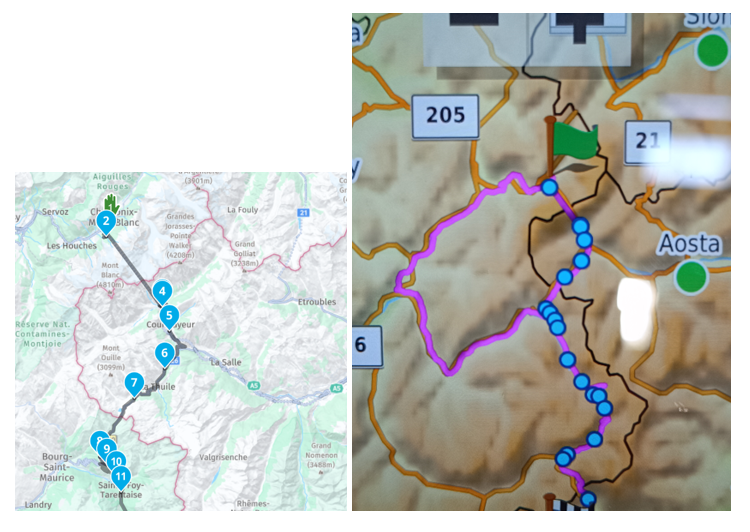
- Route
- Chamonix.png (582.05 KiB) Viewed 1004 times
Re: MRA & XT Trip difference
Posted: Wed Jun 18, 2025 10:40 am
by Peobody
The XT will continue following a route after going off-route and then returning to it provided that you did not bypass any Via points. It will ignore any bypassed Shaping points but will route you back to bypassed Via points. I don't use MRA so can't advise on how the Via and Shaping setting is handled.
Re: MRA & XT Trip difference
Posted: Wed Jun 18, 2025 1:04 pm
by FrankB
Hi Karl,
karltimber wrote: Wed Jun 18, 2025 10:28 am
Easy route is thru a tunnel and onwards south. This is what I have done in MRA (with Tunnels
not set to avoid)
What matters is how the avoidances are set on the XT. The XT has no knowledge of the settings in MRA.
Another thing to check on the XT is if Traffic is enabled. With Traffic enabled the XT will sometimes make a complete mess of your routes.
karltimber wrote: Wed Jun 18, 2025 10:28 am
2 If I note this and just travel thru the tunnel, will the Trip just pickup the road (at no.4) on the other side and continue or will it want me to do a U-turn.
Make sure your routes are 'saved' not 'imported'. The default for BC and MRA imported routes is 'imported'.
Stuff to read:
https://www.zumouserforums.co.uk/viewtopic.php?t=2301 and
https://www.zumouserforums.co.uk/viewtopic.php?t=3150
Re: MRA & XT Trip difference
Posted: Wed Jun 18, 2025 4:15 pm
by karltimber
When you mean "saved".
I go into mra, gpx1.1, export, open, G-drive.
Should I go - gpx1.1, downloads, open, G-drive ?
Whats the reason behind this ?
Thx
K
Re: MRA & XT Trip difference
Posted: Wed Jun 18, 2025 4:23 pm
by Peobody
@FrankB is talking about the status of the routes on the XT as listed in Trip Planner. Routes can be in one of two categories, "Saved" or "Imported". The links he provided contain details if you are familiar with how the XT differs in its handling of Saved vs. Imported routes.
Re: MRA & XT Trip difference
Posted: Wed Jun 18, 2025 5:19 pm
by karltimber
Thanks both.
Will read those.
Appreciate it
K
Re: MRA & XT Trip difference
Posted: Wed Jun 18, 2025 8:42 pm
by rbentnail
Another thing is in Settings/Navigation, set the Auto Recalculate to off. Then do NOT recalculate when you leave the route. The XT will just continue on as usual when you re-join the route on the other side of the tunnel. I do this all the time.
Re: MRA & XT Trip difference
Posted: Wed Jun 18, 2025 8:57 pm
by Peobody
I have my Auto Recalculate set to "Prompt" but the same guidance applies (eg: answer "No" to the recalculate prompt).
Re: MRA & XT Trip difference
Posted: Thu Jun 19, 2025 8:55 pm
by jfheath
Saved vs Imported
Any route created as a gpx file and placed in the GPX folder on the Zumo, is regarded as 'Imported'.
This includes any external gpx files sent to the XT using the Drive app.
The behaviour of imported routes is completely different from the behaviour of saved routes, particularly if the Zumo has recalculated the route
Eg.
The route may insist that you go back to its recalculated route if you deviate from it.
If you are unable to follow instructions that woul take you to the next via point or shaping point, then the 'missed' point may be removed from the route.
Identical 'Saved' routes do not display this weird behaviour.
There are 3 ways that I know of to make an imported route believe that is a saved route.
1. use TripManager from @FrankB
2. Use the SetToSaved utility - also from FrankB
3. Use the Save Active Route facility on the XT1 to make a 'saved' version of the imported route. Or use the Copy facility on the XT2
Oh and disable synching with either Drive or Tread.