Zumo XT2 - Making it Work for You

For help and advice on the Garmin Zumo XT2.
jfheath
Posts: 3648
Joined: Sat Oct 19, 2019 4:17 pm
Location: West Yorkshire, Uk
Has liked: 507 times
Been liked: 1171 times
Great Britain

Zumo XT2 - Making it Work for You

Post by jfheath »

A new collection of Pages providing info about the XT2 - all in one place.

Section 1 - Key Terms Section 2 - Interactive Tour - of XT2 screens. (On narrow screens, best viewed in Landscape)
  • In this section, the screen simulates the behaviour of the XT2 screen - you click the screen as you would on the XT2. The list below links to the start page for each icon on the main XT2 menu screen. The pages are not in any particular order. Navigate using the links on the screen.
    The Next / Previous links on the banner of each screen display are there to take you to the next or previous start page, relative to the screen that you are viewing. Start Pages are identified with the banner number shown in Cyan - eg 2.04
.
Section 3 - Collections Section 4 - Foolproof Routing Section 5 - What Goes Wrong - Tested with and without Tread
Have owned Zumo 550, 660 == Now have Zumo XT2, XT, 595, 590, Headache
Use Basecamp (mainly), MyRouteApp (sometimes), Competent with Tread for XT2, Can use Explore for XT - but it offers nothing that I want !

Links: Zumo 590s . Zumo XT & BC . Zumo Navigation Booklet . Zumo XT2
jfheath
Posts: 3648
Joined: Sat Oct 19, 2019 4:17 pm
Location: West Yorkshire, Uk
Has liked: 507 times
Been liked: 1171 times
Great Britain

Re: Zumo XT2 - Responsive Layout

Post by jfheath »

I have developed a new 'responsive' layout for these pages about the XT2.

In landscape view, the page is made up of pairs of blocks placed side by side, with additional pairs of blocks underneath. Each block can contain text, pictures or both. Usually, text is on the left, image on the right, as shown in the blue outlined image below.


300 Layout.png
300 Layout.png (142.48 KiB) Viewed 3388 times


When the page is displayed in portrait view, or on a narrow screen like a mobile phone (or if you shrink the size of your browser on a computer), then the right hand block drops underneath the left hand block - so text is shown above the associated image. See the green outlined image.

The images with the blue and green outline show the same page displayed on different width screens.
Have owned Zumo 550, 660 == Now have Zumo XT2, XT, 595, 590, Headache
Use Basecamp (mainly), MyRouteApp (sometimes), Competent with Tread for XT2, Can use Explore for XT - but it offers nothing that I want !

Links: Zumo 590s . Zumo XT & BC . Zumo Navigation Booklet . Zumo XT2
jfheath
Posts: 3648
Joined: Sat Oct 19, 2019 4:17 pm
Location: West Yorkshire, Uk
Has liked: 507 times
Been liked: 1171 times
Great Britain

Re: Zumo XT2 - Notes in Progress

Post by jfheath »

Placeholder

I've just been through the process of installing Tread and linking to the XT2 - without allowing the XT2 to synch. It is slightly different from the last time that I did it.

Here are the steps as I went through them.
  • Save any files that you want in the InternalStorage/gpx folder. (Including CurrentTrackLog and the Archive folder if you like to keep these).
  • Completely Uninstall the Tread app from your phone.
  • Make sure that the BT connection with the XT2 is unpaired in your phone.
  • Reset the XT2 to factory condition : (Settings->Device->Reset->Delete Data & Reset Settings)
    Note that the Reset Default Settings option does not work - it keeps your data and finds your link to Explore.
  • Install the Tread App from the Apple or Play store.
  • Restart the XT2 and dismiss all messages that pop up.
  • Click the BT logo at the top of the main screen . Select Add a phone.
  • Scan the QR code that pops up on the XT2 screen, and select the Tread link that popes up on the phone's screen.
  • Select Next to get through all of the cartoon pics and then accept the EULA.
  • Agree, and then sign into your explore.garmn.com account.
  • Pair your Garmin XT2
  • Allow Tread to find, connect etc.
  • Phone fines the XT2 - select Pair and wait - a message will appear on phone and on XT2. Accept both.
  • The next phone screens ask if you want to set up various features. These are optional and can be set up later. For "Acess to device location", I suggest only while using the app.
  • The next screen is crucial. It has four icons and these have captions:
    Get Notified, Display smart notifications, Set up Emergency assistance, Enable storage. Say whatever you want to the first three - its up to you. The last one is a trap. If you enable storage then that is the synchronisation process. And it cannot be undone without repeating all of the above steps. Do not click on Enable Storage.

    Instead go to the top of the screen and click on <Finish Setup.
Point of info: The screen that contains a list - Map, Favourites, Great Rides, etc has an option for Settings. That contains the list of options that you have just seen including "Zumo XT2". In there is an option to 'Finish Setup' - where you can accidentally select Enable Stotage - which actually enables synch. Note that in automatic updates it defaults to updating by wifi. I suggest turning that off.
Have owned Zumo 550, 660 == Now have Zumo XT2, XT, 595, 590, Headache
Use Basecamp (mainly), MyRouteApp (sometimes), Competent with Tread for XT2, Can use Explore for XT - but it offers nothing that I want !

Links: Zumo 590s . Zumo XT & BC . Zumo Navigation Booklet . Zumo XT2
Kokkie
Posts: 9
Joined: Sat Aug 10, 2024 7:48 am
Has liked: 2 times
Been liked: 1 time
Netherlands

Re: Zumo XT2 - Making it Work for You

Post by Kokkie »

Wow....that's very nice !!

Thanks :D

Mike
Liquidsilver
Posts: 1
Joined: Tue Nov 11, 2025 11:28 pm
Been liked: 2 times
United States of America

Re: Zumo XT2 - Making it Work for You

Post by Liquidsilver »

Thanks from the US. I've learned a lot from your posts and I wanted to thank you.
User avatar
Sean OZ
Posts: 77
Joined: Fri Mar 15, 2024 6:31 am
Has liked: 25 times
Been liked: 20 times
Australia

Re: Zumo XT2 - Making it Work for You

Post by Sean OZ »

Excellent information.

It must have taken you, MANY hours to put it altogether.I
I very much appreciate your efforts.
Thank You !
Zumo XT2
2020 Honda CB500X
Sometimes down, but never beaten. :-)
jfheath
Posts: 3648
Joined: Sat Oct 19, 2019 4:17 pm
Location: West Yorkshire, Uk
Has liked: 507 times
Been liked: 1171 times
Great Britain

Re: Zumo XT2 - Making it Work for You

Post by jfheath »

Thank you. Still loads to do. Fixing bike is my priority at present.
Have owned Zumo 550, 660 == Now have Zumo XT2, XT, 595, 590, Headache
Use Basecamp (mainly), MyRouteApp (sometimes), Competent with Tread for XT2, Can use Explore for XT - but it offers nothing that I want !

Links: Zumo 590s . Zumo XT & BC . Zumo Navigation Booklet . Zumo XT2
jfheath
Posts: 3648
Joined: Sat Oct 19, 2019 4:17 pm
Location: West Yorkshire, Uk
Has liked: 507 times
Been liked: 1171 times
Great Britain

Re: Zumo XT2 - Making it Work for You

Post by jfheath »

Nothing new added, but I have tidied up the links on the above menu page, and have been through all of the Section 2 / Interactive XT2 pages to make sure that the links are consistent.

In some places the method of returning back to the previous screen is not always clear. If there is a left hand margin where the usual < and > icons are shown on the XT2 screen, clicking anywhere in that area will take you back to your previous screen.

I wanted to add new pages - but really needed to get this sorted out first.
Have owned Zumo 550, 660 == Now have Zumo XT2, XT, 595, 590, Headache
Use Basecamp (mainly), MyRouteApp (sometimes), Competent with Tread for XT2, Can use Explore for XT - but it offers nothing that I want !

Links: Zumo 590s . Zumo XT & BC . Zumo Navigation Booklet . Zumo XT2
Liksaa
Posts: 1
Joined: Tue Jan 06, 2026 9:35 am
India

Re: Zumo XT2 - Making it Work for You

Post by Liksaa »

Thanks for putting this together! I see you have Section 4.04 (RUT Behaviour) listed above.
I've had issues in the past where my device recalculates a route the moment I import it, ruining my shaping points. Does your guide in that section specifically address how to lock the route down so the XT2 doesn't change it upon import, or is that more about settings on the device itself?
jfheath
Posts: 3648
Joined: Sat Oct 19, 2019 4:17 pm
Location: West Yorkshire, Uk
Has liked: 507 times
Been liked: 1171 times
Great Britain

Re: Zumo XT2 - Making it Work for You

Post by jfheath »

Liksaa wrote: Tue Jan 06, 2026 9:50 am Thanks for putting this together! I see you have Section 4.04 (RUT Behaviour) listed above.
I've had issues in the past where my device recalculates a route the moment I import it, ruining my shaping points. Does your guide in that section specifically address how to lock the route down so the XT2 doesn't change it upon import, or is that more about settings on the device itself?
Welcome Liksaa

Not in that particular section. RUT behaviour usually happens when a route has been recalculated - often by pressing Skip.
eg suppose there is an incident ahead that you want to avoid, but in doing so, you are by-passing a shaping point. To stop it taking you there, you have to press skip.

That recalculates the route and as a result changes the nature of the entire route. Now it focuses on getting you back onto its route rather than taking you to the next route point. By doing that, if you ignore the next request to go back to whereyou left the route, it builds a new route going back from where you are now to the point where it asked you to go back. If you ignore that, it does the same. Each time you continue ahead, it drops another 'breadcrumb' to take you back to. And it cannot escape from this until you get very close to the original route some way ahead.

That problem can be solved by using Trip Manager, to transfer GPX files to the XT2, or by making a copy of a route using the Zumo screen, and running the copy, rather than the original. Yes Really !

What you are describing is as a result of using Tread. Using Tread on a Phone or an ipad - create a route made entirey of Via Points, they stay very nearly exactly where you place them. Change some of the vias to shaping points - and those locations will often move to a different road.

Also If you get a perfect route in the XT2 imported as a GPX file, then that remains as it was. The Zumo may well recalculate it for a number of reasons, but it will keep the Vias and Shaping points more or less where you plotted them. But then it will try to Synchronise with the Tread database. The XT2 will talk to your Tread App on your phone by BT. The phone will talk to the Garmin Explore database by your phone's wifi data. The Data will be synched back to your phone and then to the XT2 - and it will have changed.

I believe that Tread is not doing what it was intended to do, and in order to prevent this, you really have to get rid of the part that synchronises the XT2 with the Explore database.
And to do that - if it is already set up, you have to delete Tread from your phone and you have to carry out a complete system reset of your XT2.

You can if you wish then go through the process of setting up Tread on your phone, and doing everything that you did before to set it up,

EXCEPT when you get to the point where it asks if you want to save your data or synch your data, Refuse. There will be many options presented to enable synch. But there is no option to disable it. There is even an option in the Collections menu to catch the careless finger press.

By having Tread set up but not synching, that enables you to have traffic info, road closure info, weather, what is up ahead, petrol locations and prices. I find some of that quite useful. o thatis how I set mine up.

Trip Manager is a program developed by @FrankB on this site. It works with PC / Winodws 64bit computers. and it is a method of getting a GPX file from the computer transferred into a route file (called a trip file) on the XT2. The XT2 still neeeds to calculate the route between route points - so you need to think about that when placing your shaping points. But the points will not move and they will not change their name. I still use Basecamp to create my routes. It still works very well, and if at home, I'll use Trip Manaager to transfer them to the XT2 / XT1.

I'll come back and edit in some information about where you can find more detail about this little essay !

Ok - actually most of what you are asking about also applies to the XT1.
And there is a menu page here which covers much of it. Always near the top of the Zumo XT menu of the Board Index.

To answer your particular question about locking a route down - well, you can use a lot of shaping points to pin it down, - but then the route loses its flexibility. I like my routes to allow me to go a different way, and they will recalculate when I do that. Having a shaping point every couple of miles, I'd be forever skipping them (which can result in issues, as I have described), or the satnav will be nagging me to go a different way.

Instead, I'll have maybe 5 via points for a long route. Start, stop and maybe three breaks. Then I'll place shaping points to steer the route onto the roads that I want. More if the roads are running close to a nearby faster road.

But generally, I will take a copy of a track created from my route and transfer that to the Zumo. All Zumos will display a route and a track at the same time. One on top of the other. You just have to make the track visible. The route may alter, but the track stays exactly where you plotted it. If the two deviate, you have a choice: go with the satnav, or go with the original.

If you go with the original, the satnav will probably want to navigate you a different way, but ignore that and it will soon change its mind and navigate the way that you are going. And if you have run a copy, or you have transferred the route using Trip Manager, then it will never get into a RUT situation.

There is an example of a route running on the XT1 with a green track displayed underneath the route.
Another example further down the page, shows a red track and the route deviating from the track.
Page 50 of the XT1 reference pages

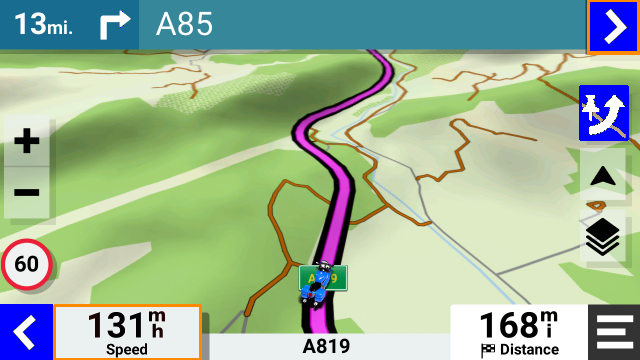
I haven't yet got round to showing this for the XT2 - with the XT2, you can set the visibility of a track by putting it into a collection and making the collection visible. Here is an image of a route on top of a black track. Black stands out very clearly, especially when you deviate from the route.
Image

Collections are implemented very well on the XT2, I tend to have one collection for each day of a tour, and set all of them to be invisible except the current day. There is a complete section 3 on that topic in the links that you quoted.
Have owned Zumo 550, 660 == Now have Zumo XT2, XT, 595, 590, Headache
Use Basecamp (mainly), MyRouteApp (sometimes), Competent with Tread for XT2, Can use Explore for XT - but it offers nothing that I want !

Links: Zumo 590s . Zumo XT & BC . Zumo Navigation Booklet . Zumo XT2
Post Reply