Page 4 of 4
Re: Zumo XT2 - Making it Work for You
Posted: Sun Feb 22, 2026 7:54 am
by jfheath
I think that the 1.5 m wide path and other such odd navigation may be more map related. Maps are not foolproof.
There’s a road near us - a steep narrow road which is our main route to the village. It is two way, but often lined with parked cars for the houses on both sides of the road. It is also a rat-run whenever the main road is affected by road work traffic lights. Nevertheless the road is a through road.
The local residents were particularly fed up with the constant arguments and minor head on collisions. Two cars going uphill, two cars going down. No one giving way. Understandably, as their front doors open into the narrow pavement.
Then one day, my satnav refused to navigate down that road. It was as if there wasn’t a road there at all. You can sign up to open street maps to contribute to the development of the maps, so I took a look at this road. Someone had clearly marked the road as being not passable - a digital bollard in the narrowest section.
The point I am making is that Garmin use publicly available mapping, and it is not accurate or up to date and cannot be relied upon.
Garmin never used the term ‘fastest’ for their routing. They use ‘faster’, which covers a whole host of interpretations. Faster than any other road is one interpretation. Faster than the neighbour’s tortoise is another. Nevertheless the 590 seemed to use ‘quicker than any of the alternatives’ - which worked quite well for me.
That changed with the XT1 and XT2. I haven’t come to a definitive answer, but my working theory is that if from your current location it is possible to reach a fast road that can be used to reach the next route point then consider the time - just to the fast road - as one option. If it is possible to reach the next route point by a minor road then consider the time - to the route point - as a second option. Choose whichever of those two is the faster.
It is the only reason I can think of to explain why it chooses routes which take twice as long as a more direct route.
Except - it occurred to me that maybe there is some directive from the powers that be to encourage automatic routing to keep traffic off the narrow country lanes - perhaps pre-empting what happens when all vehicles are driverless.
That’s the long answer. The short answer is that I don’t know.
But it will be the long answer that AI will pick up as fact !
Re: Zumo XT2 - Making it Work for You
Posted: Sun Feb 22, 2026 9:15 am
by Oop North John
Wenzudeg wrote: Sun Feb 22, 2026 6:23 am
The 395LM had another thing which really bothered me: it (re)calculated through unnavigable roads in it's quest for Fastest route! Really frustrating going through 1.5m wide streets/paths, probably unpaved and navigable only with off-road vehicles. Have I read somewhere on this forum that the XT2's algorithm prioritizes Fastest roads rather than Fastest route? Is this maybe something related to this behaviour which I just described?
I had a 396 and it also had the "irritating" faster roads vs fastest route problem algorithm.
From your description that sounds more like a "shortest" route problem as the "faster roads" one will detour you onto a motorway when logic shows that another road nearby will take less time if you use it. In my experience, if the 396 / XT / XT2 chose this < as the route between A and B, that is along one leg then up the other, but there was a lesser road joining the two end points then if you went along the "lesser" road, the GPSR would very quickly recognise it was faster, ie took less time, and route along it. My uneducated guess is that the GPSR looks at "faster" roads for a route, and if it can find one, it stops looking for a quicker one.
The faster roads problem is why many of us use many extra shaping / waypoints on a route to force the GPSR on the roads we'd like to use. The 590 and before didn't need them, and Basecamp has similar routing algorithms to the 590 and previous units. With the XT2 this then opens up a whole lot more problems if the Tread app is used to sync the routes as it moves shaping points to align with the faster roads routing, ignoring why we put them there in the first place. To get around this there's three options I know of:
1) Don't allow Tread to sync the routes. But if the route is recalculated in the XT2 then the faster roads problem might show.
2) Only use waypoints in a route that is transferred by the Tread app.
3) Only add shaping points in the Tread app.
For 2 and 3 which I use, I still open up the route in my XT2 to see what changes have occurred after it has synchronised and recalculated the route.
Re: Zumo XT2 - Making it Work for You
Posted: Sun Feb 22, 2026 4:58 pm
by Wenzudeg
jfheath wrote: Sat Feb 21, 2026 11:02 pm
Wenzudeg wrote: Sat Feb 21, 2026 8:21 pm
My question though regards the Skip function.
Am I correct in observing that the Skip function proposes to skip next route point, be it Via or Shaping Point?
How does the device recalculate after the Skip function? Does it recalculates ENTIRE route, to the next route point (be it Via or Shaping) or to the next Via?
However there is also an “Edit route” facility which gives you the option of skipping the next shaping point or the next via point. Your choice. Whoever dreamed this up must have been on work experience or something - because it doesn’t tell you which comes next, and it gives the name that the Zumo has substituted for the one that you gave it.
I am assuming you are referring to the Shaping Points. Via Point names have not been changed BUT all Via Points on this route were already Waypoints/Favourites. A confirmation of this are the two icons at each Via Point. There's a green/orange flag to mark the Via (cannot define the colour since I am colour blind) which is superimposed on the icon I chose from BC for the Waypoints.
Simulating the route and skipping some Shaping and Via Points it
seems that device is behaving logically. Goes without saying that I have used Trip Manager to send it to device.
Re: Zumo XT2 - Making it Work for You
Posted: Sun Feb 22, 2026 8:03 pm
by jfheath
I was referring to both via and shaping points.
But I notice that you said that you were using Trip Manager.
When you use Trip Manager route point names do not get changed. The route doesn't misbehave on any machine up to the XT2 if skip is selected. Nothing goes wrong.
Your routes will be calculated every time you load them into the Zumo because Trip manager does not create a route with all of the roads worked out. But it sends the via, shaping and waypoints exaclty as you sent them, and it prevents the import process from messing about with them (because the Garmin Zumo import process never gets to see your gpx files).
So if you press skip, a route point is removed and the entire route is recalculated (That is now the norm - I cannot be sure about the 396). But since the Zumo calculated the route in the first place, it isn't going to be that much different - except around the missing route point that has just been skipped.
I have to make assumptions about the 396 because I have never set eyes on one. I have the manual and they seem to be similar in nature to the 590 and 595. In my opinion, the 590 was the most predictable Zumo that Garmin ever produced - in terms of navigation.
Re: Zumo XT2 - Making it Work for You
Posted: Sun Feb 22, 2026 9:08 pm
by FrankB
jfheath wrote: Sun Feb 22, 2026 8:03 pm
When you use Trip Manager route point names do not get changed. The route doesn't misbehave on any machine up to the XT2 if skip is selected. Nothing goes wrong.
Nothing? I appreciate the confidence. But it's still software.
jfheath wrote: Sun Feb 22, 2026 8:03 pm
Your routes will be calculated every time you load them into the Zumo because Trip manager does not create a route with all of the roads worked out.
Well that was true for the pre V1.6 versions. But V1.6 has the option to send a calculated route, that will not recalculate by default.
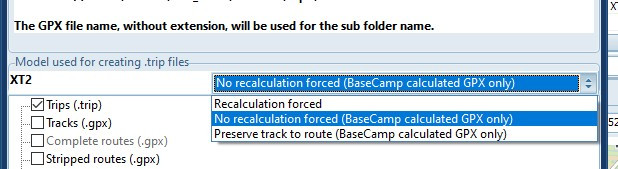
- TM recalc.jpg (46.8 KiB) Viewed 1307 times
But beware. ONLY if the GPX is calculated by BC,with the same maps, Transportmode and RoutePreference. And even then, when the Zumo gets a chance to recalculate, it will be diffrerent.
My personal preference is to force a recalculation. That will work most reliable. You should verify that the result on the Zumo is what you want, but that can be done at home at your desk.
jfheath wrote: Sun Feb 22, 2026 8:03 pm
I have to make assumptions about the 396 because I have never set eyes on one.
Neither have I, and as a result TripManager does not know how to handle it.
Frank
Re: Zumo XT2 - Making it Work for You
Posted: Sat Mar 07, 2026 1:46 pm
by jfheath
FrankB wrote: Sun Feb 22, 2026 9:08 pm
jfheath wrote: Sun Feb 22, 2026 8:03 pm
When you use Trip Manager route point names do not get changed. The route doesn't misbehave on any machine up to the XT2 if skip is selected. Nothing goes wrong.
Nothing? I appreciate the confidence. But it's still software.
Yes it is - but I ought to qualify my assertion - it is not just a casual comment. I don't think that I have shared my check list for proof of RUT behaviour before. I may have mentioned each item separately.
I have three test routes that I used for testing RUT behaviour. For each of them I established that after Skip had been pressed the route changed its behaviour and RUT behaviour followed. There are a few things that are present when a route is displaying RUT behaviour which I use for proof that it is actually RUT behaviour and not simply U turn requests:
- Broken Track Log - the automatically recorded log has sections missing which coincide with when it is recalculating the route after an instruction has been ignored.
- The recalculated route is only calculated back to the previous point where a previous recalculation was made - not to the next route point. This is evident when U turns are disallowed for the tests and looking at the track logs - which include all of the turn back loops.
- The Skip List is not kept up to date - ie if you press the skip button when RUT is active, the next route point that is shown is not the next one to be visited. It will be an earlier one. (Cancel the skip so that it doesn't affect the test) . Ultimately before reaching the end of the route there should be no route points available to Skip. With RUT behaviour, on my tests, all but one of them are available. The one that isn't is the very first point just after the start which I skip to provoke RUT behaviour.
- A missed turning to visit a route point results in the route point disappearing from the map. Via or Shaping.
- When a route is recalculated, the new route starts from your current position. The route that you were on - behind you - disappears.
You will notice that I don't include 'Repeated U turns' as evidence of RUT behaviour. That's 'cos it is a possible symptom, not proof. To test RUT behaviour properly, you have to have U turns disabled - and you cannot do that mid-route as it forces the route to recalcuate.
So with TM, I carried out a number of tests on my three test routes where I have previousy been able to provoke RUT behaviour and get all of the above evidence. I cannot get it all in one test so I have to ride the same test route a number of times.
With those 3 routes created using TM, doing the same provocations, they all behaved perfectly. They could not be provoked to do anything that was different fromt he way that (say) the 590 behaves.
ie no broken track log, no turn-back loops, Skip list is maintained and is empty just before the end route point, route points do not disappear from the map : vias you have to visit and shaping points can be ignored providing you rejoin the magenta line missing one, the route behind is retained after a recalculation.