Page 30 of 40
Re: Latest XT2/Tread software version
Posted: Wed Dec 31, 2025 9:41 am
by Oop North John
I too generate 99.9% of my waypoints in Basecamp,and then export them to the XT2 etc. I find finding POI's in Tread difficult. So far I know how to see which POI / waypoint is closer to me, but, not how far away it is, or its direction, which would be helpful.
Be aware that the icons Basecamp has available are not always the same ones the XT2 has, and vice-versa so you may see more blue flags that you expect. Not always, but sometimes.
Re: Latest XT2/Tread software version
Posted: Wed Dec 31, 2025 12:40 pm
by jacq
If I could only download the maps to Basecamp...
I used Basecamp without issues a few years back with various Garmin devices.
Currently, with the XT2, I am unable to install maps on my Mac.
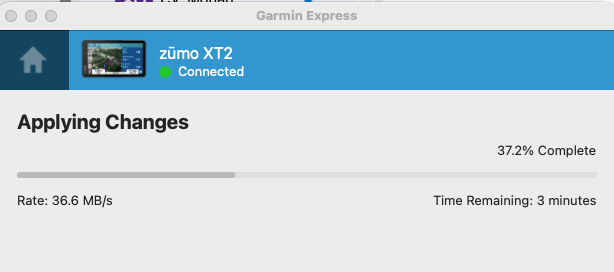
It starts the download:
- Screenshot 2025-12-31 at 12.35.24.png (32.94 KiB) Viewed 613 times
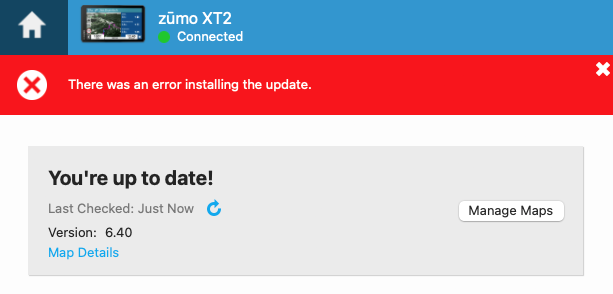
And then when it is around 70% it fails. I tried a dozen times.
- Screenshot 2025-12-31 at 12.37.13.png (35.03 KiB) Viewed 613 times
Such a shame.
Re: Latest XT2/Tread software version
Posted: Wed Dec 31, 2025 2:12 pm
by turbo19
Which version of Garmin Express are you using?
Re: Latest XT2/Tread software version
Posted: Wed Dec 31, 2025 2:47 pm
by jacq
Latest - 7.27.0.0.
I just reinstalled it. Removed all cashes and it is still the same.
Re: Latest XT2/Tread software version
Posted: Wed Dec 31, 2025 2:54 pm
by turbo19
jacq wrote: Wed Dec 31, 2025 2:47 pm
Latest - 7.27.0.0.
I just reinstalled it. Removed all cashes and it is still the same.
I had some problems with the latest versions, and following the advice of people on this forum, I went back to version 7.22. So far, no problems. Here's a link where you can download the Mac version. Give it a try
 https://garmin-express.uptodown.com/mac ... 1014764974
If that doesn't work, we'll have to think of something else.
Re: Latest XT2/Tread software version
Posted: Wed Dec 31, 2025 4:55 pm
by jacq
It doesn't work.
It fails each time around 73% (~5.8GB of City_Navigator_Europe_NTU_2026_30.gmap)
Garmin Express (macOS) consistently fails XT2 install maps to the computer at a similar file size (~5.85 GB, ~73%) on every attempt.
Logs show that multiple map components are successfully downloaded and written before the failure, e.g.:
Starting transfer to [D6210330A.img]
Finished transfer to [D6210330A.img]
Starting transfer to [DA215020A.img]
Finished transfer to [DA215020A.img]
Starting transfer to [D8526110A.img]
Finished transfer to [D8526110A.img]
Starting transfer to [D6159330A.gma]
Finished transfer to [D6159330A.gma]
Immediately after these successful transfers, the install aborts with (that is from log file):
Error Domain=NSPOSIXErrorDomain Code=12 "Cannot allocate memory"
UniversalMapInstallToComputerOperation -> Changed to [Canceled] / [Failed] phase
Same errors regardless of Garmin Express version.
I have plenty of disk space, plenty of free RAM.
I even tried mounting another SSD drive to the folder where it downloads those maps.
Another hours lost on something that Garmin broke! They had great devices few years back, it is just downhill sadly.
Re: Latest XT2/Tread software version
Posted: Wed Dec 31, 2025 6:08 pm
by jfheath
Delete the Existing Map files that are on the Zumo - the files that are causing the issues.
These are in: Internal Storage/.System/Map
There are possibly 3 files that have the same prefix, but different suffixes. I would take copies of the smaller files first eg .GMA - just in case - it shouldn't be necessary but .....
You can find out which file belongs to which map with your Zumo connected by USB to Basecamp. Click on the map name under 'Devices' in the XT2 tree, and read the information in the bottom left pane. Mine says D621033a.img for the City Navigator Europe NTU 2026.3
That should help you find the filename that is causing problems for the named map that you are installing. So if City NAv 2026.3 is not installing, delete all of the files that are called D621033a.*
Then reinstall just that one map.
(This is not just a shot in the dark. It happened to me once, and deleting the partially installed map file, before using Express to reinstall it, solved the problem).
But before you do any of that
- just check how much space you have available in internal storage. It may be necessary to delete another map to make room, and install it onto the SD card later
Re: Latest XT2/Tread software version
Posted: Wed Dec 31, 2025 6:26 pm
by Oop North John
jacq wrote: Wed Dec 31, 2025 12:40 pm
And then when it is around 70% it fails. I tried a dozen times.
Screenshot 2025-12-31 at 12.37.13.png
What do you see if the "Manage Maps" tab is selected?
I see on my Windows lap top what maps are where, including the micro SD card, and it lets me select what map I want to update.
Re: Latest XT2/Tread software version
Posted: Tue Jan 06, 2026 11:27 am
by turbo19
New Tread version for Android:
2.12.48 (2025-01-05)
All hope is lost regarding the RUT and route management issue. I think Garmin is simply replacing units until the new navigator comes out in the spring (and I don't think they'll change anything anyway because I believe Tread is a medium-term app).
I'm waiting for the third Garmin unit; I'll do some tests when I receive it tomorrow
Re: Latest XT2/Tread software version
Posted: Tue Jan 06, 2026 12:07 pm
by jfheath
I did my traditional Happy New Year post to product support and reminded them that it is now 4 years since I identified and reported the RUT issue on the XT1. Since then nothing has happened, except thd same fault was reproduced on the XT2.
They told me that they had now replicated the fault, which is impressive since I told them how to do that 4 years ago, and that they are still working hard on finding a solution.
I don't know which way to take this. Either they are not doing anything at all, or they have got so many fundamental issues in the design of the software that it is requiring a complete system software rewrite.
Certainly the latter seems possible. Rut behaviour, moving route points, renaming route points, disappearing route points, route navigation treating via points as the only things that matter, inability to treat gpx files from friends as important condiderations, emphasis on using popular, scenic, moto, 'adventurous' routing as more important than planned routes, inability to create tracks ..... these all point to a way of thinking that ignores people who want a satnav to take them on roads that the user had chosen, without needing to look for road signs.
If they want to know how to do this, I could point them to the Zumo 590. Put that in an XT2 case with brighter screen, better battery, Usb C for faster charging and some of the nicer features from the XT2 - eg handlebar controller, collections and transfer of gpx files by BT without any processing. I'd go for that.
But we shall see. .....