Page 25 of 26
Re: Introducing TripManager
Posted: Fri Apr 10, 2026 5:36 pm
by giuseppe66
Thanks for the quick reply. I agree that the route changes when the GPS recalculates, because I uploaded the file modified by TRK2RT to the TripManager map, and the deviations displayed in the XT2 aren't there
Re: Introducing TripManager
Posted: Fri Apr 10, 2026 5:46 pm
by FrankB
To summarize:
- If you use a GPX file created by MRA (or any other routeplanner than BaseCamp) and want to be sure that the trip on the Zumo is the same as what is planned, the ONLY option you have is to send a track, and on the Zumo use 'Convert to trip'. But this will remove all Shaping and Via Points.
- If you use a GPX file created by BC you can also use the option 'No recalculation forced'. The trip will be as it was in BC. But beware! If the Zumo recalculates for any reason, the result could still be different.
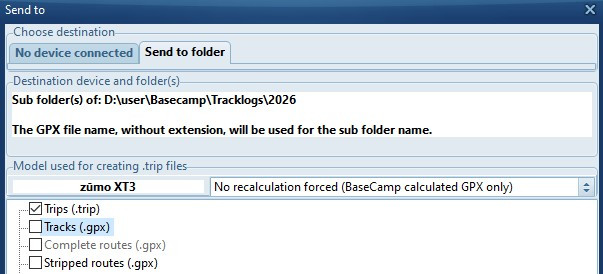
- tripoption.jpg (48.15 KiB) Viewed 711 times
Link to Docs:
https://frankbijnen.github.io/TripManag ... ateoptions
Re: Introducing TripManager
Posted: Fri Apr 10, 2026 5:58 pm
by giuseppe66
FrankB wrote: Fri Apr 10, 2026 5:46 pm
To summarize:
- If you use a GPX file created by MRA (or any other routeplanner than BaseCamp) and want to be sure that the trip on the Zumo is the same as what is planned, the ONLY option you have is to send a track, and on the Zumo use 'Convert to trip'. But this will remove all Shaping and Via Points.
- If you use a GPX file created by BC you can also use the option 'No recalculation forced'. The trip will be as it was in BC. But beware! If the Zumo recalculates for any reason, the result could still be different.
tripoption.jpg
Link to Docs:
https://frankbijnen.github.io/TripManag ... ateoptions
Yes, thanks, i set TRIP, TRACKS and COMPLETE ROUTES
Re: Introducing TripManager
Posted: Mon Apr 13, 2026 3:46 pm
by Peobody
Can TripManager delete tracks from an XT?
I have used TripManager to send a route with track to my XT. I now find the need to change the route which I will do in Basecamp. I know that I can delete the old route .trip file using TripManager but don't see a way to use it to delete the corresponding track. Am I missing anything?
Re: Introducing TripManager
Posted: Mon Apr 13, 2026 4:31 pm
by FrankB
@Peobody
For other users reading this. This answer is ONLY valid when using an XT and have not set up Explore. (How you have it, if I'm not mistaken)
- Yes, you can delete a track using TripManager. Use the 'GPX' button, select the file(s) to delete, Click on 'Functions' and select 'Delete selected files'.
But:
- TripManager can only delete the file, if the GPX contains multiple tracks and or routes/waypoints, they are all deleted.
- If you want to transfer a new version with the same filename, manually deleting is not needed. TripManager will overwrite the existing file. It will warn you if the file exists.
- You can also delete tracks on the XT. Apps/Tracks. Select the wrench etc. If the XT is not setup to use Explore it will the delete the track from the GPX. The last track deleted from the GPX will delete the GPX.
Re: Introducing TripManager
Posted: Mon Apr 13, 2026 6:31 pm
by Peobody
FrankB wrote: Mon Apr 13, 2026 4:31 pm
- If you want to transfer a new version with the same filename, manually deleting is not needed. TripManager will overwrite the existing file. It will warn you if the file exists.
This could be key, and could simplify things for me. Consider this scenario.
- I create a route in Basecamp named "Damascus Day 3".
- I get that route and track onto the XT by using TripManager and doing a "Send to device" selecting the Trips and Tracks options.
- I then decide to modify that route. The route name will not change.
Normally I would delete both the route and the track using the delete functions on the XT, connect it to the PC, and then send the modified route using TM. This morning, I had the XT connected and TM running so decided to see if I could do the deletes and the resend without disconnecting the XT. Deleting the route (.trip) is obvious but I got hung up with not being able to figure out how to delete the track. Are you saying that I could have simply done the same "Send to device" from TM with the modified route and that would have overwritten (with prompts) the existing .trip and track on the XT?
FrankB wrote: Mon Apr 13, 2026 4:31 pm
- Yes, you can delete a track using TripManager. Use the 'GPX' button, select the file(s) to delete, Click on 'Functions' and select 'Delete selected files'.
The GPX button reveals a file named "Tracks_Damascus Day 3.gpx". Am I correct in understanding that deleting this file will delete the track from the XT, but may not be necessary if it will be overwritten?
Re: Introducing TripManager
Posted: Mon Apr 13, 2026 6:52 pm
by FrankB
Peobody wrote: Mon Apr 13, 2026 6:31 pm
Are you saying that I could have simply done the same "Send to device" from TM with the modified route and that would have overwritten (with prompts) the existing .trip and track on the XT?
Yes.
Side Note: Suppose you had set 'Show on map', and possibly another color, on the XT, you will have to do that again.
FrankB wrote: Mon Apr 13, 2026 4:31 pm
Am I correct in understanding that deleting this file will delete the track from the XT, but may not be necessary if it will be overwritten?
Yes.
But again. This will only work for the XT, when NOT connected to Explore.
Re: Introducing TripManager
Posted: Tue Apr 14, 2026 1:13 am
by Peobody
FrankB wrote: Mon Apr 13, 2026 6:52 pm
Peobody wrote: Mon Apr 13, 2026 6:31 pm
Are you saying that I could have simply done the same "Send to device" from TM with the modified route and that would have overwritten (with prompts) the existing .trip and track on the XT?
Yes.
Worked great! Thanks
@FrankB .
Re: Introducing TripManager
Posted: Tue Apr 14, 2026 5:43 am
by FrankB
The programmer (thats me) developped TripManager initially for the XT. Later the XT2, XT3 and Tread 2 were added. Meanwhile I bought and XT3, and will use that with TripManager and on the bike.
But the XT works best!
Re: Introducing TripManager
Posted: Tue Apr 14, 2026 2:18 pm
by giuseppe66
Sorry, I have another question. I use the theme made by Chris and I noticed this. If I export in gpx1.1 from MRA and then copy the gpx file directly into the XT2, the track will have a different color than the route and if I make a mistake in the route I can continue on the track. However, if I import the same gpx into TripManager and then into TRK2RT, when I transfer it with TripManager to the XT2, it doesn't show me the track separate from the route but only the route. Am I missing something? Thanks