Page 23 of 26
Re: Introducing TripManager
Posted: Wed Mar 18, 2026 3:35 pm
by FrankB
@Oop North John
I really recommend reading thru Steve's
@smfollen Userguide:
https://frankbijnen.github.io/TripManag ... e_V1.6.pdf
It's a lot of reading but it keeps you off the street!
The Table of contents can be accessed here:
https://frankbijnen.github.io/TripManager/toc.html
Re: Introducing TripManager
Posted: Wed Mar 18, 2026 4:14 pm
by Oop North John
Thanks, I'd printed it off before starting, but missed one step, which was a fundamental one.
Congratulations on a piece of software that puts Garmins efforts to shame!
Re: Introducing TripManager
Posted: Thu Mar 19, 2026 8:38 pm
by Oop North John
Another couple of questions.
I sent some routes to my XT2 from Basecamp to the SD card and imported them into a collection. When I opened up Tripmanager I can see the routes and they had no check mark. So I added one to make it a "saved" route. Does this update the XT2 so that the route becomes a saved one, and avoids the RUT problem, or do I need to sent it from Tripmanager using Technique #5? Because when I look at my Tripmanager the send to button isn't active and page 16 of the guide is not making any sense to me
While I'm at it, can routes and tracks be shown at the same time on the map?
TVMIA.
Re: Introducing TripManager
Posted: Thu Mar 19, 2026 8:54 pm
by proofresistant
Oop North John wrote: Thu Mar 19, 2026 8:38 pm
While I'm at it, can routes and tracks be shown at the same time on the map?
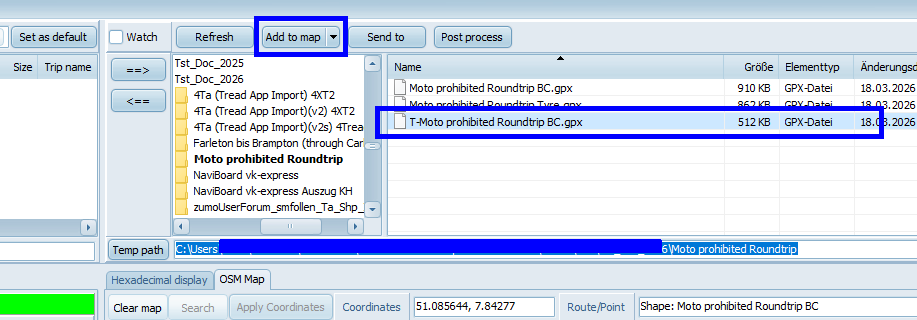
I've already sent a tip like that before

"
... When use the map to see what the actual route data on the device is, may also compare it to the original by adding the origin track to the map: ... "
- PNG-Bild (neu) (6) (1).png (59.03 KiB) Viewed 554 times
Re: Introducing TripManager
Posted: Thu Mar 19, 2026 9:00 pm
by proofresistant
Oop North John wrote: Thu Mar 19, 2026 8:38 pm
So I added one to make it a "saved" route. Does this update the XT2 so that the route becomes a saved one, and avoids the RUT problem, or do I need to sent it from Tripmanager ...
I'll have to take another close look,
but yeah,
you'll probably have to resend it—select “Trip” somehow, then right-click...
Sorry for the “vague” help, but the GPS is on the bike right now
Re: Introducing TripManager
Posted: Thu Mar 19, 2026 9:03 pm
by Oop North John
proofresistant wrote: Thu Mar 19, 2026 8:54 pm
Oop North John wrote: Thu Mar 19, 2026 8:38 pm
While I'm at it, can routes and tracks be shown at the same time on the map?
I've already sent a tip like that before
"
... When use the map to see what the actual route data on the device is, may also compare it to the original by adding the origin track to the map: ... "
PNG-Bild (neu) (6) (1).png
I saw that, but the "add to map" is also not active,and try as I can, I can't get the far right block to show anything to select, looking at the XT internal storage as I know I have tracks generated from a route there.
Re: Introducing TripManager
Posted: Thu Mar 19, 2026 9:08 pm
by FrankB
Oop North John wrote: Thu Mar 19, 2026 9:03 pm
I saw that, but the "add to map" is also not active,and try as I can, I can't get the far right block to show anything to select, looking at the XT internal storage as I know I have tracks generated from a route there.
Dont navigate into the XT2 storage on the right upper block. Keep that for your Windows files.
The Left-upper block is for the Device Storage.
When you select one GPX on the right upper block you should be able to add it to the map
Re: Introducing TripManager
Posted: Thu Mar 19, 2026 9:10 pm
by proofresistant
Oop North John wrote: Thu Mar 19, 2026 9:03 pm
I can't get the far right block to show anything to select, looking at the XT internal storage as I know I have tracks generated from a route there.
The right block shows the contents of your computer—that's where you transferred the GPX file to the GPS, right?
Re: Introducing TripManager
Posted: Thu Mar 19, 2026 9:18 pm
by Oop North John
proofresistant wrote: Thu Mar 19, 2026 9:00 pm
Oop North John wrote: Thu Mar 19, 2026 8:38 pm
So I added one to make it a "saved" route. Does this update the XT2 so that the route becomes a saved one, and avoids the RUT problem, or do I need to sent it from Tripmanager ...
I'll have to take another close look,
but yeah,
you'll probably have to resend it—select “Trip” somehow, then right-click...
Sorry for the “vague” help, but the GPS is on the bike right now
I shut down the XT2, closed Tripmanager and then reconnected the XT2 to my laptop, and opened up Tripmanager, and the check mark is still there. So either the programme remembers what the status that was last selected, or it does update the XT2.
Re: Introducing TripManager
Posted: Thu Mar 19, 2026 9:24 pm
by Oop North John
proofresistant wrote: Thu Mar 19, 2026 9:10 pm
Oop North John wrote: Thu Mar 19, 2026 9:03 pm
I can't get the far right block to show anything to select, looking at the XT internal storage as I know I have tracks generated from a route there.
The right block shows the contents of your computer—that's where you transferred the GPX file to the GPS, right?
As far as I'm aware I haven't transferred anything to my XT2, the right click has no link to do that. I wondered if the arrows next to the upper right block were for transferring data, but that's only because I've seen that logic used on other programs.
What I'm seeing on startup of Tripmanager is below.