Page 17 of 26
Re: Introducing TripManager
Posted: Fri Dec 05, 2025 6:28 pm
by FrankB
Peobody wrote: Fri Dec 05, 2025 6:01 pm
When using TM, are there any considerations when the source is a list export vs a route export?
If you mean 'things to look out for'. Not that I'm aware of. There is one difference, that is only applicable to the XT. When you send a complete list, it allows to have the trips grouped in the Trip Planner.
I think it saves you some time, and hopefully some errors. Consider a 4 day trip. I create a list for that in BC with some waypoints and a route for every day. Some times I have 2 or 3 options for one day. So lets say 4 - 8 routes in total and usually the only Waypoints are the hotels.
- I export it to Windows.
- Boot up the XT. Remove ALL tracks/trips and Waypoints.
- 'Send to' in TM. Tick Trips,Track and Waypoints. Trips forced to recalculate, Tracks are created automatically, Waypoints are stored as is.
Now let's say one Hotel is full and I have to find another. Chances are that you have to change multiple routes. When done changing in BC I clean the XT and transfer the complete list again. That way I'm sure all the changes made in BC make it to the XT.
Note that a 'clean XT' boots up much faster.
Re: Introducing TripManager
Posted: Fri Dec 05, 2025 7:07 pm
by Peobody
I don't want Waypoints (Vias) transferred to the XT. I typically have them for coffee/breakfast, lunch, fuel, and hotel, and possibly some additional ones sprinkled throughout the route to not be dependent on CEP in the event of a restart. I don't want them cluttering up my "Saved" list. I can restart the route and select any one of them as the entry point even though that point is actually my intended destination. I make hotel reservations before departure. I feel comfortable relying on Google maps on my phone to find an alternative if I ever had to. Fortunately, I never have. One commonality is the cleaning of the XT before the start of a multi-day trip.
The phrase "different strokes for different folks" comes to mind. The sharing of ideas, approaches, and processes is part of what makes this forum so valuable.
Re: Introducing TripManager
Posted: Fri Dec 05, 2025 10:44 pm
by smfollen
Peobody wrote:
I don't want Waypoints (Vias) transferred to the XT.
A point of clarification - I don't mean to be obsessive here, but I think it might help.
The term "Waypoint" is used to mean different things in different contexts, so it can cause confusion.
In Garmin's gpx centric world, which is where Trip Manager lives. Waypoints and Vias are two different things.
Routes are made up of Route Points, never waypoints. Route points may be either Via or Shaping.
Waypoints are simply save locations (aka Favorites). Waypoints can be used to specify route points, but they still remain two different things.
Whenever a route is transferred to the zumo, or to anywhere, the via and shaping points are transferred with it. They have to be since they define the route. This is true regardless of what method is used to transfer the route.
If waypoints are available, they too can be transferred to the zumo, but they do not have to be.
Trip Manger can, optionally, generate Waypoints from route points, if selected, but it does not do so by default. Whether or not to transfer the waypoints to the zumo is also optional.
(Note also that Basecamp adds to the confusion by calling shaping points via points that do not alert.)
Hopefully this helps. If not, then sorry I interrupted.
Re: Introducing TripManager
Posted: Sat Dec 06, 2025 2:14 am
by Peobody
smfollen wrote: Fri Dec 05, 2025 10:44 pm
Waypoints are simply save locations (aka Favorites). Waypoints can be used to specify route points, but they still remain two different things.
I fully understand this concept, BUT, when I create a route IN BC I typically first use the "New Waypoint" tool to place route points along the roads I intend to travel. Most of those points will be treated as Waypoints (ie: added to Saved aka Favourites) when the route is imported by the XT. That can be mitigated by making them non-alerting but if I have a 300 mile day I will likely leave at least 4 of the points as alerting (Via) points. These get added to the Saved list along with 'actual' Waypoints in the route (ie: coffee shop, restaurants, fuel stops, motel). My frustration has always been that a straight forward export or send to device from BC > Import by XT can turn route points into Waypoints by automatically recording them in the Saved list. I have learned some tricks to minimize this so there is no need to get into that. The important things are that the Saved list can accumulate unwanted Waypoints without any user control, and, most, if not all Vias will become Waypoints during import.
Re: Introducing TripManager
Posted: Sat Dec 06, 2025 2:26 am
by jfheath
Many thanks for the above post @smfollen . Absolutely spot on.
Since this is a Trip Manager thread rather than just an XT thread I’m going to add a few more comments.
First of all regarding Basecamp and Shaping Points. Basecamp does refer to ‘Shaping Points’ - notably in the option to remove shaping points from route - which is an option in Edit->Options->Device Transfer, and also in one of the pop-up menus when right clicking on a route.
However, Basecamp lists all route points in the route list under the heading ‘Via Points’ - and distinguishes the shaping points by putting them in grey text and suffixing a note ‘does not alert on arrival’.
I believe the ‘Via’ heading to be a remnant from Mapsource. Mapsource had only via points - shaping points had not been introduced until the Zumo 590 came along, with Basecamp as the tool to make use of them. Many features from Mapsource remain but it looks like someone forgot to change the heading on the route dialog box, rather than a deliberate avoidance of the term Shaping Point.
The Zumo XT2 has tightened up on its rather fuzzy naming in some areas - Trips are now called ‘Routes’. So we have a Route App, A Route Planner App which loads and saves Routes.
However, the term ‘Via Point’ has a new variation in the XT2. In addition to Via and Destination, the XT2 route planner refers to them as ‘Stop’ when creating a route. So when adding a route point you have to select ‘shaping’ or ‘stop’ !
‘Shaping point’ is now used more frequently in the Route Planner on the XT2. Shaping Points cannot be given a name. If you change them from Via Points, the original name is discarded and the Route Planner calls them all ‘Shaping Point’.
The habit of changing a route point name to something else first appeared with the XT1. It happened with via points and with shaping points, apparently at random. One way to prevent this was to first create a route point as a Waypoint. Build the route using saved waypoints and set each to be a via or a shaping point as you wish. Name them as you like and set them as Via or Shaping. All route points then retain their name and position.
So on routes unknown to me, I would create every point as a Waypoint, then set them all except Start and End to Shaping Points and then change 3 to Vias (3 coffee stops). In Basecamp I found that to be the quickest method.
By setting the trip meter on the bike to zero at the start of each day’s ride, I would have a reference that allowed me to see exactly where I was in relation to my route list. That is because I use a name like 00 999 PointName - where 00 is the day number, 999 is the distance from the start. It sounds odd, but it has saved me a couple of times.
I would have to turn off ‘up ahead places’ because if that was on, the XT1 Map would show all waypoints / saved / favourites as a large square icon - a white heart in a green box. If you zoomed in, the Waypoint was plotted in exactly the same place as the shaping point blue discs or the via point orange flag. The XT1 allowed smaller custom icons and that made it easier to see that the waypoint and the route point occupied exactly the same spot.
If a BC route is built with waypoints, then those waypoints are automatically sent in the gpx file along with the route. They are declared near the top of the file before the <rte> route tag is declared. Within the route the coordinates are copied from the waypoint declaration and route point extensions are used to define the <rtept> as either via or shaping. In fact there are two things that occupy the same location. One is the route point - via or shaping, one is the waypoint. The two things were always different even on the 590 - the waypoint was never part of the route, but it was always plotted in the same location, so it did not matter. The route passed through the waypoint.
The XT2 ‘improves’ on this distinction. The XT2, given half a chance, will relocate every route point. I don’t think it does this deliberately, but it sure is sloppy programming to fail to appreciate the consequences. I think that what it does is to use the coordinates in a lookup table of known locations. It finds a known place ‘nearby’ and uses the name of that location. Typically the name will be very precise and contain commas and county codes. So my point 04 123 Coffee Stop - which makes sense to me - Coffee stop for day 4, 123 miles from the start, now becomes “18 SideStreet, CBA”, and the point is now at that address rather than where I placed it. It has been moved and renamed. Moved only slightly, but sometimes onto a different road.
And this is really significant because the XT2 does not do this with Waypoints. But it does do it with the shaping point or the via point that was created from a waypoint. So having planned a route with carefully positioned and saved waypoints, your route no longer passes through the waypoints, it passes through its relocated via and shaping points instead.
But it does emphasise the fact that a Waypoint is not a route point.
I did report this behaviour to Garmin a long time ago and illustrated it. They may have fixed it since, but somehow, I doubt it.
But TripManager by-passes the route point look-up routines, so this never happens - which conveniently brings me back to the topic of this thread.
Re: Introducing TripManager
Posted: Sat Dec 06, 2025 2:40 pm
by smfollen
Thank you
@jfheath and
@Peobody I now understand Peobody's issue. I did not realize that, when the route is built from Waypoints, Basecamp includes the Waypoints in the exported gpx even when you try to export only the route (the selection).
I think Trip Manager offers a possible solution. In "Send to" it can send "Stripped routes". That will keep the route, but remove the waypoints from the gpx file so it will prevent the waypoints from cluttering up the saved list.
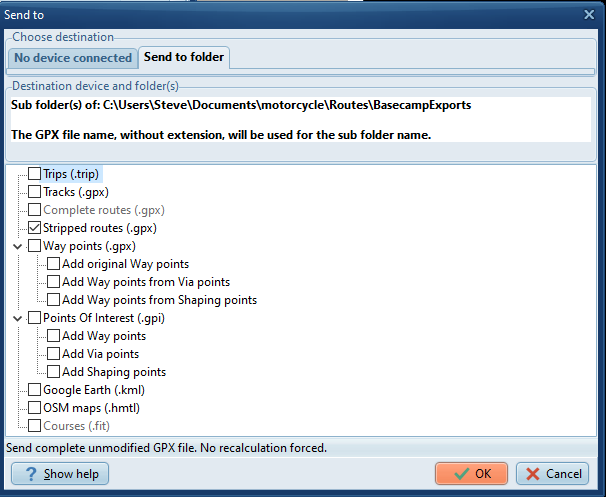
- SendStrippedRoute.png (53.46 KiB) Viewed 609 times
Of course, without them, the route points probably become more susceptible to moving and renaming if the zumo's onboard route planner is used?
I've got an XT2 and no longer have the original XT, so I can't test it.
For what its worth, I try to do all of my route planning with Basecamp, importing or creating routes without waypoints, then use Trip Manager to transfer the route to the XT2. I avoid the zumo's onboard trip planner as much as possible (and avoid the Tread app entirely).
I do sometimes create a few Waypoints in Basecamp at critical locations (hotels, campgrounds, etc.) for backup, but I do not use those to create the route.
Re: Introducing TripManager
Posted: Sun Dec 07, 2025 6:00 pm
by jfheath
smfollen wrote: Sat Dec 06, 2025 2:40 pm
I think Trip Manager offers a possible solution. In "Send to" it can send "Stripped routes". That will keep the route, but remove the waypoints from the gpx file so it will prevent the waypoints from cluttering up the saved list.
I don’t know about that. I haven’t used it. Normally - ie when used by Basecamp - a stripped route refers to the fact that all shaping points have been removed from the route, leaving just the ‘ghost’ points and the Via Points. But of course TM doesn’t create a route with ghost points.
I could look it up, or find out easily enough. I’m just pointing out a possibly different interpretation.
Re: Introducing TripManager
Posted: Sun Dec 07, 2025 6:27 pm
by FrankB
jfheath wrote: Sun Dec 07, 2025 6:00 pm
I don’t know about that.
I do know about that. (I should!)
A stripped route in TM is a route with it's Ghost points stripped. You will only find a route <rte> with routepoints <rtept>. Much like the MRA GPX 1.1 format. Neither does it include tracks <trk> nor Waypoints <wpt>
Re: Introducing TripManager
Posted: Mon Dec 08, 2025 6:58 am
by jfheath
smfollen wrote: Sat Dec 06, 2025 2:40 pm
Of course, without them, the route points probably become more susceptible to moving and renaming if the zumo's onboard route planner is used?
As mentioned before, on the XT2, if waypoints are used in a route, that does not prevent route points from being moved. The waypoints remain in their original place, the route points move, so the route no longer passes through the waypoints.
However, I am quite happy to have a number of waypoints saved and use them to build a route on the XT2 RoutePlanner App. I have never noticed these route points to be moved from their original location. However, the route points will probably if if the XT2 synchs with the Explore Database - and then synchs back to the XT2. That last step - synching back - only seems to happen if you tap the synch button on the XT2.
But not ‘noticing’, is not the same as saying ‘it never does’.
The Route planner on the Tread app - iPad and android phone - will move the route point when additional points are placed, but curiously, if you undo the last action or two, and then repeat the same action, it doesn’t move the route points !!
Re: Introducing TripManager
Posted: Fri Dec 19, 2025 3:26 pm
by vigo
I am trying to understand the potential for me of this program.
I prefer using tracks converted to routes on my XT2 for obvious reasons.
Would the Tripmanager be of any use for me when navigating tracks?
How is the new export function of
https://kurviger.de/ in relation to the problems of XT2?