Page 16 of 26
Re: Introducing TripManager
Posted: Fri Nov 14, 2025 6:29 pm
by FrankB
Re: Introducing TripManager
Posted: Wed Dec 03, 2025 8:48 pm
by oldwobbler
I've only just got my XT2 so I'm on a steep learning curve already. I'm trying to get to grips with TripManager since it should fix any problems I may have with planned routes. But, I'm struggling with basic set up. Looking at Tripmanager, there are four "windows". For the top right one, showing the computer, how are people populating this window? I use Basecamp for my route planning. How do I navigate Tripmanager to a GPX file I've created in Basecamp so I can let it work its magic before moving it to the zumo? Or am I going about this the wrong way?
Tripmanager looks to be a fantastic piece of work so, thank you to everyone involved in producing it. I just need to be able to use it properly

Re: Introducing TripManager
Posted: Wed Dec 03, 2025 9:04 pm
by smfollen
@oldwobbler Yes it is a steep learning curve for the XT2 and TM.
The short answer is to navigate the the folder and file on your computer just as you would anywhere else in Windows.
Navigate to whatever folder you exported to from Basecamp and then select the export file. There is a Trip Manager users guide here
https://frankbijnen.github.io/TripManag ... e_V1.6.pdf. What you ask about begins on page17.
Re: Introducing TripManager
Posted: Wed Dec 03, 2025 9:15 pm
by oldwobbler
@smfollen thanks for the reply.
Just to clarify, once I've finished planning a route in Basecamp, I need to export it to a separate folder on my PC, and then navigate Tripmanager to the same folder? Its not possible to navigate Tripmanager to the actual Basecamp GPX file I've just created? I can only work on GPX files I've exported?
Thanks for the help.
Re: Introducing TripManager
Posted: Wed Dec 03, 2025 9:37 pm
by smfollen
@oldwobbler You can work on any gpx file you would like from whatever the source might be, assuming it has valid content.
I mentioned Basecamp because you had said "I use Basecamp for my route planning".
Yes once you finish planning your route in Basecamp, export to whatever folder you like - I have one called BasecampExports - then In TM, navigate to that folder and select the GPX file you just exported. Like this
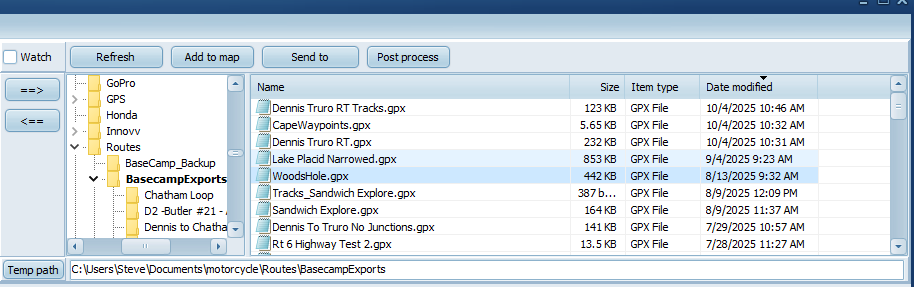
- fileExample.png (69.08 KiB) Viewed 801 times
Re: Introducing TripManager
Posted: Wed Dec 03, 2025 9:46 pm
by oldwobbler
Thank you - got it.
Re: Introducing TripManager
Posted: Wed Dec 03, 2025 10:29 pm
by FrankB
Thanks
@smfollen for clarifying that.
@oldwobbler
Both BaseCamp and TripManager remember the last used folder (or Directory) name. So it's a one-time job to get it right.
Tip: You can click on the column heading of 'Date Modified' to sort. Click again to sort ascending/descending. That way the oldest/newest files are on top. The small black triangle indicates what column is sorted on.
And that setting is also remembered.
Frank
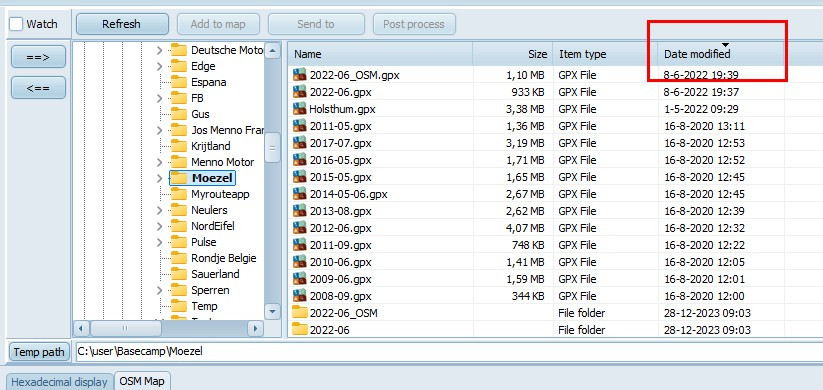
- Sort.jpg (121.77 KiB) Viewed 796 times
Re: Introducing TripManager
Posted: Fri Dec 05, 2025 3:50 pm
by Peobody
FrankB wrote: Wed Dec 03, 2025 10:29 pm
Tip: You can click on the column heading of 'Date Modified' to sort. Click again to sort ascending/descending. That way the oldest/newest files are on top. The small black triangle indicates what column is sorted on.
This facsinates me because the screenshot shows .gpx filenames in what appears to be the form of YYYY-MM.gpx. When I export from BC my filenames default to the route name, list folder name, or waypoint name, depending on what I am exporting.
@FrankB, do you intentionally name them this way?
Re: Introducing TripManager
Posted: Fri Dec 05, 2025 5:16 pm
by FrankB
@Peobody
I dont change the name when exporting from Basecamp. Those are the names of the 'lists' in BC.
You may wonder: How does that look on the XT? Aren't there a lot of duplicates?
Answer: I clean my XT before loading new trips.
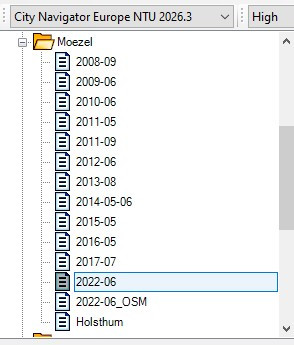
- BC.jpg (29.47 KiB) Viewed 755 times
Re: Introducing TripManager
Posted: Fri Dec 05, 2025 6:01 pm
by Peobody
FrankB wrote: Fri Dec 05, 2025 5:16 pm
I dont change the name when exporting from Basecamp. Those are the names of the 'lists' in BC.
I am trying to understand your process as compared to mine. It looks like you are exporting lists where as I export routes. As such, when I use TM I am accessing a directory that contains .gpx files in which is only one route, with files names identifying the contained route. When using TM, are there any considerations when the source is a list export vs a route export?