Page 2 of 3
Re: Where are tracks and waypoints stored in XT2 internally?
Posted: Mon Sep 08, 2025 5:52 pm
by proofresistant
FrankB wrote: Mon Sep 08, 2025 5:38 pm
Didn't notice the right window. Sorry.
Put 1 track in Internal Storage\GPX, restart the Zumo. Do you have 662 tracks then?
How many tracks are there in Explore.garmin.com? Maybe an error syncing?
If that fails copy the entire Internal Storage to your hard drive. Searching works better on a hard drive.
EG
Dir *.gpx /s Unfortunately, that's no longer possible; it's now an MTP connection
And tracks are no longer imported automatically on the XT2 either.
And yes, after all GPX files have been deleted from the device, all tracks are back after restarting, even without Wi-Fi or Bluetooth pairing.
Re: Where are tracks and waypoints stored in XT2 internally?
Posted: Mon Sep 08, 2025 6:00 pm
by FrankB
proofresistant wrote: Mon Sep 08, 2025 5:52 pm
Dir *.gpx /s Unfortunately, that's no longer possible; it's now an MTP connection
That's the reason for copying it first to your hard-drive.
Cant you delete all tracks and Waypoints from the Zumo?
Re: Where are tracks and waypoints stored in XT2 internally?
Posted: Mon Sep 08, 2025 6:04 pm
by proofresistant
FrankB wrote: Mon Sep 08, 2025 6:00 pm
That's the reason for copying it first to your hard-drive.
All those gigabytes, sorry, no.
I tried the global search in Explorer, that's enough

FrankB wrote: Mon Sep 08, 2025 6:00 pm
Cant you delete all tracks and Waypoints from the Zumo?
Sure i can, everthing works fine, but where ist the content stored?
Re: Where are tracks and waypoints stored in XT2 internally?
Posted: Mon Sep 08, 2025 6:10 pm
by FrankB
proofresistant wrote: Mon Sep 08, 2025 6:04 pm
Sure i can, everthing works fine, but where ist the content stored?
Maybe in Internal Storage\.System\SQLite\Explore.db (.bckup) That looks to me the Explore DB
I dont use Explore and mine is only 40 Kb
Re: Where are tracks and waypoints stored in XT2 internally?
Posted: Mon Sep 08, 2025 6:19 pm
by proofresistant
I think that without the Explore DB, nothing works on the XT2 anymore, regardless of whether it is connected to external or not.
The collections alone have to be stored somewhere.
It's a waste that I can't look into the Explore.db. I had already tried to use SQL Lite elsewhere, but somehow it was too complicated because SQL Lite is ‘only’ intended for internal use in applications.
Re: Where are tracks and waypoints stored in XT2 internally?
Posted: Wed Sep 10, 2025 6:07 am
by FrankB
proofresistant wrote: Mon Sep 08, 2025 6:19 pm
It's a waste that I can't look into the Explore.db. I had already tried to use SQL Lite elsewhere, but somehow it was too complicated because SQL Lite is ‘only’ intended for internal use in applications.
I did an experiment, admitted on an XT1, that shows that WayPoints and Tracks are stored in explore.db, when connected and syncing is allowed with Garmin Explore. For the XT2 things might be different. But if you want to look at the explore.db to answer the question "Where are tracks and waypoints stored in XT2 internally?" you can try this.
1. Copy Internal Storage\.System\SQLite\Explore.db to your hard-drive.
2. Open
https://sqliteviewer.app in a browser
3. Click Open File and select Explore.db on your hard-drive
4. Select items
5. Filter on type (Type=1 are Waypoints, Type=2 are Tracks)
Updating explore.db, to remove things for an example, is another matter. sqliteviewer.app is only a viewer.
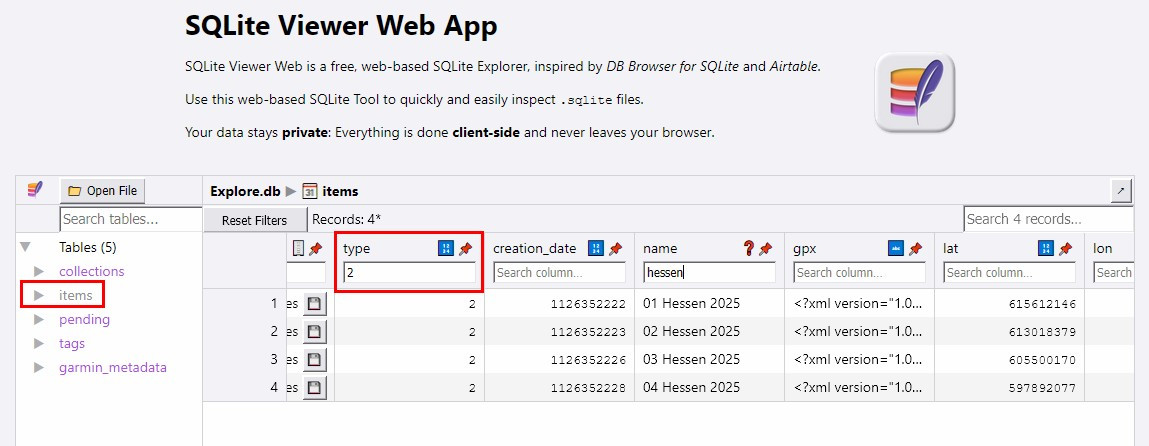
- SQLite_Viewer.jpg (106.75 KiB) Viewed 292 times
Re: Where are tracks and waypoints stored in XT2 internally?
Posted: Wed Sep 10, 2025 10:20 am
by proofresistant
FrankB wrote: Wed Sep 10, 2025 6:07 am
I did an experiment ...
@FrankB ,
Your reply came just before I wrote about my experience yesterday.
You're right, it's easy to read in the internal SQL Lite DBs.
The Device DBs are not as protected as I knew from others.
I first used the web version you mentioned.
That was a good start, thanks for the tip

But then switched to a PortableApps version
https://sqlitebrowser.org/.
I don't know yet whether you can also write with it; I haven't dared to try it yet.
First, I now have to download a backup of all databases to my PC, from the zumo XT2 and Tread 2 also and will compare them.
And what can I say, my urge to research grew enormously. It's really interesting what you can find in databases

In addition to Explore, the vehicle profiles are also particularly interesting.
Now I “just” have to understand the Explore DB first.
At first glance, I think there's even a copy of the trips included, but I haven't examined the data content enough yet.
Wow, it's all so time-consuming.
Re: Where are tracks and waypoints stored in XT2 internally?
Posted: Wed Sep 10, 2025 10:30 am
by FrankB
proofresistant wrote: Wed Sep 10, 2025 10:20 am
I don't know yet whether you can also write with it; I haven't dared to try it yet.
It's good to be careful with this. Would be a shame if a trial bricks your unit.
Re: Where are tracks and waypoints stored in XT2 internally?
Posted: Thu Sep 11, 2025 7:08 pm
by proofresistant
FrankB wrote: Wed Sep 10, 2025 6:07 am
...
... WayPoints and Tracks are stored in explore.db ...
...
- SQLite_Viewer.jpg (83.71 KiB) Viewed 269 times
...
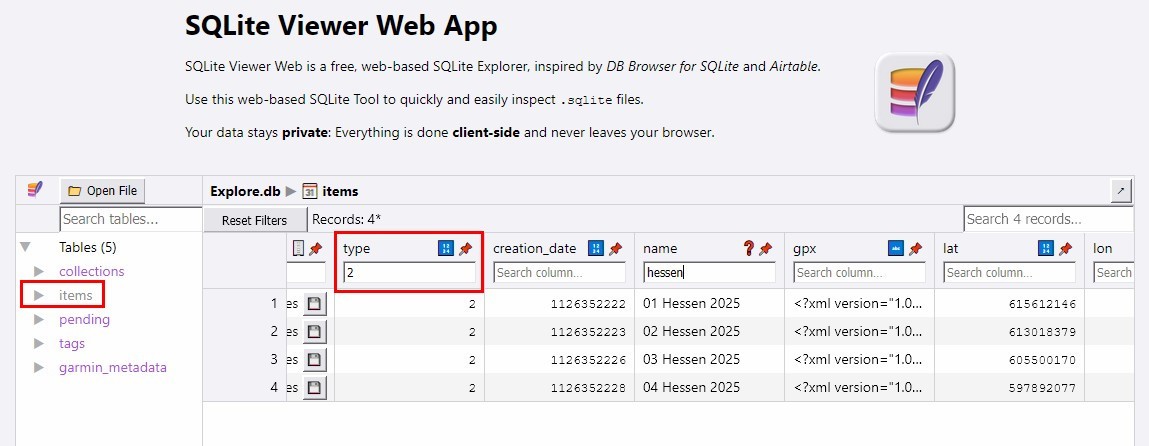
I can now confirm
@FrankB
The
tracks and
waypoints are stored in
Explore.db
In
zumo XT2 and
Tread 2 also, they are in the [items] table same as zumo XT (1).
(However, I have only tested this with Explore storage originally enabled, so I dont know yet what happens without the Explore storage option.)
Re: Where are tracks and waypoints stored in XT2 internally?
Posted: Thu Sep 11, 2025 7:58 pm
by FrankB
proofresistant wrote: Thu Sep 11, 2025 7:08 pm
(However, I have only tested this with Explore storage originally enabled, so I dont know yet what happens without the Explore storage option.)
Do you want to know for sure? My guess would be very much like the XT1.