klirtom wrote: Fri Aug 01, 2025 6:16 am
There is the missunderstanding

I do not create the round trip on my own. I'm using
Round Trip app available on XT2.
No - not a misunderstanding: There are a number of ways that you can create a round trip and
@smfollen's response showed Basecamp Maps - just to illustrate his reply.
But you did not say
how you created your round trip. So I thought that I would try a different approach from that used on many forums. I thought that I would find out what the question involved before giving a reply.
When using the XT2 to create a round trip - Main Screen -> Apps -> Round Trip - you can specify the start, the distance, duration or intermediate destination, and the direction in which you wish to travel. (I know that you know that, but other people reading may not - although you kindly provided the link to the relevant page in the 'manual'.)
What you get is a route. But it is not a normal route - it has no route points and if you try to edit it, it looses the information that keeps it in place and takes you straight home. Also if you use the 'shape' button, it then becomes a normal point to point route and any deviation will take you straight to the next route point. Home or the mid point. The manual doesn't tell you that, but the Zumo will warn you if you try to edit it.
The route created by the "round trip" facilty behaves like a track that has been converted to a route. (Or converted to a trip if using the XT1). A Track-Trip.
These don't behave like normal routes. They stay fixed in place - like a track, but they give directions. But if you have to deviate from the route - eg if a road is closed, or there is a traffic problem - then it locates a point on the remaining route that it is closest to your current position, and navigates you to that. That is pretty good - usually - but it presents two potential problems:
- These type of routes can be subject to the RUT issue. It would happen if you are forced to deviate from the route (eg road works) and the XT2 calculates a way to rejoin the route by going back the way that you have just ridden. And you ignore it - because it is taking you straight back to the road works. It will then spend the rest of your route trying to make you go back - unless you manage to find the original route up ahead. I know this because I came across it when I did weeks of testing that lead me to the discovery of RUT behaviour in normal point to point routes.
- 'Round Trips' are not circular. I'm sure that you were just trying to explain etc.
Typically a long round trip will be going there and coming back a slightly different way. A very long thin oval.
Or like this 250 round trip that I have just generated on my XT2.
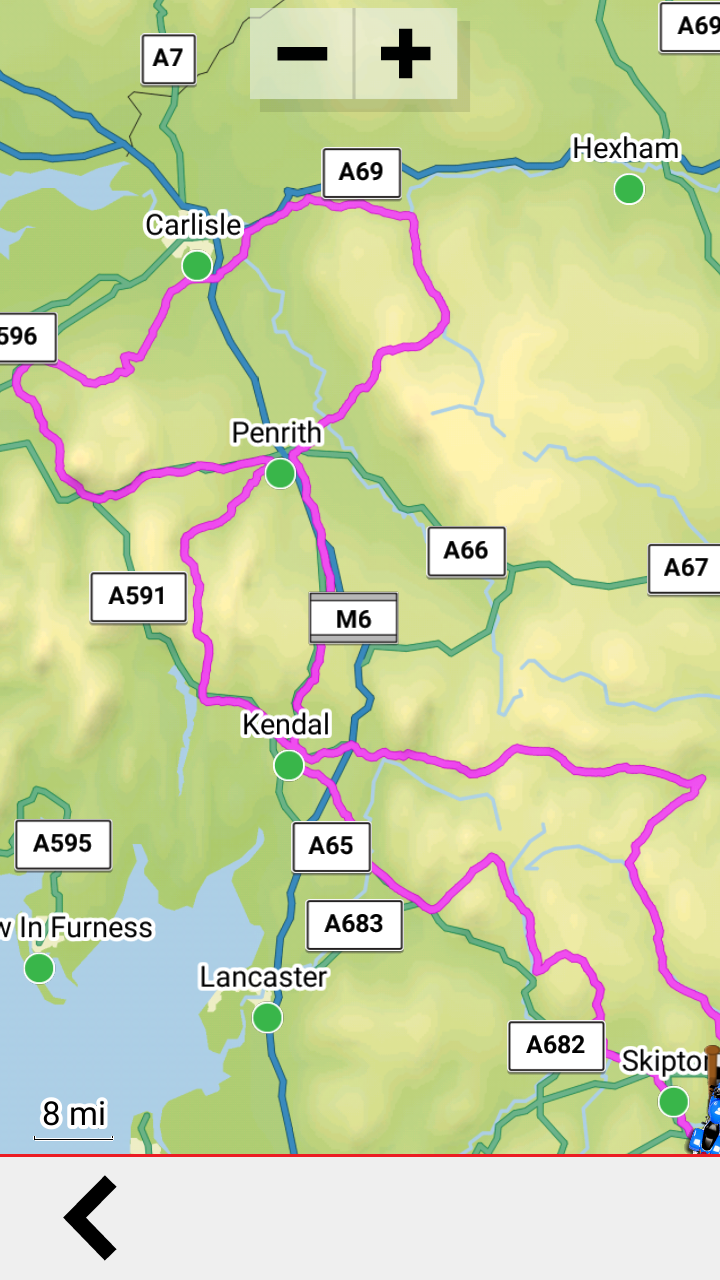
- XT2 250 mile Round Trip.png (989.44 KiB) Viewed 200 times
The route starts at the bottom of the page and heads north up the right / east side of the loop. Then from the A69 it starts heading south down the left / west side of the route.
There are a number of places where the route heading north is VERY close to the route heading south - if you go off route - eg for a coffee stop - the XT2 will find a way to the nearest point on the route from your current position - and in places like Kendal and Penrith, that could easily find the section heading south, when you are still heading north. This is not what I think - I know this because I have tried it.
So what @smfollen was suggesting was to create two routes. In the example from my map, One route would take you north using the East / Right side of the map - up to the A69 at the top. The other would bring you back down the west / left side.
That technique prevents the problem of the satnav jumping onto the wrong part of the route
You cannot do this using round trip. However - you can insert an intermediate destination and it plots the first half and draws a dotted straight line back to the beginning, Perhaps when you get there, it calculates the return part of the route. I don't know. It seems likely. I'll have to try that one day to find out.