Page 2 of 3
Re: V7.17.3.0
Posted: Thu Jun 15, 2023 9:53 pm
by Peobody
Russ, please logout then login, or restart your PC and then see if it is running in the background.
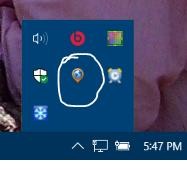
- clipimage.jpg (6.65 KiB) Viewed 6395 times
Re: V7.17.3.0
Posted: Thu Jun 15, 2023 11:07 pm
by rbentnail
Peobody wrote: Thu Jun 15, 2023 9:53 pm
Russ, please logout then login, or restart your PC and then see if it is running in the background.
clipimage.jpg
Ah yes, I see now. Yep, it's there running in the background upon restart. I selected quit. Then checked that the box in GE is unticked- it is. But somehow in [computer] Settings/Startup Apps, GE had been turned on. I turned it off. Going to restart again and see what happens.
edit- after restarting again, GE is not running in the background. I reckon I got it done!
Re: V7.17.3.0
Posted: Fri Jun 16, 2023 3:15 pm
by Bear
It seems to be behaving itself for me. Installed as an upgrade on two machines (one each Win10 and Win11) with the box unticked and, after restarting both, Express isn't running on either installation.
Re: V7.17.3.0
Posted: Fri Jun 16, 2023 3:43 pm
by Peobody
Bear wrote: Fri Jun 16, 2023 3:15 pm
It seems to be behaving itself for me. Installed as an upgrade on two machines (one each Win10 and Win11) with the box unticked and, after restarting both, Express isn't running on either installation.
How did you check for it running?
Did you do the upgrade as a different user or run as administrator? This is something that I am extremely curious about due to the fact that the registry entry is created in HKEY_CURRENT_USER. It makes me wonder whether 'run as administrator' places that registry key in HKCU for the administrator. If so, the problem would only affect folks who do the installation as a user with administrator privileges.
Re: V7.17.3.0
Posted: Sat Jun 17, 2023 10:06 am
by Bear
I used Task Manager to see whether Express was running. On both machines I'm using an administrator account for everything with no other accounts set up.
Re: V7.17.3.0
Posted: Sat Jun 17, 2023 1:12 pm
by Peobody
Thanks @Bear. That blows my conjecture about why GE starts in the background during system startup for some people and not for others.
Re: V7.17.3.0
Posted: Sat Jun 17, 2023 8:59 pm
by rbentnail
Peobody wrote: Fri Jun 16, 2023 3:43 pm
Bear wrote: Fri Jun 16, 2023 3:15 pm
It seems to be behaving itself for me. Installed as an upgrade on two machines (one each Win10 and Win11) with the box unticked and, after restarting both, Express isn't running on either installation.
How did you check for it running?
Did you do the upgrade as a different user or run as administrator? This is something that I am extremely curious about due to the fact that the registry entry is created in HKEY_CURRENT_USER. It makes me wonder whether 'run as administrator' places that registry key in HKCU for the administrator. If so, the problem would only affect folks who do the installation as a user with administrator privileges.
I too used Task Manager to look for it. I am the sole user of my laptop and am always logged in as admin. I rarely shutdown my computer. I have it set to Sleep when I close the lid.
Re: V7.17.3.0
Posted: Sun Jun 18, 2023 12:38 am
by Peobody
rbentnail wrote: Sat Jun 17, 2023 8:59 pm
I too used Task Manager to look for it. I am the sole user of my laptop and am always logged in as admin. I rarely shutdown my computer. I have it set to Sleep when I close the lid.
Russ, earlier you said that you saw it running in the background after a restart. Did you see its icon in the System Tray but not see it in Task Manager?
Re: V7.17.3.0
Posted: Sun Jun 18, 2023 8:59 pm
by rbentnail
Peobody wrote: Sun Jun 18, 2023 12:38 am
rbentnail wrote: Sat Jun 17, 2023 8:59 pm
I too used Task Manager to look for it. I am the sole user of my laptop and am always logged in as admin. I rarely shutdown my computer. I have it set to Sleep when I close the lid.
Russ, earlier you said that you saw it running in the background after a restart. Did you see its icon in the System Tray but not see it in Task Manager?
The first time I saw it in the system tray. After turning off in the Startup app, it was no longer there upon restart so I looked through the Task Manager.
Re: V7.17.3.0
Posted: Sun Jun 18, 2023 9:52 pm
by Peobody
rbentnail wrote: Sun Jun 18, 2023 8:59 pm
The first time I saw it in the system tray. After turning off in the Startup app, it was no longer there upon restart so I looked through the Task Manager.
Thanks Russ. That confirms that you have disabled it by disabling it as a Startup app, and not that it disabled itself.