

Correct... I have the XT2. Apologies for not mentioning it earlier.
Created two folders on SD card and named them GPX and POI. There is another folder, SQL. I do not know how and why it got there but it's not bothering me.
Set as default destinations for Gpxs and Pois these two paths: zumo XT2/Memory Card/Garmin/GPX and zumo XT2/Memory Card/Garmin/POI
For Trips I presume the destination file must be on Internal Memory to avoid recalculation on import.
Introducing TripManager

Re: Introducing TripManager
Looks OK to me.Wenzudeg wrote: Sun Feb 01, 2026 6:45 pm Correct... I have the XT2. Apologies for not mentioning it earlier.
Created two folders on SD card and named them GPX and POI. There is another folder, SQL. I do not know how and why it got there but it's not bothering me.
Set as default destinations for Gpxs and Pois these two paths: zumo XT2/Memory Card/Garmin/GPX and zumo XT2/Memory Card/Garmin/POI
The only folder known to work is 'internal Storage\.System\Trips'.Wenzudeg wrote: Sun Feb 01, 2026 6:45 pm For Trips I presume the destination file must be on Internal Memory to avoid recalculation on import.
Avoid recalculation on import is not related to the folder name.
-
rhoenschrat

- Posts: 9
- Joined: Thu Jan 29, 2026 10:34 pm
- Location: Fulda, Germany
- Has liked: 2 times
- Been liked: 6 times
- Contact:

Re: Introducing TripManager
Hi @FrankB,
first of all, thank you very much for all the work you’ve done on this topic. As one of those … Mac users … my main interest isn’t so much the TripManager itself, but rather the wealth of information and documentation you’ve provided about trip files and their internal structure.
Since I’m not a fan of running Windows applications in a virtual machine on my Mac, and because I’ve made surprisingly good progress using “vibe coding” for my various stupid ideas, I went down that rabbit hole and started building a macOS app that aims to do something similar to TripManager.
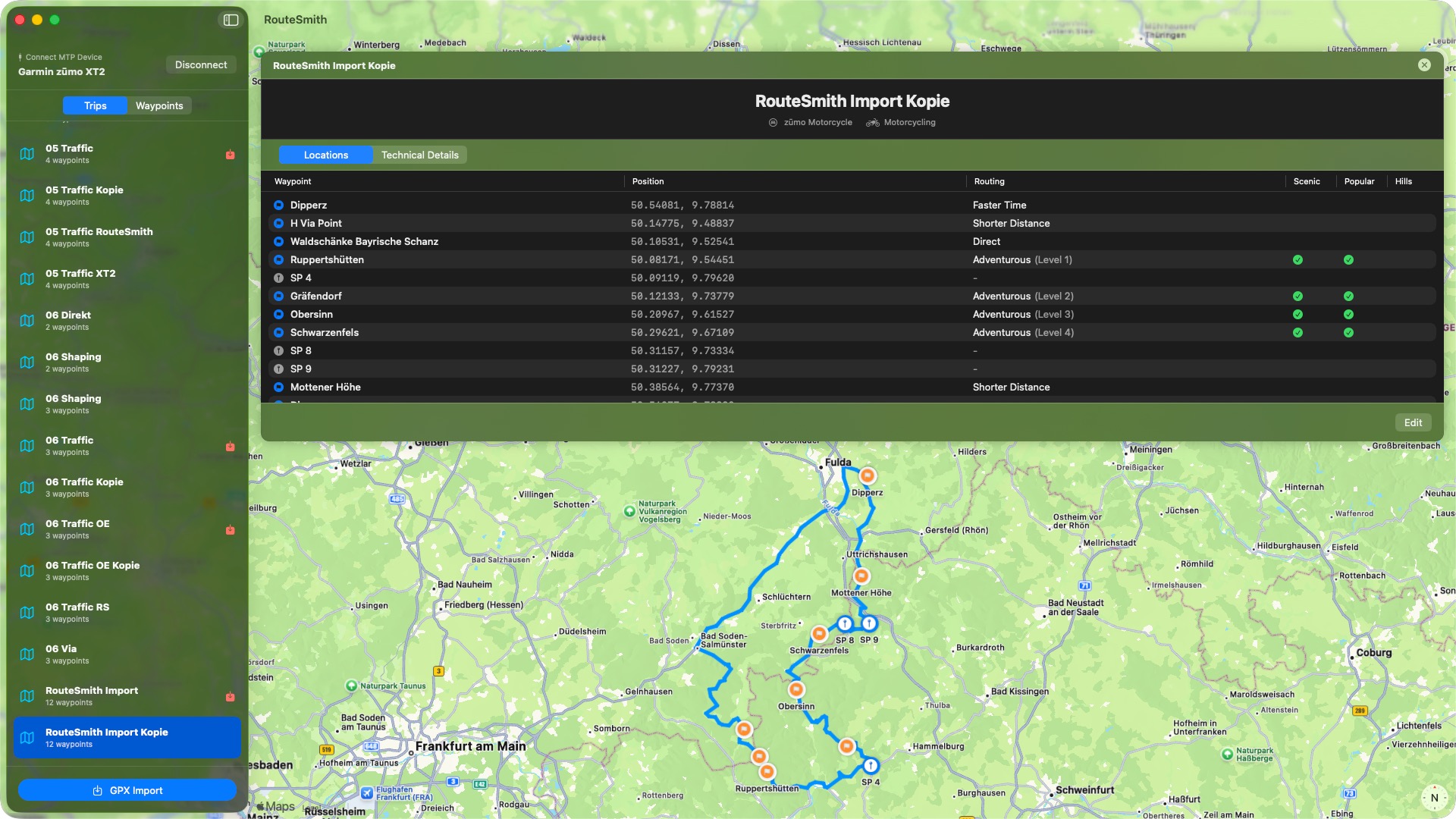
My main goal is to get routes planned in Kurviger onto a Zumo XT2 as accurately as possible. And yes — I’m chasing the unicorn here. Not only do I want the route to be 100% identical to what was planned in Kurviger, but I also want to retain device features like skipping waypoints or detouring by road.
Regarding the “100% like Kurviger” part, I was quite successful by exporting routes with the route point extension and importing them directly onto the device. However, the adventurous level was not set correctly after import — and at that time, I hadn’t even heard about the RUT issue yet.
That eventually led me to your tool and documentation — and finally to my actual question.
I tried to combine importing a route with the route point extension and modifying the trip file in a single step during import. I read all available information from the GPX file, including the CalculationMode and AdventurousLevel, and transferred that data into the trip file. The route containing the route point extension was “injected” into Current.gpx.
Unfortunately, this doesn’t work as expected. My hope was that the XT2 would generate the required subclass nodes when the route is opened for the first time after import — but it doesn’t. Instead, it actually wipes the route from Current.gpx.
Am I missing something here? Is there anything I can do to make this approach work?
Thanks again, and best regards
first of all, thank you very much for all the work you’ve done on this topic. As one of those … Mac users … my main interest isn’t so much the TripManager itself, but rather the wealth of information and documentation you’ve provided about trip files and their internal structure.
Since I’m not a fan of running Windows applications in a virtual machine on my Mac, and because I’ve made surprisingly good progress using “vibe coding” for my various stupid ideas, I went down that rabbit hole and started building a macOS app that aims to do something similar to TripManager.
My main goal is to get routes planned in Kurviger onto a Zumo XT2 as accurately as possible. And yes — I’m chasing the unicorn here. Not only do I want the route to be 100% identical to what was planned in Kurviger, but I also want to retain device features like skipping waypoints or detouring by road.
Regarding the “100% like Kurviger” part, I was quite successful by exporting routes with the route point extension and importing them directly onto the device. However, the adventurous level was not set correctly after import — and at that time, I hadn’t even heard about the RUT issue yet.
That eventually led me to your tool and documentation — and finally to my actual question.
I tried to combine importing a route with the route point extension and modifying the trip file in a single step during import. I read all available information from the GPX file, including the CalculationMode and AdventurousLevel, and transferred that data into the trip file. The route containing the route point extension was “injected” into Current.gpx.
Unfortunately, this doesn’t work as expected. My hope was that the XT2 would generate the required subclass nodes when the route is opened for the first time after import — but it doesn’t. Instead, it actually wipes the route from Current.gpx.
Am I missing something here? Is there anything I can do to make this approach work?
Thanks again, and best regards
-
MotoToph
- Posts: 73
- Joined: Sun Nov 10, 2019 1:41 am
- Location: Virginia Beach, Virginia
- Has liked: 32 times
- Been liked: 16 times

Re: Introducing TripManager
I use Parallels Desktop on Mac. instead of being an emulator it virtualization software. Much better than emulation!danham wrote: Tue Jan 14, 2025 12:52 pm This is amazing. Thank you! You are causing me to finally consider running a Windows emulator on my Mac.
-dan
ZUMO XT
K1600GT
K1600GT
Re: Introducing TripManager
Out of curiosity. Did you run TripManager with Parallels? And if yes, was it succesfull?MotoToph wrote: Mon Mar 02, 2026 3:55 pm I use Parallels Desktop on Mac. instead of being an emulator it virtualization software. Much better than emulation!
-
rhoenschrat
- Posts: 9
- Joined: Thu Jan 29, 2026 10:34 pm
- Location: Fulda, Germany
- Has liked: 2 times
- Been liked: 6 times
- Contact:
Re: Introducing TripManager
I did, and yes, it was succsessful.FrankB wrote: Mon Mar 02, 2026 4:32 pm Out of curiosity. Did you run TripManager with Parallels? And if yes, was it succesfull?
Re: Introducing TripManager
@MotoToph @rhoenschrat
I added a note to the online docs: https://frankbijnen.github.io/TripManag ... intro.html
Note: The online docs https://frankbijnen.github.io/TripManager/toc.html are updated for V1.7.0.380, but that version has not yet been released. I expect to release V1.7 soon.
I added a note to the online docs: https://frankbijnen.github.io/TripManag ... intro.html
Note: The online docs https://frankbijnen.github.io/TripManager/toc.html are updated for V1.7.0.380, but that version has not yet been released. I expect to release V1.7 soon.
-
twowheelstom

- Posts: 456
- Joined: Tue May 29, 2018 7:00 pm
- Location: Nova Scotia
- Has liked: 146 times
- Been liked: 54 times

Re: Introducing TripManager
For the Zumo XT3 , can the older computer based Basecamp program manage and transfer GPX files and Routes to an XT3 rather then using Tread or TripManager?
Zumo 396
1994 Yamaha 250
1994 Yamaha 250