Changed adventurous behavior on XT2

For help and advice on the Garmin Zumo XT2.
User avatar
rhoenschrat
Posts: 9
Joined: Thu Jan 29, 2026 10:34 pm
Location: Fulda, Germany
Has liked: 2 times
Been liked: 6 times
Contact:
Germany

Changed adventurous behavior on XT2

Post by rhoenschrat »

I’m currently working on a video about all the things that are wrong or weird with the Garmin Zumo XT2. Right in the middle of my preparation, I ran into yet another very strange issue, and I’d like to confirm whether this is happening to others as well.

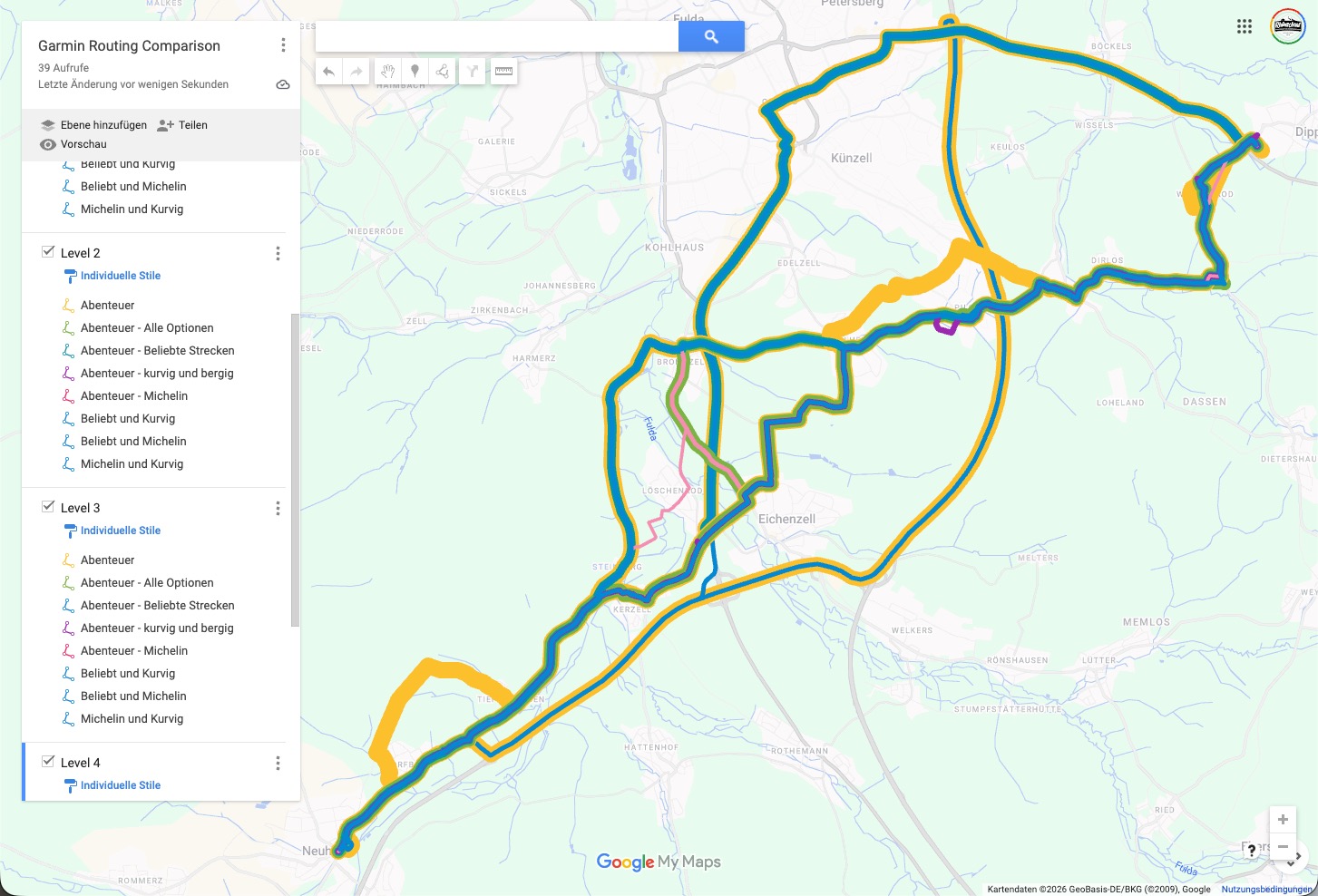
At the start of my preparation, I did a detailed comparison of how the different Adventurous Routing levels and option settings affect routing. I used a fixed test route and tried all possible combinations. Based on this comparison, I selected what I considered the closest match to the Curvy Route option in Kurviger.com, which is my preferred route planner.

I’m now in the phase of testing detour behavior, and that’s when I noticed some very odd behavior with the Adventurous Routing levels on the XT2. At first, I thought this was just a small glitch during testing, but then I realized that something seems to have changed.

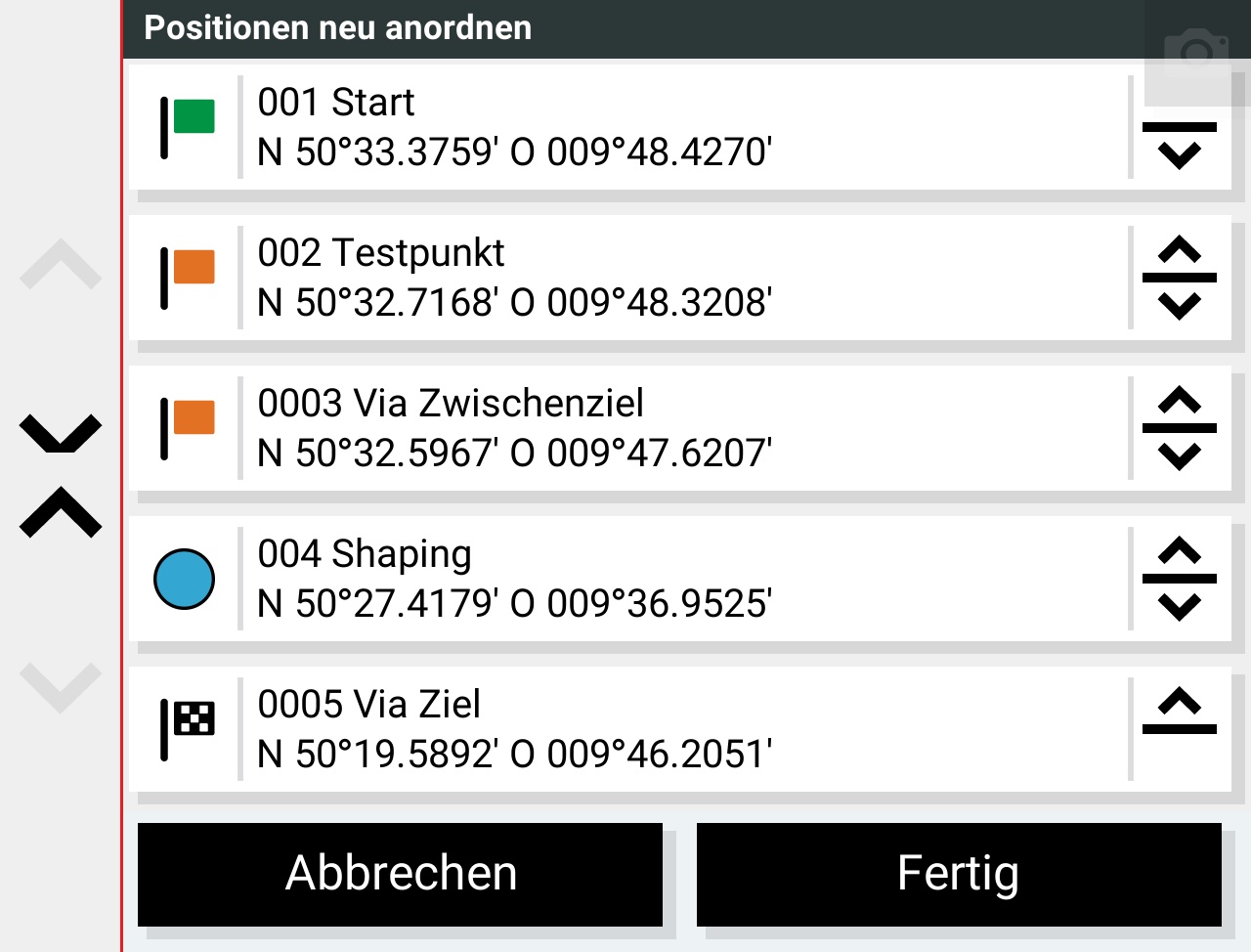
My test route consists of 5 waypoints. One of them (4) is a shaping point; the others are via points. The first two route segments use Faster Time, and the last segment (which includes the shaping point) uses Adventurous Routing.
I did not enable the global “Avoid Highways” option, because I wanted to be able to use highways on specific route segments.
Image

When I originally did my comparison, I observed the following behavior:
• Adventurous Level 1: Almost identical to Faster Time, using highways
• Adventurous Level 2: Already avoids highways completely
• Adventurous Level 3: Almost identical to Level 2
• Adventurous Level 4: Adds a few more curves, but mostly unnecessary ones

Since that comparison, there has been at least one major map update. Unfortunately, I don’t remember whether there was also a relevant firmware update.

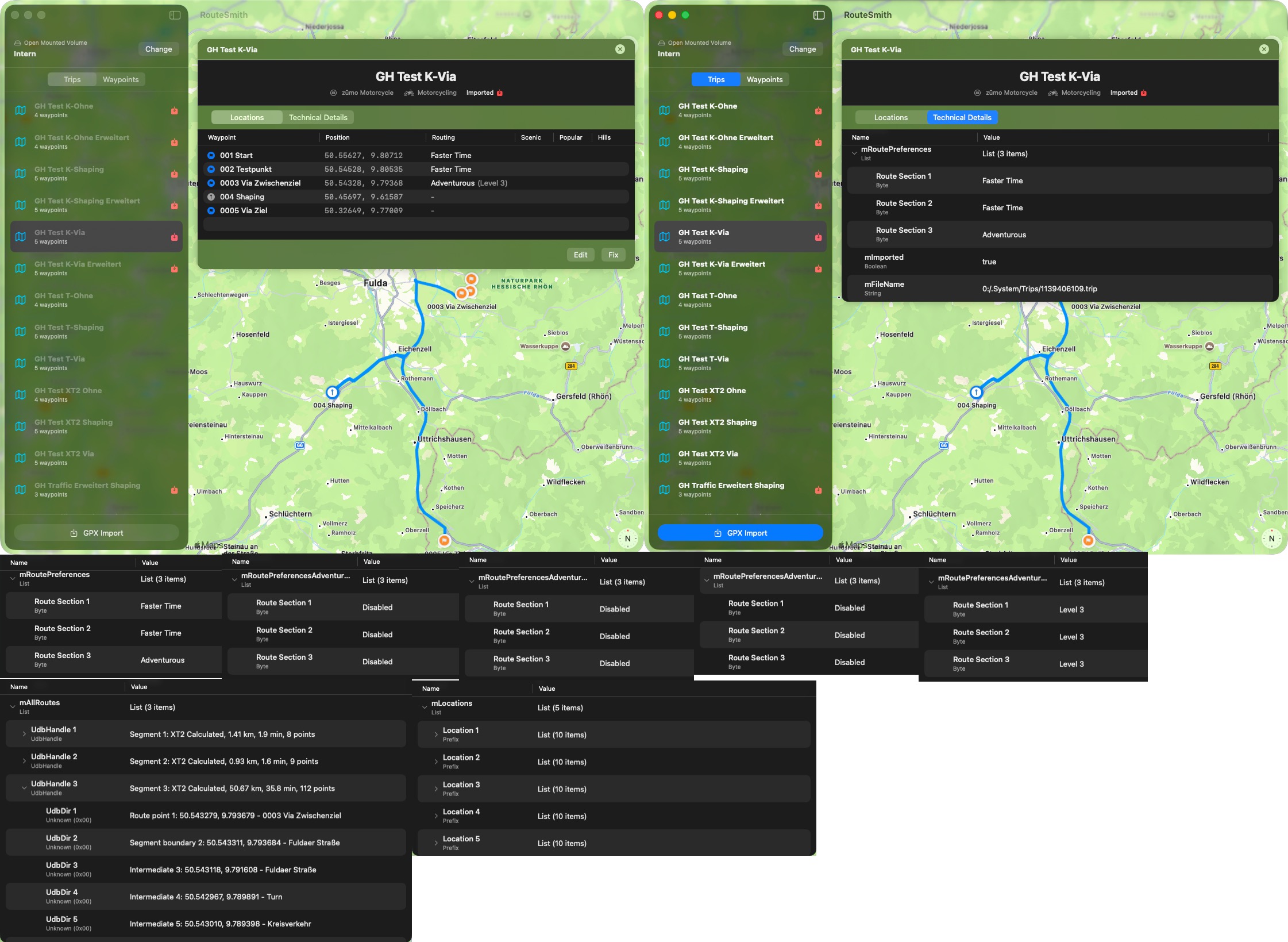
For reference, I’ve added screenshots from the Tread app on my iPad, which still show the behavior I observed on my XT2 at the beginning of January.

Now, however, I’m seeing the following behavior on the XT2:
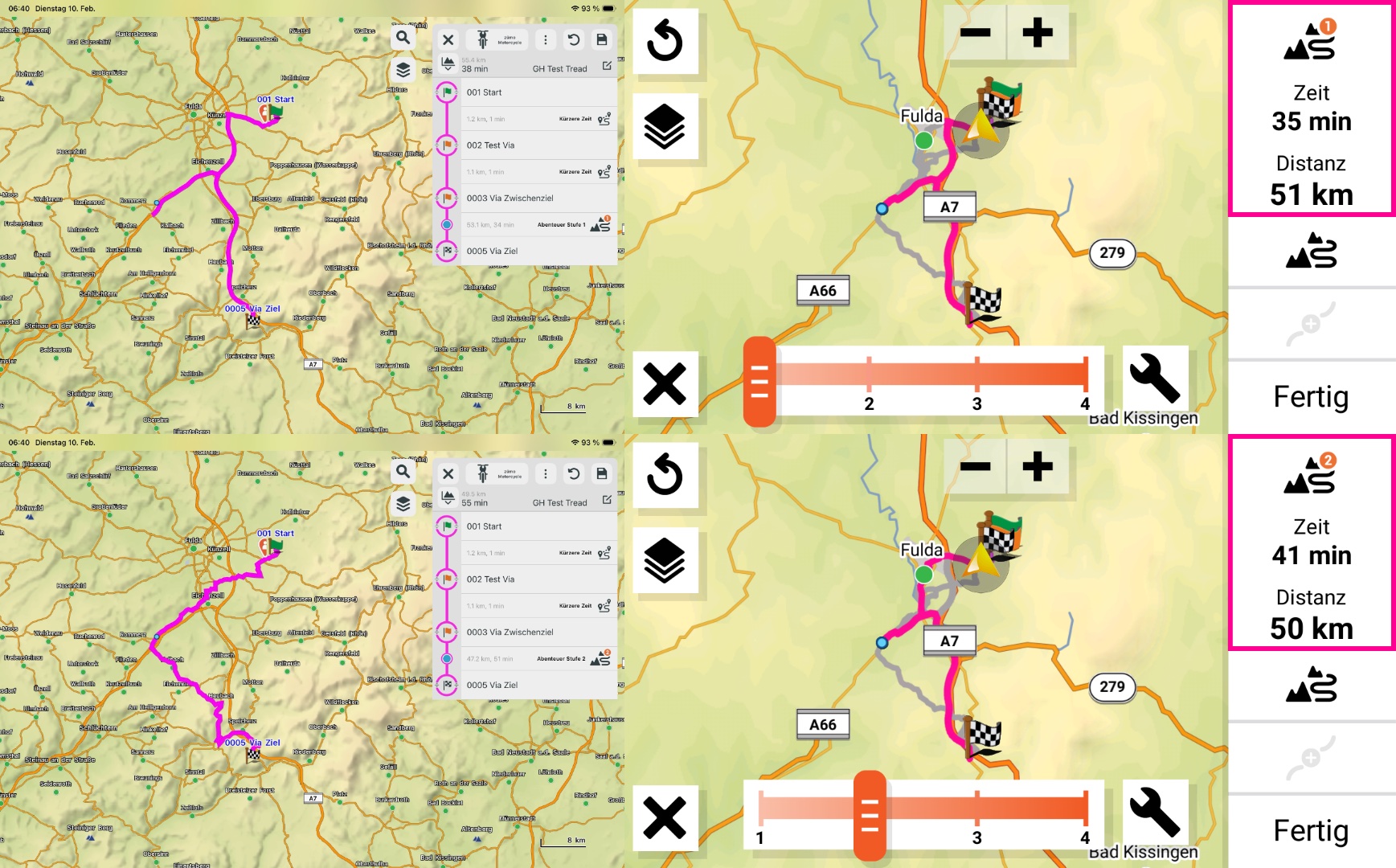
• Level 1: Still the same — almost identical to Faster Time with highways.
• Level 2: Only a minimal change on the route segment from Via (3) to Shaping Point (4). This looks like Faster Time with Avoid Highways to me.
The segment from Shaping Point (4) to the destination Via (5) still uses highways.
Image

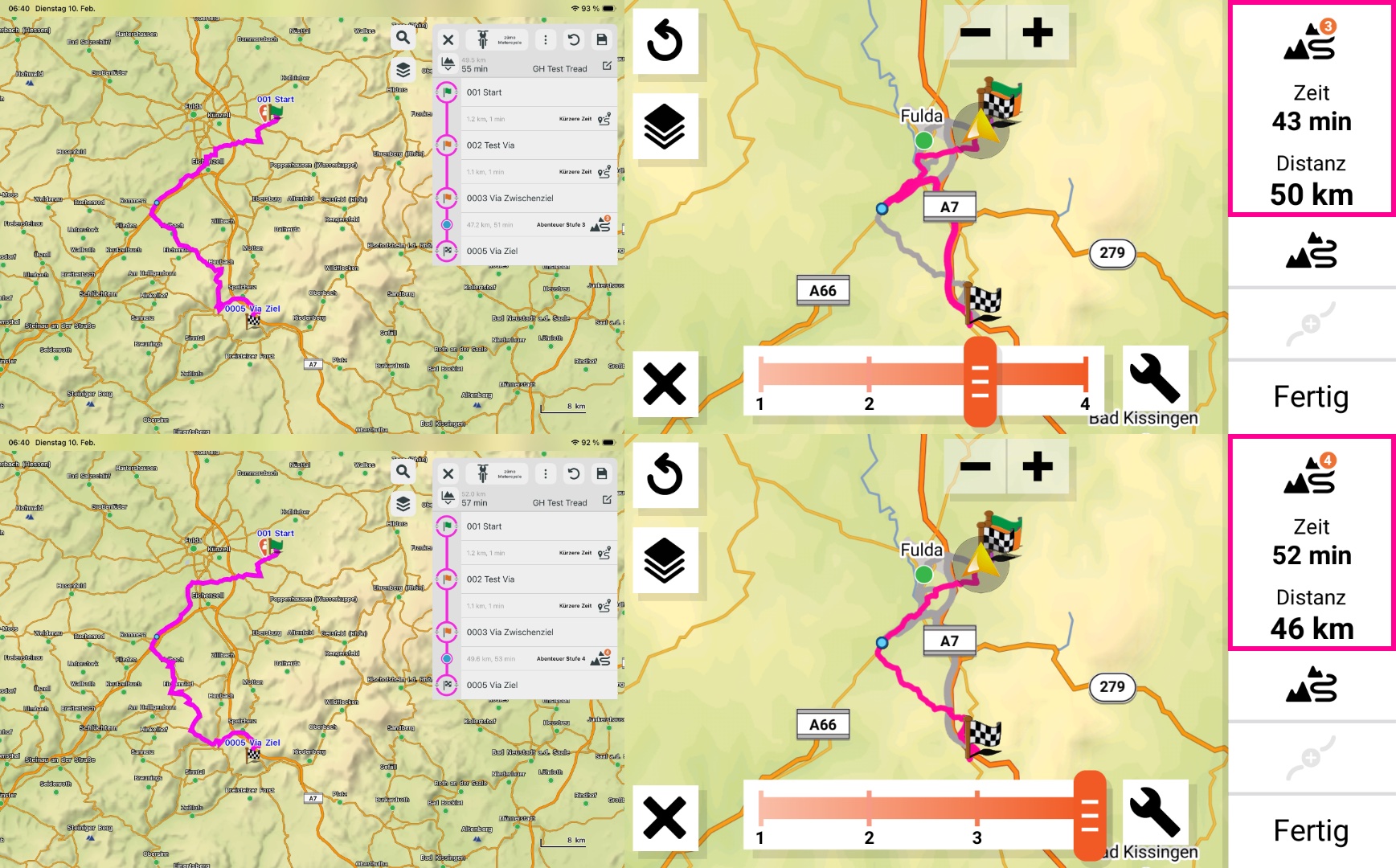
• Level 3: The Adventurous segment now seems to apply adventurous routing — but again only from Via (3) to Shaping Point (4).
The segment from Shaping Point (4) to Via (5) still uses highways.
• Level 4: Finally, the entire segment uses adventurous routing — but it’s noticeably less twisty than Level 4 used to be.
Image

What I find especially strange is that I’m seeing two different routing behaviors within a single route segment, even though only one Adventurous level can be selected for that segment.

Can anyone here confirm this behavior?
Is this a known bug that I might have missed?
smfollen
Subscriber
Posts: 276
Joined: Wed Jan 10, 2024 8:31 pm
Location: Boston Area
Has liked: 137 times
Been liked: 127 times
Contact:
United States of America

Re: Changed adventurous behavior on XT2

Post by smfollen »

a video about all the things that are wrong or weird with the Garmin Zumo XT2
That's going to be a long video. I'd love to see it.
What I find especially strange is that I’m seeing two different routing behaviors within a single route segment, even though only one Adventurous level can be selected for that segment.
I'm not sure how I could verify what you are seeing but I can share some thoughts that might help you investigate.
If you open the .trip file on the XT2 in Trip Manager, you can verify the XT2's view of segments and settings. It will show you:

the route segments and routing preferences per segment,
Segments.png
Segments.png (37.03 KiB) Viewed 650 times
the adventurous level when applicable,
AdvLevel.png
AdvLevel.png (40.14 KiB) Viewed 650 times
and what each segment is made up of.
Segment Content.png
Segment Content.png (45.61 KiB) Viewed 650 times
Segments are normally between via points but maybe your last segment became 2 segments somehow - via to shaping and shaping to last via?
My test route consists of 5 waypoints. One of them (4) is a shaping point; the others are via points.

Just for clarity, in Garmin terminology, which is fairly consistent with the gpx standards, waypoints are saved locations (aka favorites). Via and shaping points are route points, not waypoints.
The first two route segments use Faster Time ...
Although Garmin calls it "faster time", the zumo actually prefers faster roads, even when they take longer.
I did not enable the global “Avoid Highways ...
I have noticed that there is sometimes a difference between what I consider to be a highway, and what the zumo considers to be a highway. The map probably plays a role here. I also suspect that the zumo's preference for faster roads and setting avoid highways creates a conflict.
... screenshots from the Tread app ...
If you allow the Tread App to sync, it introduces another set of variables. When Tread syncs, it can make significant changes to shaping points.
jfheath
Posts: 3642
Joined: Sat Oct 19, 2019 4:17 pm
Location: West Yorkshire, Uk
Has liked: 507 times
Been liked: 1169 times
Great Britain

Re: Changed adventurous behavior on XT2

Post by jfheath »

Nothing much to add to what @smfollen said except:

When you load a route with Adventurous routing, the value of the slider is not the level that is set for the route segment. The only value that you can rely on is the one in the display for the segement on the right hand side of the screen - a small white number in an orange circle.

I notice that your screenshots show the slider in the position that matches the number in the circle - that isn't my experience - although it is a little while since I started to look into this. I decided that I hadn't got a clue what it was doing and I needed to find a couple of places in the local area for which the stanav would calculate 4 different routes depending on the settings in the XT2. So then I would know from the roads that it used, which setting it had adopted.

Only then could I work out what takes priority. Is it the fact that I have chose level 4, or is it the fact that I have Michelin Maps as a routing preference.

I don't think that you can set an activity number to anything but a whole segment - from what I have seen, the routing as a tag that is added immedidately after a Via Point is declared in the GPX file.

I've got two A5 notebooks here of routes with different settings and what data was retained in different circumstances. One of the last entries was that some segments had changed because the Tread synch had got hold of the route and altered it. That might have happened before and I didn't notice. I needed a better testing model and eliminate what Tread was doing because that behaviour rendered all of my tetsing useless ! So that became another investigation, and it was about this time that FrankB announced that TripManager wouldn't work with the XT2 - so I became the XT2 user and spent the time on that and on reporting to Gramin the influence that Tread was having on routes and route points.

I never came back to it.

I haven't got an answer for you. I decided that I would never want to use what Garmin decides is a category for adventurous routing (except I agree that Faster routes always seem to be identical to level 1 routes). I have little interest in using the routes that other Moto users use. And Michelin scenic routes - I'm unsure of what criteria they use, cos there are a few near me that are 'scenic', but I know of better ones that would fall into that category (for me) that are not lined in Michelin's green.
Have owned Zumo 550, 660 == Now have Zumo XT2, XT, 595, 590, Headache
Use Basecamp (mainly), MyRouteApp (sometimes), Competent with Tread for XT2, Can use Explore for XT - but it offers nothing that I want !

Links: Zumo 590s . Zumo XT & BC . Zumo Navigation Booklet . Zumo XT2
proofresistant
Posts: 512
Joined: Mon Jun 26, 2023 5:09 pm
Has liked: 39 times
Been liked: 97 times
Germany

Re: Changed adventurous behavior on XT2

Post by proofresistant »

Hello @rhoenschrat

First of all, welcome to the forum. It's nice to see that even an experienced user like you is looking for support here :geek: :-)

I'll just give you a quick answer because I don't have much time right now :(

Please note:
  • The Tread app manipulates routes, especially shaping points
  • The Tread app can often lead to endless loops during synchronization
  • The Tread app calculates routes differently than the zumo XT2
  • When the Tread app is also in action, it makes it unnecessarily difficult to reproduce comparable results
Then my experiences with the Adventoure routes:
  • Adventurous Level 1: Like Father Time, with highways, but then an attempt to use fewer highways
  • Adventurous Level 2: Avoids even more highways and becomes quite winding
    (my preferred option)
  • Adventurous Level 3: Adventurous – very winding
  • Adventurous Level 4: Almost unusable, takes routes you don't want to ride
Then in general:
  • There are also avoidance conditions that are taken into account, but which are not immediately apparent.
    This can then also “look like” different routing behavior
PS
“TripManager” is a really great tool for seeing what is actually stored in the device in the route (trip).
User avatar
rhoenschrat
Posts: 9
Joined: Thu Jan 29, 2026 10:34 pm
Location: Fulda, Germany
Has liked: 2 times
Been liked: 6 times
Contact:
Germany

Re: Changed adventurous behavior on XT2

Post by rhoenschrat »

smfollen wrote: Tue Feb 10, 2026 3:11 pm That's going to be a long video. I'd love to see it.
Actually it will be a series of videos, as I try to keep them shorter ... better matching with the attention span of the usual YouTube user.
And the thumbnail for the videos is already prepared :twisted:
Image
Unfortunately you'll need to listen to the auto dubbing in English. :oops:
smfollen wrote: Tue Feb 10, 2026 3:11 pm I'm not sure how I could verify what you are seeing but I can share some thoughts that might help you investigate.
If you open the .trip file on the XT2 in Trip Manager, you can verify the XT2's view of segments and settings. It will show you:
Continously having an eye on that, but not with the TripManager ... the Dark Side of the Force - remember?
And all of the info look as aspected - but not the route.
Image


smfollen wrote: Tue Feb 10, 2026 3:11 pm Just for clarity, in Garmin terminology, which is fairly consistent with the gpx standards, waypoints are saved locations (aka favorites). Via and shaping points are route points, not waypoints.
Sorry, promise to get better on this. :oops:

smfollen wrote: Tue Feb 10, 2026 3:11 pm If you allow the Tread App to sync, it introduces another set of variables. When Tread syncs, it can make significant changes to shaping points.
jfheath wrote: Tue Feb 10, 2026 3:49 pm I've got two A5 notebooks here of routes with different settings and what data was retained in different circumstances. One of the last entries was that some segments had changed because the Tread synch had got hold of the route and altered it. That might have happened before and I didn't notice. I needed a better testing model and eliminate what Tread was doing because that behaviour rendered all of my tetsing useless ! So that became another investigation, and it was about this time that FrankB announced that TripManager wouldn't work with the XT2 - so I became the XT2 user and spent the time on that and on reporting to Gramin the influence that Tread was having on routes and route points.
proofresistant wrote: Tue Feb 10, 2026 4:38 pm I'll just give you a quick answer because I don't have much time right now :(
Please note:
  • The Tread app manipulates routes, especially shaping points
  • The Tread app can often lead to endless loops during synchronization
  • The Tread app calculates routes differently than the zumo XT2
  • When the Tread app is also in action, it makes it unnecessarily difficult to reproduce comparable results
I'm well aware of this. This is why I call Tread/Explore the root of all evil. :twisted:
I'm using the Tread App for traffic and weather info, but Explore and any sync is disabled. So no issues with shaping points moving around and routes get screwed up.

jfheath wrote: Tue Feb 10, 2026 3:49 pm When you load a route with Adventurous routing, the value of the slider is not the level that is set for the route segment. The only value that you can rely on is the one in the display for the segement on the right hand side of the screen - a small white number in an orange circle.
Or the value in the .trip file, I know. And I checked this.

jfheath wrote: Tue Feb 10, 2026 3:49 pm I notice that your screenshots show the slider in the position that matches the number in the circle - that isn't my experience - although it is a little while since I started to look into this. I decided that I hadn't got a clue what it was doing
I already solved that puzzle. When you edit the a route, select a route segment with adventurous routing and press the adventurous button to change the level, the slider will not show what is currently set for the current route, but simply what you selected the last time when you used the slider.

jfheath wrote: Tue Feb 10, 2026 3:49 pm and I needed to find a couple of places in the local area for which the stanav would calculate 4 different routes depending on the settings in the XT2. So then I would know from the roads that it used, which setting it had adopted.
Oh, I allready went down that rabbit hole.
Image

jfheath wrote: Tue Feb 10, 2026 3:49 pm I don't think that you can set an activity number to anything but a whole segment - from what I have seen, the routing as a tag that is added immedidately after a Via Point is declared in the GPX file.
And this is what I did and what I expected to happen. And this is actually my confusion. I should not be possible that one segment has two different routing modes between the routepoints.

proofresistant wrote: Tue Feb 10, 2026 4:38 pm First of all, welcome to the forum. It's nice to see that even an experienced user like you is looking for support here :geek: :-)
Thanks, but for the Garmin stuff I'm a neewbe.

proofresistant wrote: Tue Feb 10, 2026 4:38 pm Then my experiences with the Adventoure routes:
  • Adventurous Level 1: Like Father Time, with highways, but then an attempt to use fewer highways
  • Adventurous Level 2: Avoids even more highways and becomes quite winding
    (my preferred option)
  • Adventurous Level 3: Adventurous – very winding
  • Adventurous Level 4: Almost unusable, takes routes you don't want to ride
Yes, same experience for me.

proofresistant wrote: Tue Feb 10, 2026 4:38 pm PS
“TripManager” is a really great tool for seeing what is actually stored in the device in the route (trip).
I know, but unfortunately for me it is on the Dark Side of the Force (Windows).
But thanks to all the documentation from @FrankB I was able to start building a similar tool for the Mac.


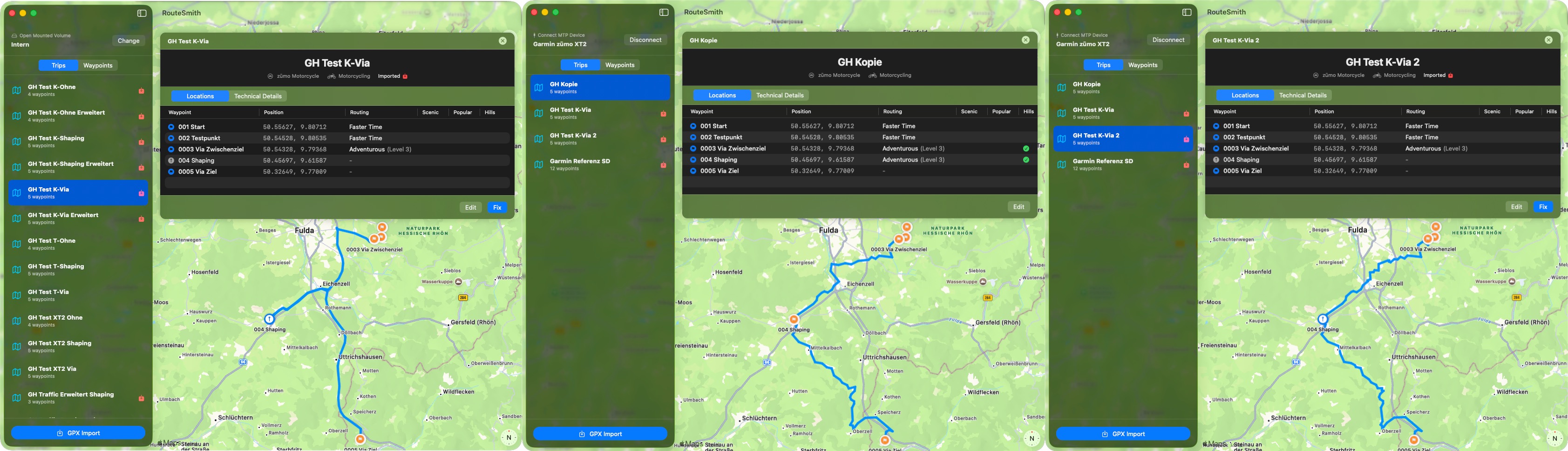
Menthile the situation got even more strange.
Trying to understand the issue I created a copy of the route (on device).
On the copy of the route I turned the shaping point in the adventurous segment into a via point.
This turned the segment into two segments. Both with adventurous routing level 3, and immediately the route is like it was when I started in January.
Then I imported the test route with the shaping point again, an now it is also calculated correct.
I don't get it.
Image
proofresistant
Posts: 512
Joined: Mon Jun 26, 2023 5:09 pm
Has liked: 39 times
Been liked: 97 times
Germany

Re: Changed adventurous behavior on XT2

Post by proofresistant »

@rhoenschrat,
At least a short answer(s) ;-)


rhoenschrat wrote: Tue Feb 10, 2026 7:37 pm I'm well aware of this. This is why I call Tread/Explore the root of all evil. :twisted:
I'm using the Tread App for traffic and weather info, but Explore and any sync is disabled. So no issues with shaping points moving around and routes get screwed up.
OK, but “any sync is disabled” isn't that easy to do retrospectively, is it?
As far as I know, you're not allowed to activate the Explore connection when installing the app.
https://www.rhoenschrat.de/routesmith/f ... vior-2.jpg
https://www.rhoenschrat.de/routesmith/f ... vior-3.jpg

Anyway, based on your pictures, I suspected Tread App sync might be activated/involved.


rhoenschrat wrote: Tue Feb 10, 2026 7:37 pm I know, but unfortunately for me it is on the Dark Side of the Force (Windows).
But thanks to all the documentation from @FrankB I was able to start building a similar tool for the Mac.
Don't you have an old Windows computer (PC/notebook) lying around somewhere :?: ?
The documentation from @FrankB and the tips from other users here in the forum are worth their weight in gold.
But what you can see in TripManager is even more impressive, at least for me ;-) and intuitive, so you don't have to search for it, it's just listed there :ugeek:
@Frankb and you will definitely can discuss lot to talk about the whole stuff :ugeek: ;-)
Next it will be good that such tools already exist for Windows and will also be available for Mac in future.
I'm gradually beginning to understand why Java exists. How nice it would be if ...


PS
By the way, I found this in another thread "Introducing TripManager":
rhoenschrat wrote: Mon Feb 02, 2026 8:57 am ... hadn’t even heard about the RUT issue yet ...
Let me ask you, have you heard about the CEP problem?
It's a pretty interesting malfunction also, even if it's pretty rare.


PPS
Your videos are useful, that's for sure.
And if there's going to be a series about the dark side of the zumo XT2, even better.
But then it would be nice to mention the helpful lights on the horizon, such as TripManager, which would be the icing on the cake :idea:
User avatar
rhoenschrat
Posts: 9
Joined: Thu Jan 29, 2026 10:34 pm
Location: Fulda, Germany
Has liked: 2 times
Been liked: 6 times
Contact:
Germany

Re: Changed adventurous behavior on XT2

Post by rhoenschrat »

proofresistant wrote: Tue Feb 10, 2026 9:05 pm OK, but “any sync is disabled” isn't that easy to do retrospectively, is it?
As far as I know, you're not allowed to activate the Explore connection when installing the app.
No, it's not.
Funny part is, that first I thought it isn't possible at all to use the Tread app without der Explore sync. Somehow I didn't remember that this was an option during the initial setup.
Then one day I just logged out of my account in the Tread app and logged back in again. And the Sync was off. I thought it was that easy to do, but it isn't. Somehow I must have done something else. But I don't have any clue what.
When I re-enabled the sync to take some screenshots about the bad impact of the sync, it was hell to get it off again.
In the end I started from scratch. I re-installed the app and used the Diagnostic Page / Clear all user data

proofresistant wrote: Tue Feb 10, 2026 9:05 pm Don't you have an old Windows computer (PC/notebook) lying around somewhere :?: ?
Fortunately no ;)
But I have a Paralles Desktop running on one Mac. But I also used to get agro when I have to use Windows after just a few minutes. :lol:
So, I try to prevent it.

proofresistant wrote: Tue Feb 10, 2026 9:05 pm The documentation from @FrankB and the tips from other users here in the forum are worth their weight in gold.
But what you can see in TripManager is even more impressive, at least for me ;-) and intuitive, so you don't have to search for it, it's just listed there :ugeek:
Yes, it is. A lot of it, I should have in my app as well. But still some things to add.

proofresistant wrote: Tue Feb 10, 2026 9:05 pm Frankb and you will definitely can discuss lot to talk about the whole stuff :ugeek: ;-)
And we did start already.

proofresistant wrote: Tue Feb 10, 2026 9:05 pm Let me ask you, have you heard about the CEP problem?
It's a pretty interesting malfunction also, even if it's pretty rare.
I was about to say "luckily not".
Just as for the RUT problem I checked in Google what it is. And Google gave me: "Circular Error Probable". :lol:
But then I rememberd I read in one of the post about the "Closest Entry Point" issue.
jfheath
Posts: 3642
Joined: Sat Oct 19, 2019 4:17 pm
Location: West Yorkshire, Uk
Has liked: 507 times
Been liked: 1169 times
Great Britain

Re: Changed adventurous behavior on XT2

Post by jfheath »

RUT behaviour in detail.

app.php/ZXT-P104 And subsequent pages.


I notice that in the Google AI explanation of RUT behaviour, which is based on my description, it has learned how to use the term ‘waypoint’ incorrectly from somewhere else.

The Zumo never calculates a route to the next ‘waypoint’. It should calculate to the next route point - which will be either a via point or a shaping point. Whether or not the route point was originally created and saved as a waypoint is irrelevant.

The use of Closest Entry Point when starting a route has never resulted in RUT behaviour in any of my tests, which Google AI claims.
Have owned Zumo 550, 660 == Now have Zumo XT2, XT, 595, 590, Headache
Use Basecamp (mainly), MyRouteApp (sometimes), Competent with Tread for XT2, Can use Explore for XT - but it offers nothing that I want !

Links: Zumo 590s . Zumo XT & BC . Zumo Navigation Booklet . Zumo XT2
vigo
Posts: 13
Joined: Thu Aug 08, 2024 2:42 pm
Has liked: 3 times
Netherlands

Re: Changed adventurous behavior on XT2

Post by vigo »

In my experience, I can set the adventure level per segment in the Tread app, but on the XT2, every change is applied to the entire route. Has that been your experience as well?

In my opinion, the Kurviger app is much easier to use, especially when it comes to adventure. Export it as a track, and you're all set.
jfheath
Posts: 3642
Joined: Sat Oct 19, 2019 4:17 pm
Location: West Yorkshire, Uk
Has liked: 507 times
Been liked: 1169 times
Great Britain

Re: Changed adventurous behavior on XT2

Post by jfheath »

vigo wrote: Sun Feb 15, 2026 8:57 am
In my opinion, the Kurviger app is much easier to use, especially when it comes to adventure. Export it as a track, and you're all set.
Tracks work for a lot of people, but I am not a fan of using tracks to navigate - I like to have the estimated time of arrival at the next 'pit-stop' particularly for my pillion. Also when navigating a track, if you deviate, that can be subject to RUT behaviour as well. I like to have the track displayed under my route so that I can see where the XT/XT2 has changed it - and I can choose to follow whichever I want. Typically, on a well prepared route, the Zumo will recalculate the current section to head the way I decided to travel.
vigo wrote: Sun Feb 15, 2026 8:57 am In my experience, I can set the adventure level per segment in the Tread app, but on the XT2, every change is applied to the entire route. Has that been your experience as well?
I can see why you might think that - but no. It applies it only to the seqment being edited. The problem is that when you select a segment to edit, the sliding scale shows the last value that was entered.

If you synch the route with the Tread App - not something that I recommend, but I do it occasionally - the Tread App on your phone or ipad will show you the setting for each segment. (A segment is a part of the track bounded by a Via Point at each end).
****Wrong ****Also the route planner screen on the XT2 will reveal the level as a tiny digit in an orange circle.****Wrong !!

I'm looking for some screen shots. I'll post some later. I found one - attached below. However - I was wrong - when you open up the Trip Planner App and select an existing segment, it shows the screen below, but the digit represent the current setting of the slider, not the setting assigned to that segment.

74337.png
74337.png (877.51 KiB) Viewed 486 times

However on my phone and Ipad you get the entire route in a table on the right hand side and it shows the level assigned to each segment. Select the segment from the table to edit the setting. Click the image to zoom in to a full sized version.

Screenshot 2026-02-15 at 10.04.10.png
Screenshot 2026-02-15 at 10.04.10.png (1.07 MiB) Viewed 479 times
Have owned Zumo 550, 660 == Now have Zumo XT2, XT, 595, 590, Headache
Use Basecamp (mainly), MyRouteApp (sometimes), Competent with Tread for XT2, Can use Explore for XT - but it offers nothing that I want !

Links: Zumo 590s . Zumo XT & BC . Zumo Navigation Booklet . Zumo XT2
Post Reply