proofresistant wrote: Sat Jan 17, 2026 6:08 pm
Other data such as “weather, traffic, up-ahead, fuel on route with prices” are of only marginal interest to me, if any.
(Weather only works for the past anyway, I don't have traffic on the small roads I travel on, and when I need to refuel, I usually use the gas stations that are already on the map when I'm on motorcycle tours).
I was just saying what is and what isn’t available, rather than expressing a preference. Ie it is possible to link the tread app on the phone without it synching your routes, and changing them. You cannot disable synch once it is installed, but you can set it up without enabling synch. But in order to do that you have to reset the XT2 AND delete the Tread app from your phone, and then reinstall and relink.
I usually add comments like that for people coming across posts using a search engine, or using the search feature, or just being alerted to a new post - so that they don’t get the impression that there are only two options: With Tread or without Tread. There is a third - with tread, but without synch.
——
The weather data can be seen as an animated image eg of rain moving across a map presumably from recent satellite images.
But weather display is not restricted to historical data It can also show forecast data as symbols eg in an app that is shown on the right hand side of a landscape screen.
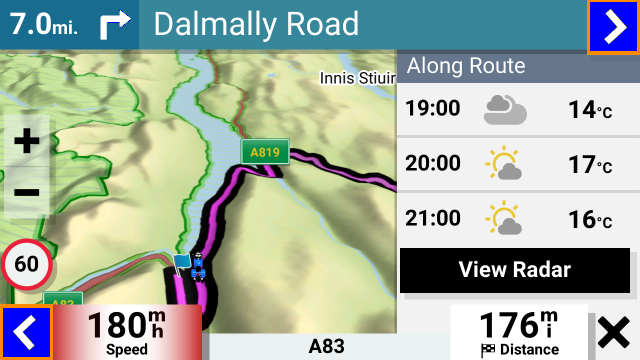
- IMG_0070.png (242.83 KiB) Viewed 706 times
Or as a day-today symbol chart for the week .
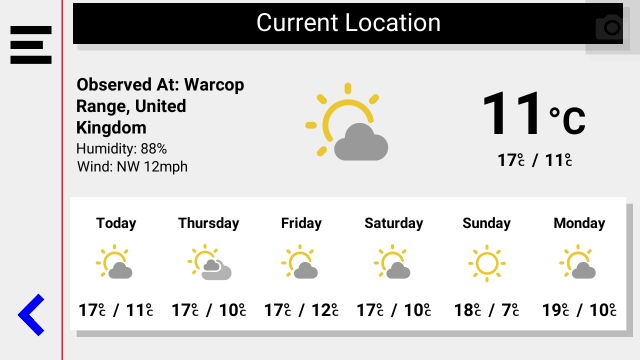
- IMG_0071.png (37.02 KiB) Viewed 705 times
Limited, but it it is there.
proofresistant wrote: Sat Jan 17, 2026 6:08 pm
There is no question that using USB is currently the best and most reliable solution.
It's no surprise that I like TripManager so highly.
Nevertheless, I'm not giving up hope on “wireless” as the state of the art.
I quite liked the Wireless transfer with the XT1 and the Garmin Drive App. Drive carried out similar functions to the Tread app with the XT2 - Ie it managed the data flow for weather, traffic, etc, it enabled synchronisation of routes from the Explore database - the same one that Tread uses, it allowed wireless transfer. You could set it up so that synch was not allowed, but the other two were.
So I could plan a route on my computer, export it as a gpx file and email it to my phone. The drive app would pick it up and send it to the XT1. Brilliant. It placed the gpx file in Internal Storage in the GPX folder. From there the data could be imported. I used that a lot primarily because it saved the wait for a usb connection, and it saved wear and tear on the USB socket.
I do miss that capability, but when I found out more about the transfer / import process in the XT2, I wouldn’t use it even if it was provided.
That is because the XT2 treats the gpx files in internal storage as its own work areas. Once imported, certain data is removed from the file and the file is effectively resaved without it. Example. You might have noticed that tracks and waypoints are made available in their respective apps, without having to import them ? But the track data is removed from the gpx files when that happens - so that data is lost. You cannot import it manually if you accidentally delete the track from the Zumo screen. This does not happen if the data is put on the SD card. The gpx file remains intact, but tracks and waypoints have to be imported manually.
Also - routes that come from GPX files and placed on the XTs are all regarded as imported, regardless of the software that created them. They have to be converted to .trip files and that conversion process adjusts and renames route points. They are also susceptible to RUT behaviour if the Zumo recalculates the route. The latter is prevented simply by using the XT2’s copy facility, and using the copied route.
But the best way to get round the problems is to use Trip Manager, and the only way that can work is by having access to the .System/trip folder.
And that needs a USB cable.