
I plan my routes at home with Basecamp and transfer them to my XT for use during my rides.
I recently toured in France and got hit a number of times by unexpected road closures (you see a yellow sign warning you about an upcoming road closure some kilometers away). Usually there will be deviations that are signposed with other yellow signs that eventually get you back onto the original road. However, these deviations signs are not always there, or sometimes they start out ok but then leave you stranded somewhere in the middle of nowhere..
How do people manage this? I have set my XT to not recalculate when I deviate from the planned route because I find that the safest option in general. In any case, using the recalculate option won't help with these road closures because it doesn't know about them and just insists on routing you straight through them.
I ended up zooming out on the map, figuring out an alternative route via some village or town far enough away to hopefully lie past the closure, and then ride by the seat of my pants via all kinds of back roads to get there. Doable, but not optimal.
Does anyone have any better ideas on how to manage this?
Road closures?
-
Peobody

- Subscriber
- Posts: 2124
- Joined: Tue Apr 20, 2021 1:33 pm
- Location: North Carolina USA
- Has liked: 195 times
- Been liked: 560 times

Re: Road closures?
That is how I do it. I haven't found an easier way.Snijderj wrote: Mon Aug 11, 2025 11:35 am I ended up zooming out on the map, figuring out an alternative route via some village or town far enough away to hopefully lie past the closure, and then ride by the seat of my pants via all kinds of back roads to get there. Doable, but not optimal.
Funny story... Several years ago I road with a group (4 or 5 riders, don't remember) for what was supposed to be a 6 hours ride through rural North Carolina. The route was created by one member and shared with the rest. Not long into the ride we hit a closed road due to a bridge over a stream being closed. There was a huddle over someone's GPS map to determine the next best bridge option, then we headed that way, one leader, manually navigating. That bridge was closed too. Another huddle then off we went. I think it was on attempt number four that we finally got across. We had no idea that flooding had affected the area to this extent. None of the GPSes notified of any of the closures. It was a memorable ride, mostly because it set a record for total number of U-turns in a ride (IIRC, it was 5).
2008 Honda GL1800 Goldwing
zūmo XT linked to Cardo Packtalk Bold and iPhone SE.
zūmo XT linked to Cardo Packtalk Bold and iPhone SE.

Re: Road closures?
I load my routes in Google Maps.
viewtopic.php?t=1965
You can load the routes at home, view them on the road with your mobile.
viewtopic.php?t=1965
You can load the routes at home, view them on the road with your mobile.
Re: Road closures?
Thanks for your replies.
Google Maps on my PC has a different menu bar than what FrankB shows. There is no 'Your Places' item and so I'm stuck right there.
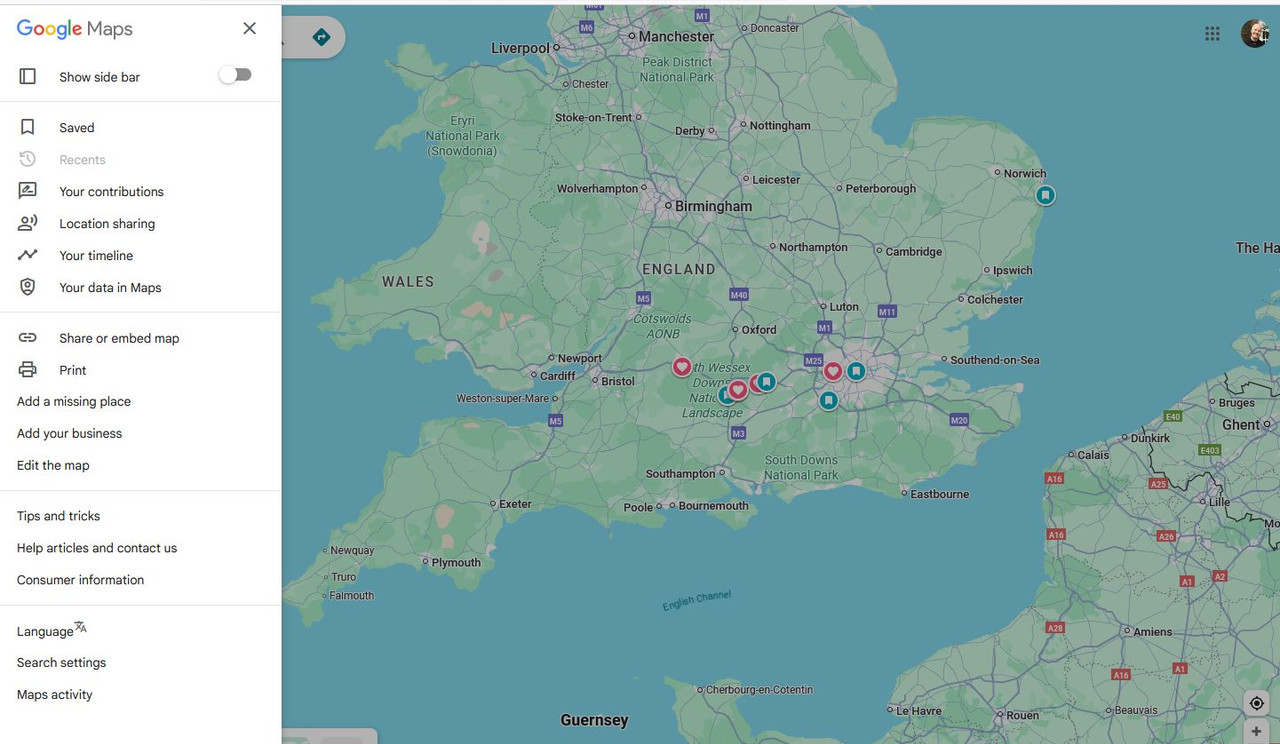
However, your posts have pointed me to what I can do in future: before setting out on a ride I can recreate my planned route using Google Maps on my phone, and check for any closures. That way I can plan alternatives while sitting down with a cup of coffee, a lot better than when standing with the bike by the roadside in traffic!
Google Maps on my PC has a different menu bar than what FrankB shows. There is no 'Your Places' item and so I'm stuck right there.
However, your posts have pointed me to what I can do in future: before setting out on a ride I can recreate my planned route using Google Maps on my phone, and check for any closures. That way I can plan alternatives while sitting down with a cup of coffee, a lot better than when standing with the bike by the roadside in traffic!
-
smfollen
- Subscriber
- Posts: 276
- Joined: Wed Jan 10, 2024 8:31 pm
- Location: Boston Area
- Has liked: 137 times
- Been liked: 127 times
- Contact:
Re: Road closures?
@Snijderj Frank's Trip Manager can generate google compatible kml files from gpx files. It can also generate html files based on OSM maps.
You might also check out Google My Maps which allow you to do more than the standard google maps.
You might also check out Google My Maps which allow you to do more than the standard google maps.
Re: Road closures?
They must have changed the 'words'.Snijderj wrote: Tue Aug 12, 2025 7:45 am Google Maps on my PC has a different menu bar than what FrankB shows. There is no 'Your Places' item and so I'm stuck right there.
Click on 'Saved', then look for 'Maps'
Open in 'My Maps'
-
Peobody
- Subscriber
- Posts: 2124
- Joined: Tue Apr 20, 2021 1:33 pm
- Location: North Carolina USA
- Has liked: 195 times
- Been liked: 560 times
Re: Road closures?
Google MyMaps requires Google authentication. That is a dealbreaker for me. In my mind, using anything Google related while authenticated means I'm feeding their data machine with data specific to me. I'll tolerate a lot of inconvenience before resorting to that.
2008 Honda GL1800 Goldwing
zūmo XT linked to Cardo Packtalk Bold and iPhone SE.
zūmo XT linked to Cardo Packtalk Bold and iPhone SE.
Re: Road closures?
Updated the PDF with new screenshots. viewtopic.php?t=1965FrankB wrote: Tue Aug 12, 2025 9:52 pm They must have changed the 'words'.
Click on 'Saved', then look for 'Maps'
Open in 'My Maps'
Re: Road closures?
That is indeed something to consider.Peobody wrote: Tue Aug 12, 2025 11:19 pm Google MyMaps requires Google authentication. That is a dealbreaker for me. In my mind, using anything Google related while authenticated means I'm feeding their data machine with data specific to me. I'll tolerate a lot of inconvenience before resorting to that.
Meanwhile I have given up fighting that. 'Big Tech' always seems to find ways to get to your private data.
Garmin has Explore, Connect and Tread with all your trips. They also have Traffic data. Let's assume they are serious about your data, but they can get hacked.
It's the downside of using Cloud services.
-
jfheath
- Posts: 3648
- Joined: Sat Oct 19, 2019 4:17 pm
- Location: West Yorkshire, Uk
- Has liked: 507 times
- Been liked: 1171 times

Re: Road closures?
With the XT1 I find the road closure information to be very 'sketchy'. Soemtimes the information isn't precise enough and it will (say) route you away from the A6 because it is closed in one particular section. I ignored it and the road wasn't closed. I checked on the AA website when I got home - the road was closed two miles to the left of a roundabout I turned right.Snijderj wrote: Mon Aug 11, 2025 11:35 am I plan my routes at home with Basecamp and transfer them to my XT for use during my rides.
I recently toured in France and got hit a number of times by unexpected road closures (you see a yellow sign warning you about an upcoming road closure some kilometers away). Usually there will be deviations that are signposed with other yellow signs that eventually get you back onto the original road. However, these deviations signs are not always there, or sometimes they start out ok but then leave you stranded somewhere in the middle of nowhere..
How do people manage this? I have set my XT to not recalculate when I deviate from the planned route because I find that the safest option in general. In any case, using the recalculate option won't help with these road closures because it doesn't know about them and just insists on routing you straight through them.
I ended up zooming out on the map, figuring out an alternative route via some village or town far enough away to hopefully lie past the closure, and then ride by the seat of my pants via all kinds of back roads to get there. Doable, but not optimal.
Does anyone have any better ideas on how to manage this?
I also note that road closure information re-routes whether or not you allow the Zumo to recalculate. I like to have the information on for traffic and other up ahead info. In the UK - the people that do the road works and the people that put out road signs and collect them back in again are two different groups of people. Road closure signs can be up well ahead and remain well after the actual closure.
I've also noticed that a road can be marked by the Zumo as closed - but it is actually only closed from10pm 'til 6am - ie a night time closure.
So I always have the track of the route that I am riding displayed underneath the route. If the route recalculates, I can see where I intended to go.
I'll use AA Roadwatch on the aa.com website which is pretty good at gathering traffic / road closure information.
And I'll use a combination of info on screen, what AA said, amount of traffic coming from the opposite direction and intuition / guesswork.
Oh and a quick look at the fuel guage in case I guess wrong.
You could put the ride into the satnav the night before, turn the GPS off, simulate your position, and get the Zumo to simulate the ride - let it gather the traffic info and get one of the detailed lists of road closures along your route. It will look a considerable way ahead. You have an XT1 - so the next piece of info is useless, but the XT2 has a simultor multiplier, so it will simulate the ride at up to 3 times the normal speed. Your phone needs to have a decent signal to keep the traffic data pouring in. This link has some info and pics of the sort of displays that you can get on the XT screen regarding traffic and road closures. The data is subject to inaccuracies, but it will give you a clue of problem areas so that you can get more information.
There is no answer. Closures, like floods, can spring up overnight. I think a route that is on your limit will give you real problems if it rains all day, if something odd crops up. These days I try to plan curved routes between start and destination so that if something crops up, there is a more direct route available. A wet weather alternative.
Have owned Zumo 550, 660 == Now have Zumo XT2, XT, 595, 590, Headache
Use Basecamp (mainly), MyRouteApp (sometimes), Competent with Tread for XT2, Can use Explore for XT - but it offers nothing that I want !
Links: Zumo 590s . Zumo XT & BC . Zumo Navigation Booklet . Zumo XT2
Use Basecamp (mainly), MyRouteApp (sometimes), Competent with Tread for XT2, Can use Explore for XT - but it offers nothing that I want !
Links: Zumo 590s . Zumo XT & BC . Zumo Navigation Booklet . Zumo XT2